

If you have been running your business on a patchwork of disconnected tools — one platform for accounting, another for inventory, something else for payroll, and a spreadsheet holding everything together — you already know what operational friction feels like at scale. Every week brings another manual reconciliation, another report that took three hours to build, another decision made on data that was already two days old.
That friction is not a people problem. It is a structural one. And it compounds quietly until it becomes expensive enough that action is unavoidable.
AI ERP software — enterprise resource planning platforms built with an active intelligence layer — is the structural fix entrepreneurial businesses have been waiting for. Not the bloated legacy systems built for multinationals in the 1990s. The modern, modular, cloud-native platforms that bring your entire operation into one environment, automate the workflows consuming your team’s best hours, and surface insights that used to require a dedicated analyst.
This guide covers everything you need to make a confident decision about AI ERP software adoption — from understanding what these systems actually do, to comparing platforms worth considering, to implementing without disrupting the operations you are trying to improve. No vendor spin. Just a clear strategic framework built for lean teams that need to move fast and operate smart.
What an AI ERP system actually does
Most entrepreneurs encounter the term ERP and immediately picture something designed for companies ten times their size. That association is not entirely wrong — the category was built for enterprise scale — but the modern generation of AI-driven platforms has changed the equation significantly for growing businesses.
At its core, an ERP system is a centralized platform that connects the major operational functions of your business. Finance, inventory, HR, customer data, and project management all live in the same environment, working from the same data source. The fundamental value is not just consolidation — it is alignment. When every department operates from the same source of truth, the coordination failures that quietly drain entrepreneurial businesses begin to disappear.
The AI layer adds a second dimension on top of that foundation. Traditional ERP systems were passive record-keepers — they stored what happened and generated reports when asked. AI-driven platforms are active decision-support systems. They analyze patterns continuously, surface insights proactively, automate routine decisions based on rules you configure, and flag anomalies before they become operational problems.
In practical terms, that means a cash flow alert that reaches your finance lead three weeks before a gap actually hits. An inventory reorder that triggers automatically when stock drops below a threshold you set once. A financial close that compresses from twelve days to four because the reconciliation work happens without manual intervention. A weekly operations report that generates and distributes itself every Monday morning without anyone building it.
The core modules that deliver the most immediate value for entrepreneurial teams are financial management, inventory and order management, CRM integration, reporting and analytics, and HR and payroll. Most modern platforms deploy these modularly — you activate what you need at your current stage and expand as your operational complexity grows.
The businesses that get the most out of AI ERP platforms are not necessarily the largest or the most technically sophisticated. They are the ones that go in with clear objectives, realistic timelines, and a team that is genuinely committed to the adoption process. The platform provides the infrastructure. The operational leverage comes from using it consistently and intentionally.
For a complete breakdown of how these systems work, what the core modules cover, and how to know whether your business is ready for the investment, the full guide to what an AI ERP system actually does covers the foundational concepts in detail AI ERP software.
Best AI ERP software for entrepreneurs in 2025
The ERP market is crowded in a way that makes evaluation genuinely difficult. There are dozens of platforms competing for attention, every vendor claims to be AI-driven, and the feature checklists start to look identical after the third demo. Cutting through that noise requires a framework built on constraints rather than features — and an honest assessment of which platforms actually deliver for lean, fast-moving entrepreneurial teams.
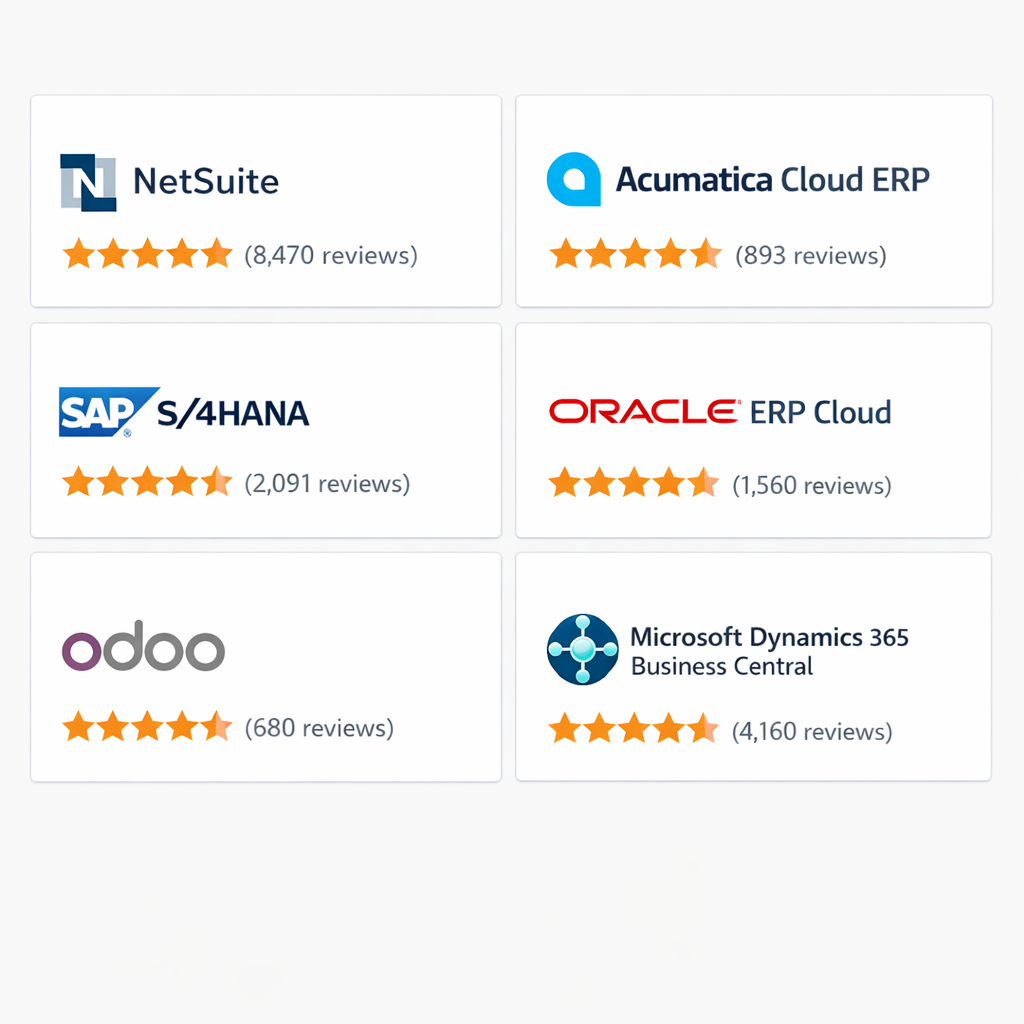
The platforms that consistently earn their place in this conversation are NetSuite, Odoo, SAP Business One, Microsoft Dynamics 365 Business Central, and Zoho One. Each occupies a distinct position in the market, and the right choice depends on variables that no feature comparison can resolve on its own.
NetSuite is the benchmark for growth-stage businesses preparing for serious operational scale. Its financial management and reporting engine are among the strongest in the market, and the AI layer handles demand planning, cash flow forecasting, and automated financial close with meaningful accuracy. The honest trade-off is cost — licensing starts around $999 per month before per-user fees and implementation investment. For businesses generating consistent revenue with genuine operational complexity, the ROI is well-documented. For very early-stage operations, the spend is difficult to justify.
Odoo is the platform that surprises most entrepreneurs who discover it after years of paying for disconnected SaaS tools. The open-source foundation delivers full ERP coverage — accounting, inventory, manufacturing, HR, CRM, and e-commerce — at a price point accessible to small teams. The modular structure means you activate only what you need and expand as complexity demands. The learning curve rewards teams that invest in setup. Teams that rush the implementation consistently underuse the platform and attribute the gap to the software rather than the onboarding AI ERP software.
SAP Business One occupies the space between SMB accessibility and enterprise depth. Built specifically for businesses with 10 to 250 employees, it delivers inventory control, financial management, and production planning at a standard most SMB-focused platforms don’t match. The implementation model is partner-dependent, which adds cost but also adds professional guidance through a process that benefits from experienced hands.
Microsoft Dynamics 365 Business Central is the strongest option for teams already embedded in the Microsoft ecosystem. The native integration between Business Central and Microsoft 365 — Teams, Outlook, Excel, SharePoint — is genuinely seamless. The Copilot features handle automated bank reconciliation, predictive inventory replenishment, and natural language report generation with solid reliability. Per-user pricing keeps entry costs manageable, though costs scale as users and premium modules are added.
Zoho One is the most underrated option on this list for early-stage and lean operations. The combination of Zoho Books, Zoho Inventory, Zoho CRM, Zoho People, and Zoho Analytics functions as a capable ERP environment at a flat per-user monthly fee that makes it viable for solo operators and very small teams. The ceiling is real — complex multi-entity operations and sophisticated manufacturing workflows will eventually outgrow the platform — but for entrepreneurs in the early-to-mid growth phase, the value-to-cost ratio is difficult to match.
Matching a platform to your business comes down to four variables: your transaction volume, your integration dependencies, your team’s capacity for change, and your growth trajectory. A product business managing inventory across multiple locations points toward NetSuite or SAP Business One. A service business with project-based billing points toward Dynamics 365 or Odoo. An early-stage operator who needs full operational coverage without major spend points toward Zoho One AI ERP software.
The questions that matter most before signing any contract are not about features. They are about implementation timeline, total first-year cost including partner fees and training, post-launch support quality, and reference customers in your industry at your scale. Those answers tell you more about the actual ownership experience than any demo ever will.
For a detailed platform-by-platform breakdown including specific use case recommendations and the questions to ask every vendor before committing, the best AI ERP software comparison for entrepreneurs gives you the full analysis.
How to implement an AI ERP system without disrupting your operations
The implementation is where most ERP investments either pay off or fall apart. The platform selection decision gets the most attention, but the execution of the rollout is what actually determines whether the system delivers its intended value or becomes an expensive source of operational friction AI ERP software.
The failure patterns are consistent and predictable. Ownership is unclear — the project gets assigned to someone who already has a full workload and no real authority to make configuration decisions. Data migration is underestimated — years of inconsistent, duplicated records from multiple legacy systems get moved into the new platform without cleaning, and the garbage-in-garbage-out problem follows the business into its new infrastructure. Change management is skipped — the platform goes live, the team gets a two-hour walkthrough, and adoption stalls within 30 days as people quietly return to the workflows they know.
Understanding these failure patterns before the implementation begins is the most valuable preparation an entrepreneur can do. The solution to each one is straightforward, but it requires deliberate action before the platform is ever configured.
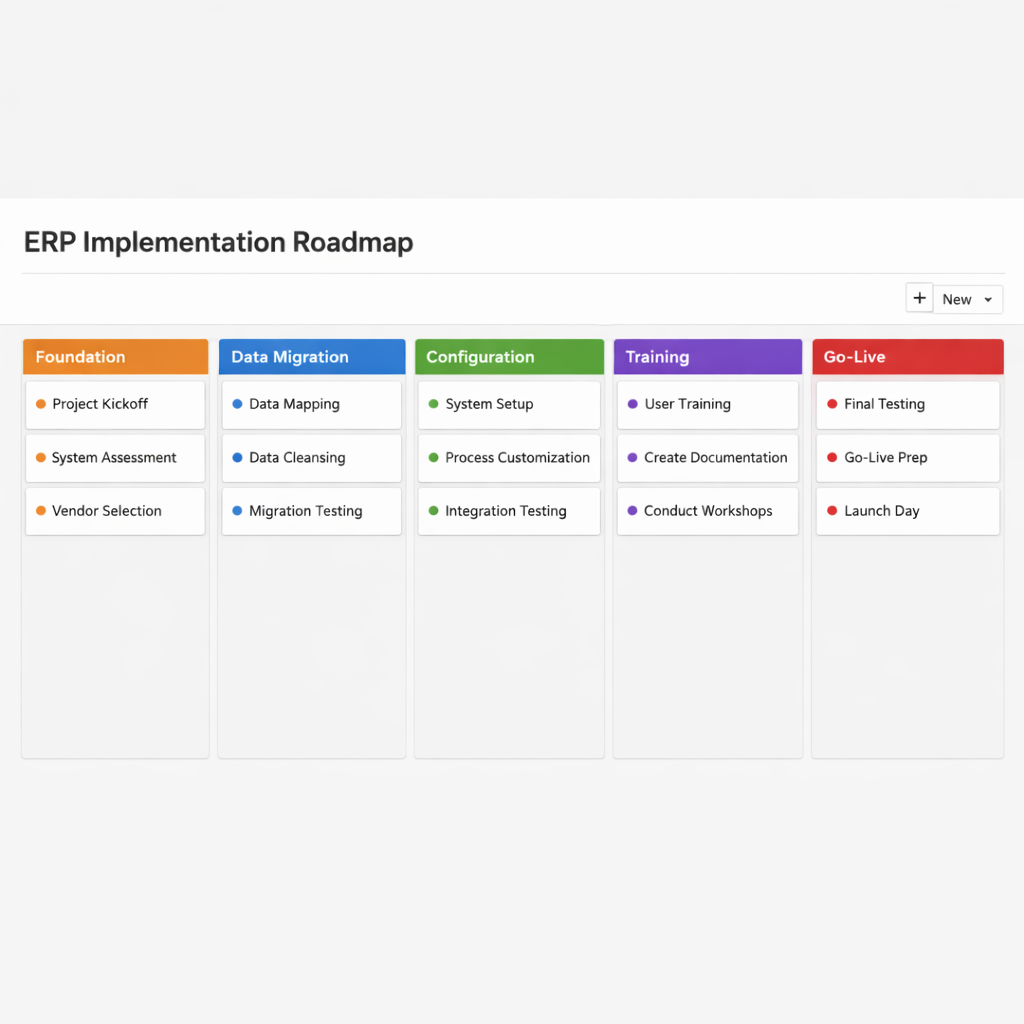
The implementation framework that works for entrepreneurial businesses runs across five phases.
Phase one is foundation building. Before touching the software, define your objectives with specificity — not improve operations but “reduce monthly financial close from 12 days to 4 and eliminate manual inventory reconciliation entirely.” Map your current workflows as they actually operate, not as they are supposed to operate. Identify your implementation owner — the person with authority and availability to own the project from start to finish. And audit your existing data so you know exactly what you are working with before migration begins.
Phase two is data migration. This is consistently the most underestimated phase of any ERP implementation. The complexity is not technical — modern platforms have solid import tools — it is organizational. Getting clean, consistently formatted data out of multiple legacy systems requires patience and precision. Clean before you migrate. Deduplicate customer records. Standardize product naming conventions. Reconcile discrepancies between your accounting records and your inventory counts. Migrate in stages rather than all at once, starting with your chart of accounts and financial history before moving to inventory, customer records, and historical transactions.
Phase three is configuration and workflow mapping. Shape the platform to match your business — not the other way around. Start with the standard configuration, run it against your actual processes, and customize only where the gap is genuinely painful. Configure your automation rules with real thresholds based on your actual business data rather than vendor defaults. Run a full test cycle before go-live — process a complete order from entry to fulfillment to invoice, run a mock payroll cycle, generate a financial report and compare it against your existing system AI ERP software.
Phase four is team training. Train by role rather than by feature. Your finance lead needs deep coverage of the accounting and reporting modules. Your warehouse manager needs to master inventory and fulfillment workflows. Your sales team needs to understand CRM integration and order entry. Use real migrated data in training sessions rather than simulated environments. Designate platform champions by department — people who go deeper into the platform than their peers and become the go-to resource for their colleagues after go-live.
Phase five is go-live and the first 30 days. Choose your launch date strategically — avoid your busiest operational period. Run parallel systems for at least two weeks after go-live so you have a fallback if something doesn’t behave as expected. Hold a daily 15-minute standup with your implementation owner and department champions during the first two weeks to surface problems fast. Track adoption metrics — not just technical uptime, but actual usage patterns, module engagement, and the presence of manual workarounds that signal training gaps or configuration issues AI ERP software.
Measuring implementation success requires metrics beyond go-live. Time savings, data accuracy improvement, decision speed, team adoption rate at 90 days, and return on investment calculated against total implementation cost are the indicators that tell you whether the platform is actually delivering its intended value.
For the complete stage-by-stage implementation framework including data migration checklists, configuration sequencing guidance, and a 90-day success measurement model, the AI ERP implementation guide gives you everything you need to execute the rollout without disrupting the operations you are trying to improve.
AI ERP vs traditional ERP: which one fits your business
The ERP market has split into two distinct generations, and the gap between them is widening every year. Understanding what actually separates them — not in marketing language but in operational reality — is essential before committing to any platform decision AI ERP software.
Traditional ERP systems were built in the 1990s and early 2000s for a specific purpose: giving large enterprises a way to centralize operational data that was scattered across incompatible systems. The architecture they chose was on-premise, the customization model was expensive and slow, and the implementation timelines were measured in years rather than months. The model worked for the organizations it was designed for — multinational manufacturers with dedicated IT departments and stable processes that didn’t need to change frequently.
The problem is that this model was never designed for entrepreneurial businesses. The cost structure, the implementation complexity, the IT dependency, and the architectural rigidity are fundamentally misaligned with how fast-moving lean organizations actually operate. Traditional ERP systems that survived into the cloud era adapted by moving online, but many carried the underlying design assumptions of their on-premise origins with them.
AI-driven ERP platforms were built from different assumptions entirely. Where traditional systems are passive record-keepers that store what happened and wait for a human to interpret the output, AI-driven platforms are active decision-support systems that analyze patterns continuously, surface insights proactively, and automate routine decisions based on rules the business configures. The intelligence is distributed between the user and the system rather than residing entirely with the user.
That philosophical difference produces practical differences across six dimensions that matter for entrepreneurial decision-making.
Architecture and deployment. Traditional ERP platforms, even cloud-hosted versions, are often built on monolithic architectures where changing one component affects others. AI-driven platforms are typically built on modern microservices architectures where individual components can be updated independently. The result is faster feature releases, more reliable uptime, and easier third-party integration.
Implementation timeline. Traditional ERP implementations for mid-sized businesses run six to eighteen months and require dedicated implementation partners and extensive customization work. AI-driven implementations for comparable businesses run two to six months. Pre-built industry templates, guided setup workflows, and modular deployment mean you can go live with core functionality quickly and expand over time.
Total cost of ownership. Traditional ERP licensing involves large upfront costs, annual maintenance fees, and significant ongoing IT and customization expenses. The total first-year cost for a mid-sized business can easily reach six figures when implementation partner fees are included. AI-driven platforms operate on subscription models with per-user monthly pricing, lower implementation costs, and vendor-managed maintenance.
Customization depth. Traditional platforms offer deep customization — almost any workflow can be modified with sufficient development investment. AI-driven platforms offer configuration flexibility but more limited customization depth. Most entrepreneurial businesses will never hit that ceiling, but businesses with genuinely specialized processes may find the constraints limiting.
Usability and adoption. Traditional ERP interfaces were built by engineers for power users — functional but rarely intuitive, with learning curves steep enough that many businesses hire dedicated ERP administrators. AI-driven platforms are designed with end users in mind. Modern interfaces, role-based dashboards, and guided workflows produce faster team adoption and lower training overhead.
Scalability. Traditional platforms were built to handle enterprise-scale complexity and can accommodate enormous transaction volumes and global operations. AI-driven platforms have closed the scalability gap significantly, and leading platforms like NetSuite and Microsoft Dynamics 365 handle multi-entity, high-volume operations reliably. Some newer platforms still have scalability ceilings that more established tools don’t.
There are specific situations where traditional ERP remains the stronger choice. Highly regulated industries with complex compliance requirements. Businesses with deeply customized legacy implementations where migration cost outweighs operational benefit. Enterprise-scale operations with global complexity that newer platforms haven’t fully replicated. For everything outside those scenarios, the operational advantages of AI-driven ERP make a compelling case for the modern approach AI ERP software.
The hidden costs that entrepreneurs most often miss on both sides of this comparison fall into three categories: internal time investment during implementation, integration development for connecting the ERP to existing tools, and change management overhead as the team transitions from familiar workflows to new ones. These costs don’t appear on vendor invoices but they are real, and budgeting for them explicitly is the difference between a realistic implementation plan and one that stalls halfway through.
The framework for making this decision is simpler than the vendor landscape makes it appear. If your business is under 250 employees, growing faster than your current tools can support, and doesn’t have a specialized compliance or customization requirement that only a legacy platform can satisfy — an AI-driven ERP is almost certainly the right direction.
For a complete side-by-side analysis of how these two platform generations compare across every dimension that matters for entrepreneurial businesses, including a straight answer on when traditional ERP still makes sense, the AI ERP vs traditional ERP breakdown gives you the full comparison without vendor bias.
ERP automation features that save entrepreneurs 10+ hours a week
The promise of AI ERP software is not just better data visibility. It is time back — specifically, the hours your team currently spends on manual data entry, cross-system reconciliation, report generation, and repetitive approval workflows that require human hands but not human judgment.
Those hours are not a fixed cost of doing business. They are recoverable. And the automation layer inside a modern ERP platform is where that recovery happens.
The entrepreneurs who extract the most value from their ERP investment are not necessarily the ones who configure the most automations. They are the ones who identify the highest-value manual workflows in their operation, automate those first, and build confidence in the platform’s reliability before expanding scope. That sequencing discipline is what separates implementations that deliver measurable time savings within 90 days from ones that produce a poorly calibrated system that nobody trustsAI ERP software.
The automation capabilities that deliver the most consistent returns fall across five operational domains.
Financial automation compresses the monthly close from a multi-day manual effort into a largely automated process. Bank reconciliation connects directly to your financial accounts and matches transactions against existing records without manual intervention. Recurring journal entries — depreciation, prepaid expense amortization, accruals — execute automatically on a schedule configured once. Automated close checklists assign tasks, track completion status, and escalate overdue items so the close process becomes a managed workflow rather than a monthly fire drill. Businesses that were taking 10 to 15 days to close their books monthly routinely report closing in 3 to 5 days after implementing financial automation — with higher accuracy and lower stress on the finance team.
Inventory automation eliminates the manual stock monitoring that consumes operations teams in product-based businesses. Automated reorder points trigger purchase orders when inventory drops below configured thresholds — no spreadsheet checking required. Demand forecasting analyzes historical sales data, seasonal patterns, and current order pipeline to generate data-driven inventory recommendations that improve in accuracy as the system accumulates more of your business’s history. Supplier lead time management tracks actual delivery performance and adjusts reorder timing automatically when a vendor’s reliability changes. For lean teams managing hundreds or thousands of SKUs, this automation layer is the difference between an inventory operation that runs itself and one that requires constant manual supervision.
Accounts payable and receivable automation addresses both sides of the cash flow equation simultaneously. On the receivables side, invoices generate automatically at fulfillment or service milestone completion, payment reminders execute on a configured schedule, and incoming payments match against open invoices without manual reconciliation. On the payables side, vendor invoices captured via OCR are automatically matched against purchase orders and delivery receipts before routing for approval. Three-way matching — confirming that the purchase order, delivery receipt, and vendor invoice all align — happens automatically rather than requiring a human to cross-reference three documents. Days sales outstanding, the average time between invoice issuance and payment collection, typically decreases 20 to 35 percent within 90 days of implementing automated collections workflows.
HR and payroll automation recovers time that most entrepreneurs don’t realize they are losing until they measure it. Payroll processing calculates hours, salary configurations, and benefit deductions then executes pay runs automatically on schedule. Time and attendance data integrates directly with payroll, eliminating the manual transfer step between systems. Onboarding workflows trigger automatically when a new hire is added — document collection, system access provisioning, benefits enrollment, compliance training assignment — each step tracked and escalated if not completed within the configured timeframe. For a team of ten people, automating these HR workflows typically recovers four to six hours per week that were previously spent on administrative tasks with no strategic value.
Reporting and analytics automation eliminates the data assembly work that precedes every important business decision. Scheduled reports generate and distribute automatically — weekly sales summary, monthly P&L, daily inventory status, weekly cash flow forecast — without anyone preparing them manually. Role-based dashboards give every team member a live view of the metrics relevant to their function, updating continuously as transactions occur. Exception-based alerts notify the right people only when something falls outside normal parameters, replacing the exhausting practice of reviewing every metric on a schedule looking for problems that may or may not exist.
The prioritization framework that produces the fastest results is sequenced around two variables: the volume of manual work the automation replaces, and the risk cost of errors in that workflow. Start with high-volume, high-error-risk workflows — bank reconciliation and accounts payable matching are the most consistent candidates. Move to high-volume, lower-risk workflows next — inventory reordering, scheduled reporting, payroll processing. Address low-volume, high-complexity workflows last — multi-entity consolidation, sophisticated demand forecasting models, complex approval routing — after your team is comfortable with the platform and your data quality is established.
At 90 days post-implementation, businesses in the 5 to 50 employee range consistently report recovering 10 to 15 hours per week across the team at the conservative end. Financial close and reconciliation alone typically returns 3 to 5 hours per week to the finance lead and business owner. Inventory management returns 2 to 4 hours per week to the operations team. Accounts payable and receivable automation returns 2 to 3 hours per week. HR and payroll returns 1 to 3 hours depending on team size. Reporting and data preparation returns 2 to 4 hours distributed across multiple team members.
Those recovered hours do not disappear — they get reallocated toward work that requires human judgment, strategic thinking, and relationship management. The finance lead who spent three days on month-end close now spends that time on financial analysis and forward planning. The operations manager who spent Monday mornings on inventory reconciliation now focuses on supplier relationships and process improvement. That reallocation is the real return on investment — not just time saved, but attention redirected toward work that actually moves the business forward.
For a complete breakdown of each automation category including specific configuration guidance, platform-by-platform capability comparisons, and a realistic 90-day time savings model, the ERP automation features guide gives you the full detail behind every workflow covered in this section.
Conclusion
The decision to adopt AI ERP software is not a technology decision. It is an operational strategy decision — a choice about whether your team spends its best hours on manual coordination, or whether that work is handled by a platform built specifically to do it.
The entrepreneurs who get this right are not the ones who pick the most feature-rich platform or the most recognized brand name. They are the ones who start with an honest assessment of their constraints, define success in specific measurable terms, and execute implementation with the same discipline they bring to any other high-leverage initiative.
The framework this guide has walked through covers the full decision arc: understanding what AI ERP software actually does and whether your business is ready. Evaluating platforms based on your industry, team size, and growth trajectory. Knowing where AI-driven systems pull ahead of traditional predecessors. Executing a go-live that does not disrupt the operations you are trying to improve. And identifying which automation workflows deliver measurable time savings within the first 90 days.
Three principles separate successful implementations from expensive disappointments.
Clarity before configuration. Businesses that struggle most start configuring before defining what they are trying to achieve. Specific objectives create a measurable standard and keep the project focused when scope creep tries to expand it.
Data quality before migration. Clean data produces a reliable system. Dirty data produces a system nobody trusts — and rebuilding that trust after go-live is significantly harder than cleaning the data before migration.
Adoption before optimization. A well-adopted standard configuration outperforms a heavily customized system that half the team has quietly abandoned for their old spreadsheets. Get adoption right first, then optimize.
The operational leverage available through modern AI ERP software is real, significant, and increasingly accessible. The gap between businesses that have built smart infrastructure and those still running on disconnected manual systems is widening every quarter. The cost of waiting — in time lost, errors compounding, and decisions made on stale data — is higher than most entrepreneurs calculate when they defer the decision.
The best time to build the operational foundation your business needs was probably 18 months ago. The second best time is now.
For entrepreneurs ready to move from evaluation to action, the most immediate next step is knowing which automation features deliver the fastest return in your specific operation. The complete breakdown of ERP implementation for small businesses without a dedicated IT team gives you the prioritized framework to get the platform paying for itself as quickly as possible.
