

The promise of an ERP system is not just better data — it is time back. ERP automation is where that recovery actually happens, specifically across the hours your team spends on manual data entry, cross-system reconciliation, report generation, and repetitive approval workflows. Those hours are not a fixed cost of doing business. They are recoverable. The entrepreneurs who get the most out of their implementation are the ones who know exactly which ERP automation workflows to prioritize first. If you are still in the evaluation phase, the complete guide to AI ERP software for small businesses gives you the full strategic context before diving into specific features.
Why manual workflows are costing you more than you think
Most entrepreneurs underestimate the true cost of manual workflows because the cost is distributed. It doesn’t show up as a single line item on a financial report. It shows up as two hours every Monday reconciling inventory counts. Forty-five minutes every Friday chasing invoice approvals. Three hours at month-end manually pulling data from four different systems to build a report that should generate itself.
Add those hours across your team and the number becomes significant fast. A five-person team each spending four hours per week on workflows that could be automated represents 20 hours of lost productive capacity every week. Over a year that is more than 1,000 hours — the equivalent of six months of full-time work — spent on tasks that deliver no strategic value.
The automation layer inside a modern ERP system is specifically designed to recover those hours. Not all of them at once, and not without thoughtful configuration. But systematically, workflow by workflow, the platform can eliminate the manual touchpoints that quietly consume your team’s best energy.
The key is knowing where to start. Not every automation delivers equal value, and trying to automate everything simultaneously is a reliable path to a poorly configured system that nobody trusts. The framework below gives you a prioritized view of where the highest-value automation opportunities live and what realistic time savings look like in practice.
Financial automation — closing the books without the chaos
For most entrepreneurial businesses, the monthly financial close is the single most labor-intensive recurring process in the operation. Collecting transaction data from multiple sources, reconciling accounts, generating financial statements, and preparing reports for stakeholders can consume days of your finance team’s time every month.
ERP financial automation compresses that timeline dramatically.
Automated bank reconciliation. Modern ERP platforms connect directly to your bank accounts and credit card providers via secure API connections. Transactions import automatically, and the system matches them against existing records — invoices, purchase orders, expense entries — without manual intervention. Discrepancies are flagged for human review rather than requiring a human to find them.
Automated journal entries. Recurring journal entries — depreciation, prepaid expense amortization, accruals — can be configured once and executed automatically on a schedule. The system posts them without anyone touching a keyboard.
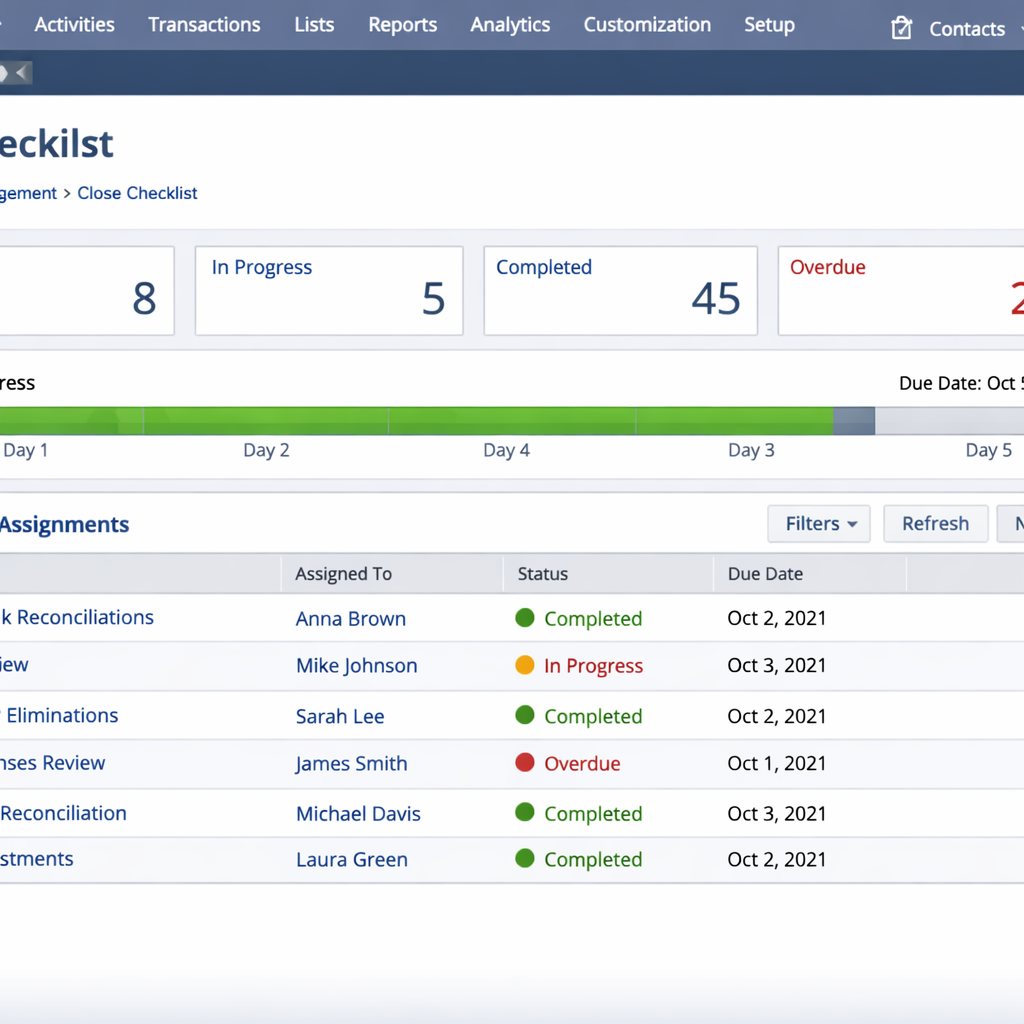
Automated financial close checklists. Leading platforms like NetSuite include automated close management tools that assign tasks, track completion status, and escalate overdue items. The close process becomes a managed workflow rather than a monthly fire drill.
Multi-entity consolidation. For entrepreneurs running multiple business entities, automated consolidation pulls financials from each entity, eliminates intercompany transactions, and generates consolidated statements without manual spreadsheet assembly.
The time savings here are among the most consistently documented in ERP implementation case studies. Businesses that were taking 10 to 15 days to close their books monthly routinely report closing in 3 to 5 days after implementing financial automation — with higher accuracy and lower stress.
Inventory automation — never make a stock decision manually again
Inventory management is where manual workflows cause some of the most expensive operational errors for product-based businesses. A stockout costs you sales and damages customer relationships. Overstock ties up cash and creates carrying costs. Both problems are largely preventable with properly configured inventory automation.
Automated reorder points. Every SKU in your catalog can have a reorder point configured — a minimum stock level that triggers an automatic purchase order when inventory drops below it. The system monitors stock levels continuously and generates purchase orders without anyone checking a spreadsheet.
Demand forecasting. The AI layer in modern ERP platforms analyzes your historical sales data, seasonal patterns, and current order pipeline to generate inventory demand forecasts. Instead of guessing how much to order, you work from a data-driven recommendation that improves in accuracy as the system accumulates more of your business’s history.
Supplier lead time management. The platform tracks actual delivery times from each supplier and factors that data into reorder timing. If a supplier’s average lead time has crept from 7 days to 12 days, the system adjusts your reorder triggers automatically rather than waiting for a stockout to reveal the gap.
Automated receiving and stock updates. When a purchase order is received, the platform updates inventory counts, matches the delivery against the original order, flags discrepancies, and generates the corresponding accounting entries — without manual data entry at any step.
Lot and serial number tracking. For businesses that need to track inventory at the individual item level — electronics, medical supplies, perishables — automated lot tracking maintains a complete chain of custody from receipt to sale without manual logging.
For a lean team managing hundreds or thousands of SKUs, this automation layer is the difference between an inventory operation that runs itself and one that requires constant manual supervision.
Accounts payable and receivable automation — cash flow on autopilot
Cash flow management is the operational heartbeat of any entrepreneurial business, and it is also one of the areas where manual workflows create the most risk. Late payments go unnoticed. Invoice errors slip through. Approval bottlenecks delay vendor payments and damage supplier relationships.
ERP automation addresses both sides of the cash flow equation.
On the receivables side:
Automated invoice generation triggers the moment an order is fulfilled or a service milestone is reached — no manual invoice creation required. Payment reminders go out automatically on a schedule you configure: a friendly reminder at 7 days, a firmer notice at 21 days, an escalation flag at 30 days. Incoming payments are matched against open invoices automatically, and the system flags any payment that doesn’t match an existing record.
The practical result is a collections process that runs without anyone managing it daily, and a receivables ledger that is always current without manual reconciliation.
On the payables side:
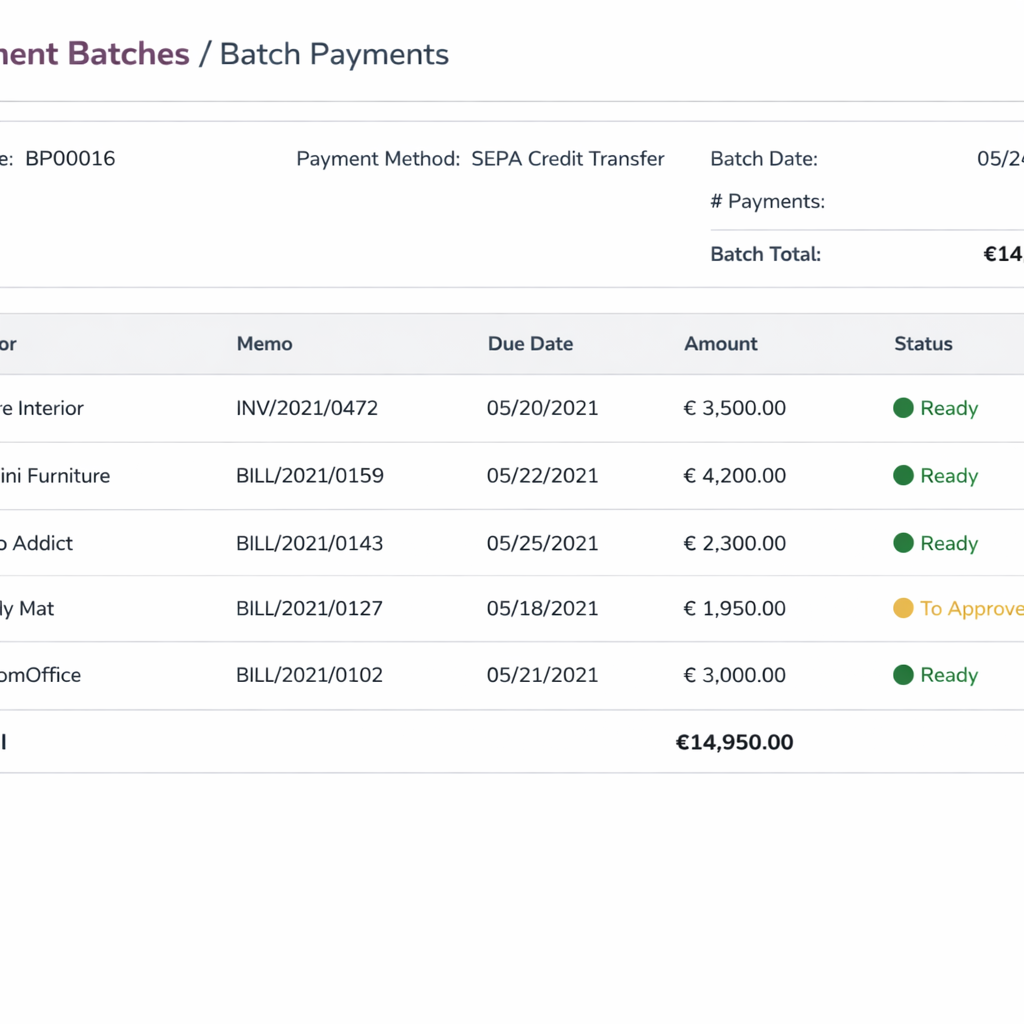
Vendor invoices captured via OCR, optical character recognition that converts scanned documents into structured data, are automatically matched against purchase orders and delivery receipts before being routed for approval. Three-way matching — confirming that the purchase order, delivery receipt, and invoice all align — happens automatically rather than requiring a human to cross-reference three documents.
Approval workflows route invoices to the right person based on amount thresholds, department, or vendor category. Approvers receive notifications, review on a mobile interface, and approve or flag with a single tap. Payment runs execute automatically on your configured schedule, prioritizing invoices by due date and available cash balance.
HR and payroll automation — eliminate the weekly administrative grind
For teams of five or more, HR administration quietly consumes more time than most entrepreneurs realize until they measure it. Payroll processing, PTO tracking, onboarding paperwork, compliance reporting — these are necessary but largely automatable tasks that don’t require human judgment to execute.
Automated payroll processing. Modern ERP platforms with integrated HR modules calculate payroll based on hours logged, salary configurations, and benefit deductions — then generate pay runs automatically on your schedule. Tax calculations, deduction management, and payroll tax filings are handled by the system rather than requiring manual calculation or a separate payroll service.
Time and attendance automation. Employee time tracking integrates directly with payroll, eliminating the manual step of transferring hours from a time-tracking tool into a payroll system. Overtime calculations, shift differentials, and PTO accruals update in real time as hours are logged.
Onboarding workflow automation. When a new hire is added to the system, an automated onboarding checklist triggers — document collection, system access provisioning, benefits enrollment, compliance training assignment. Each step is tracked and escalated if not completed within the configured timeframe.
Compliance reporting. Regulatory reporting requirements — tax filings, benefits compliance, labor law documentation — are generated automatically based on the data already in the system. The platform maintains audit trails that satisfy most standard compliance requirements without manual record-keeping.
For a team of ten people, automating these HR workflows typically recovers four to six hours per week that were previously spent on administrative tasks with no strategic value.
Reporting and analytics automation — decisions without the data prep
The most expensive manual workflow in most entrepreneurial businesses is the one that happens before every important decision: assembling the data needed to make it. Pulling numbers from multiple systems, formatting them into a coherent view, and distributing the result to the people who need it can consume an entire workday every week.
ERP reporting automation eliminates that assembly work.
Automated scheduled reports. Configure any report once — weekly sales summary, monthly P&L, daily inventory status, weekly cash flow forecast — and the system generates and distributes it automatically on schedule. Stakeholders receive accurate, current data without anyone preparing it manually.
Real-time dashboards. Role-based dashboards give every team member a live view of the metrics relevant to their function. Your operations lead sees fulfillment status and inventory levels. Your finance lead sees cash position and receivables aging. Your sales lead sees pipeline and order volume. No data preparation required — the dashboard updates continuously as transactions occur.
Exception-based alerts. Rather than reviewing every metric on a schedule, configure the system to alert you only when something falls outside normal parameters. Gross margin drops below your threshold — alert. A customer’s order volume drops significantly from their baseline — alert. A vendor’s delivery performance deteriorates — alert. You focus attention where it’s needed rather than scanning everything looking for problems.
Natural language querying. Several leading platforms now support plain language queries against your operational data. Ask the system a question in plain English and receive an immediate answer without building a custom report. This capability is still maturing but is already useful for ad-hoc analysis that would previously have required a dedicated reporting resource.
To understand how these automation features compare across specific platforms, the best AI ERP software comparison includes a detailed breakdown of automation depth by platform — so you can match the feature set to your highest-priority use cases before committing to a vendor.
How to prioritize which workflows to automate first
The most common mistake entrepreneurs make with ERP automation is trying to configure everything at once. The result is a system with a dozen half-configured automations, none of which are calibrated well enough to be reliable, and a team that doesn’t trust any of them.
A more effective approach is sequential prioritization based on two variables: the volume of manual work the automation replaces, and the risk cost of errors in that workflow.
Start with high-volume, high-error-risk workflows. Bank reconciliation and accounts payable matching are the most consistent candidates here. Both are high-frequency tasks where manual errors have direct financial consequences. Automating them delivers immediate, measurable time savings and reduces a genuine operational risk simultaneously.
Move to high-volume, lower-risk workflows next. Inventory reorder automation, scheduled report generation, and payroll processing fall into this category. The volume of manual work is significant, but the cost of a configuration error is recoverable. These automations are safe to deploy once your core financial workflows are running reliably.
Address low-volume, high-complexity workflows last. Multi-entity consolidation, complex approval routing for large capital expenditures, and sophisticated demand forecasting models require more calibration time and more data history to perform accurately. Deploy them after your team is comfortable with the platform and your data quality is established.
This sequencing approach means you capture the majority of your time savings quickly — typically within the first 60 to 90 days — while managing implementation risk effectively.
For a complete picture of how to structure the full implementation process around this automation rollout sequence, the AI ERP implementation guide gives you the stage-by-stage framework from data migration through go-live and beyond.
What realistic time savings actually look like at 90 days
The 10-hours-per-week figure in the title of this page is not a marketing claim. It is a conservative baseline drawn from documented implementation outcomes across entrepreneurial businesses in the 5 to 50 employee range. Some businesses recover significantly more. Very few recover less, assuming the automation is configured correctly and adopted consistently.
Here is what the breakdown typically looks like at 90 days post-implementation:
Financial close and reconciliation: 3 to 5 hours per week recovered, primarily from the finance lead and business owner. Monthly close time drops from 8 to 15 days to 2 to 5 days.
Inventory management: 2 to 4 hours per week recovered across the operations and warehouse team. Stockout incidents and emergency reorders decrease significantly within the first quarter.
Accounts payable and receivable: 2 to 3 hours per week recovered. Days sales outstanding, the average time it takes to collect payment after an invoice is issued, typically decreases by 20 to 35 percent within 90 days of implementing automated collections workflows.
HR and payroll: 1 to 3 hours per week recovered depending on team size. The gain scales with headcount — a 20-person team recovers more here than a 6-person team.
Reporting and data preparation: 2 to 4 hours per week recovered. This gain is often distributed across multiple team members who were each spending time on manual data assembly before the automated dashboards were in place.
The total at the conservative end is 10 to 15 hours per week across the team. At the higher end, for businesses with more complex operations and higher manual workflow volume, 20 to 25 hours per week is achievable within the first two quarters.
Those hours don’t disappear — they get reallocated. The finance lead who spent three days on month-end close now spends that time on financial analysis and strategic planning. The operations manager who spent Monday mornings on inventory reconciliation now spends that time on supplier relationship management and process improvement.
That reallocation is the real return on investment. Not just time saved, but attention redirected toward work that actually moves the business forward.
Conclusion
ERP automation is not about replacing your team. It is about redirecting your team toward work that requires human judgment, creativity, and relationship management — and letting the platform handle everything that does not.
The entrepreneurs who extract the most value from ERP automation are the ones who approach it with a clear prioritization framework, configure each workflow carefully against real business data, and measure outcomes with the same rigor they apply to any other operational investment.
Start with your highest-volume, highest-risk manual workflows. Build confidence in the platform’s reliability before expanding automation scope. And treat the time you recover not as slack, but as strategic capacity to deploy where your business needs it most. When you are ready to map your rollout step by step, the full guide to ERP software implementation without a big IT team is the right next read.
