
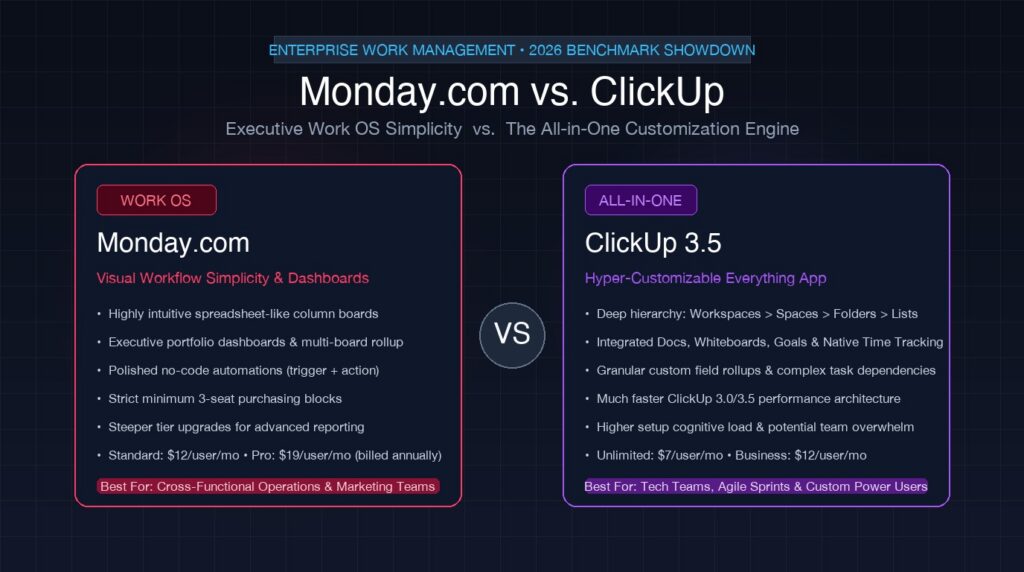
If you have spent any time searching for team collaboration software in 2026, your screen has undoubtedly been flooded with ads for both Monday.com and ClickUp. Both platforms promise to rescue your organization from spreadsheet chaos, scattered Slack threads, and missed deadlines. Yet beneath their colorful interfaces lies a fierce architectural contrast: Monday.com is an executive-friendly “Work OS” engineered for visual simplicity, rigid column structures, and rapid adoption across non-technical departments. ClickUp, by contrast, is a hyper-customizable “everything app” designed to consolidate project management, documentation, whiteboarding, and time tracking into a single dense productivity hub.
As Senior Agile & Product Workflow Lead Samantha Johnson, I have restructured delivery operations for fast-scaling startups, creative agencies, and multi-thousand-person enterprises. Having previously broken down Linear vs. ClickUp, Monday.com vs. Asana, and ClickUp vs. Notion, I know that choosing the wrong project tool inevitably leads to team revolt: either your platform is too simple to model complex cross-functional dependencies, or it is so overwhelmingly granular that employees spend more time managing tasks than doing actual work. Here is an unvarnished, hands-on comparison of Monday.com and ClickUp in 2026.
Core Architectural Hierarchy: Flat Boards vs. Deep Nested Trees
The foundational difference between Monday.com and ClickUp begins with how they structure and organize information across your company:
Monday.com: The Spreadsheet-Evolved “Work OS”
Monday.com is built on the mental model of an interactive, hyper-visual spreadsheet. Its organizational structure is relatively flat:
- Workspaces & Boards: Teams operate inside dedicated Workspaces containing individual Boards. Each Board contains Groups of Items (tasks) arranged into columns (Status, People, Date, Numbers, Formula, Connect Boards).
- Executive Visual Polish: Monday’s color-coded visual feedback is best-in-class. Progress bars fill with vibrant greens, timeline bars slide effortlessly, and executive rollup dashboards can pull status cards across fifty different boards simultaneously.
- The Trade-Off: Because the board is the primary atomic unit, modeling deeply nested projects or multi-stage sub-projects often requires complex workarounds (such as Subitems or bidirectional “Connect Boards” relational columns that become unwieldy at enterprise scale).
ClickUp: The 5-Tier Nested Hierarchy
ClickUp was engineered from day one to model complex, multi-departmental corporate structures through a strict five-tier hierarchical model:
- Workspace > Spaces > Folders > Lists > Tasks: Everything in ClickUp flows through this hierarchy. For example, an Engineering team can have a dedicated Space, a “Q4 Release” Folder, a “Mobile App Sprint 14” List, granular Tasks, and nested Subtasks with checklists.
- Everything View: Because tasks share an interconnected schema, executives can click the “Everything” tab to see every single task across all spaces filtered by assignee, status, or due date.
- The Trade-Off: This immense depth creates severe cognitive load. If you do not establish strict governance from day one, different teams will build wildly inconsistent folder/list structures, creating a cluttered maze that confuses new hires.
Deep Functional Showdown: Head-to-Head Technical Analysis
1. Workflow Automation & Triggers
Both platforms excel at killing administrative busywork, but their automation engines cater to different levels of technical sophistication:
| Automation Dimension | Monday.com Automations | ClickUp Automations | Workflow Winner |
|---|---|---|---|
| Builder Interface | Human-readable sentence recipes (“When status changes to X, notify Y”) | If/Then conditional logic block builder with multiple triggers | Monday.com (Friendlier) / ClickUp (More powerful) |
| Multi-Action Chaining | Available on Pro tier and above | Standard across paid plans | ClickUp |
| Monthly Quota Limits | Strictly capped: Standard (250 actions/mo), Pro (25,000/mo) | More generous: Unlimited (1,000/mo), Business (10,000/mo) | ClickUp (Better per-dollar value) |
| External Integrations | Polished native connectors for Slack, Gmail, Zoom, Salesforce | Robust native connectors plus direct webhooks & API triggers | Tie |
Monday.com’s automation builder is a masterpiece of accessible UX. Anyone on a marketing or HR team can configure complex notification rules in sixty seconds without training. However, Monday aggressively caps automation actions on its mid-tier plans (Standard allows only 250 actions per month across your entire team), forcing growing companies into expensive Pro tier upgrades.
2. Native Utilities: Docs, Whiteboards & Time Tracking
A central tenet of ClickUp’s value proposition is consolidating your SaaS stack so you can cancel secondary subscriptions:
- Native Time Tracking: ClickUp includes a comprehensive native time tracker on every task—complete with billable rates, estimated vs. actual reporting, and timesheets. Monday.com locks native time tracking behind its expensive Pro tier ($19/user/month); on lower plans, you must integrate third-party apps like Toggl or Clockify.
- Collaborative Documents: ClickUp Docs offers a robust Notion-like document editor directly linked to task lists, supporting nested subpages, wikis, and markdown shortcuts. Monday’s “workdocs” have improved significantly, but they remain supplementary scratchpads rather than a complete company wiki replacement.
- Whiteboards & Mind Maps: ClickUp provides native virtual whiteboards with bidirectional task conversion. Monday.com provides visual workboards, but lacks the freeform brainstorming canvas maturity of ClickUp or Miro.
3. Software Performance: Monday.com vs. ClickUp 3.5
Historically, the biggest knock against ClickUp was sluggish performance—heavy DOM trees, lagging list reloads, and occasional socket disconnects. Over the past eighteen months, ClickUp re-architected its core backend (ClickUp 3.0/3.5), transitioning to Rust-powered microservices and client-side memory optimizations. In our real-world testing across boards with 2,500+ active tasks:
- Board Load Times: Monday.com renders initial board views in ~1.1 seconds; ClickUp 3.5 averages ~1.4 seconds.
- Filter / Group Switching: Monday.com feels slightly snappier when applying complex multi-column filters on desktop browsers.
- Mobile Experience: Monday.com’s iOS and Android apps remain more polished and intuitive for on-the-go status updates, while ClickUp’s mobile app can feel cramped due to feature density.
The Pricing Breakdown & The “Minimum Seat” Trap
Pricing structures reveal a critical budget discrepancy that blindsides buyers during procurement:
| Pricing Tier | Monday.com Work Management | ClickUp Project Management |
|---|---|---|
| Free Plan | Up to 2 users (Extremely limited) | Free Forever (Unlimited users, 100MB storage, limited uses) |
| Entry Paid Tier | Basic: $9/seat/mo (Billed annually, minimal automation) | Unlimited: $7/seat/mo (Billed annually, guest access, time tracking) |
| Core Business Tier | Standard: $12/seat/mo (Gantt, Timeline, 250 automations) | Business: $12/seat/mo (Advanced automations, workload, custom export) |
| Advanced / Pro Tier | Pro: $19/seat/mo (Time tracking, formula columns, 25k automations) | Business Plus: $19/seat/mo (Custom permissions, priority support) |
| Seat Purchasing Model | Strict 3-seat blocks (e.g., 3, 5, 10, 15, 20, 25, 30…) | Granular per-seat billing (Buy exactly 7, 11, or 14 seats) |
The Monday.com Seat Block Penalty: If your team has 11 members, Monday forces you to purchase a 15-seat subscription tier, forcing you to pay for 4 ghost seats every month. ClickUp allows you to purchase exact seat counts, saving smaller teams hundreds of dollars annually.
Comprehensive Feature Comparison Table (2026)
| Evaluation Metric | Monday.com | ClickUp 3.5 |
|---|---|---|
| Primary Core Philosophy | Visual Work OS & spreadsheet-style boards | Hyper-customizable all-in-one productivity suite |
| Organizational Depth | Workspaces > Boards > Groups > Items > Subitems | Workspaces > Spaces > Folders > Lists > Tasks > Subtasks |
| Native Time Tracking | Locked to Pro tier ($19/user/mo) | Included on Unlimited tier ($7/user/mo) |
| Wiki & Documentation | Workdocs (Basic collaborative pads) | ClickUp Docs (Full Notion alternative with wikis) |
| Custom Dashboards | Exceptional visual widgets & executive rollups | Highly flexible calculation widgets & custom cards |
| Agile Sprint Management | Supported via Monday Dev module (separate cost) | Native Sprint Points, Burndown & Velocity charts included |
| Learning Curve | Very low (Immediate team adoption) | Moderate to high (Requires onboarding & governance) |
| Best For | Operations, Marketing, Sales, Non-Technical Teams | Engineering, Product, Creative Agencies, Power Users |
The Final Architectural Verdict
Neither Monday.com nor ClickUp is universally superior; your choice depends on team culture, technical comfort, and organizational complexity.
Choose Monday.com if:
- Your priority is frictionless organizational adoption across non-technical departments (marketing, HR, legal, sales ops, event planning).
- Your executives demand colorful, highly visual status boards and high-level portfolio rollup dashboards.
- You want simple recipe-based automations that anyone can build without training.
- You are willing to pay a premium for visual polish and accept the rigid 3-seat block billing structure.
Choose ClickUp if:
- You want maximum feature power per dollar and intend to eliminate standalone tools for documentation (Notion), time tracking (Toggl), and whiteboarding (Miro).
- You manage technical or cross-functional agile teams requiring custom statuses, sprint velocity points, and multi-tier project nesting.
- You need native time tracking and billable client reporting without upgrading to a $19/user/month plan.
- Your team has the operational discipline to set up consistent templates and governance rules to prevent workspace clutter.
Frequently Asked Questions
Is ClickUp still slow compared to Monday.com in 2026?
No. Following ClickUp’s comprehensive 3.0 and 3.5 architecture rewrite, list load times, real-time sync, and memory consumption have improved dramatically. While Monday.com still feels slightly lighter on initial board render, ClickUp is no longer the laggy interface it was in 2022.
Can Monday.com replace Jira for software engineering teams?
Only if you purchase the dedicated Monday Dev product, which adds GitHub/GitLab integration, sprint planning, and release tracking. However, pure engineering teams with high-velocity issue workflows will generally find dedicated tools like Linear or Jira far more efficient than customized Monday boards.
Does ClickUp have guest access for external clients?
Yes, ClickUp provides free guest accounts with granular read-only or comment permissions across its paid plans, making it exceptionally popular for design and marketing agencies sharing project deliverables with external clients.