

Choosing the wrong tool costs you more than money — it costs you team buy-in, hours of migration work, and momentum on projects that actually matter. The best project management software for a five-person startup looks nothing like what a 200-person agency needs, and that distinction is often ignored in generic roundups. Before you commit to a subscription, it helps to understand how each tool maps to the way your team actually works, a context covered in depth in the complete guide to project management for small businesses. This breakdown cuts through the noise so you can make a confident, informed decision.
Best project management software: don’t waste money on the wrong tool
Every entrepreneur reaches a point where spreadsheets and group chats stop working. Tasks fall through the cracks, nobody is sure who owns what, and every project status update requires a separate conversation. That is the moment most business owners start searching for the best project management software — and immediately get overwhelmed by the number of options, pricing tiers, and feature lists that all start to sound identical after the third tool comparison.
This page cuts through that noise. The goal is not to list every tool on the market. It is to help you understand what separates a useful platform from an expensive distraction, and which options are genuinely worth your time in 2026.
What the best project management software actually needs to do
Before comparing specific tools, it helps to define what you actually need from a platform. The best project management software for your business is the one your team will use consistently — not the one with the most features or the most recognizable brand name.
There are four core functions every solid project management tool should handle without friction.
Task organization means you can break a project into clear, assignable units of work with deadlines and ownership. Progress visibility means anyone on the team can see where a project stands without sending a message to ask. Communication context means conversations about a task happen inside that task, not scattered across email threads and Slack channels. Reporting means you can pull a clear picture of what is on track, what is at risk, and where bottlenecks are forming.
If a tool does all four of those things well for your team size and workflow, it is worth considering. If it does two of them brilliantly but forces you to build workarounds for the other two, keep looking.
Understanding these requirements also connects directly to the planning habits covered in how to build a project management plan from scratch — because the best software in the world will not save a project that was never properly planned.
The best project management software options for small teams in 2026
The tools below represent the strongest options available for entrepreneurs and small business owners. Each one has a distinct strength, and the right choice depends on how your team thinks and works.
Asana is one of the most mature platforms in this space and remains one of the best project management software options for teams that run multiple projects simultaneously. Its strength is flexibility — you can view work as a list, a board, a timeline, or a calendar, and switch between views without losing any data.
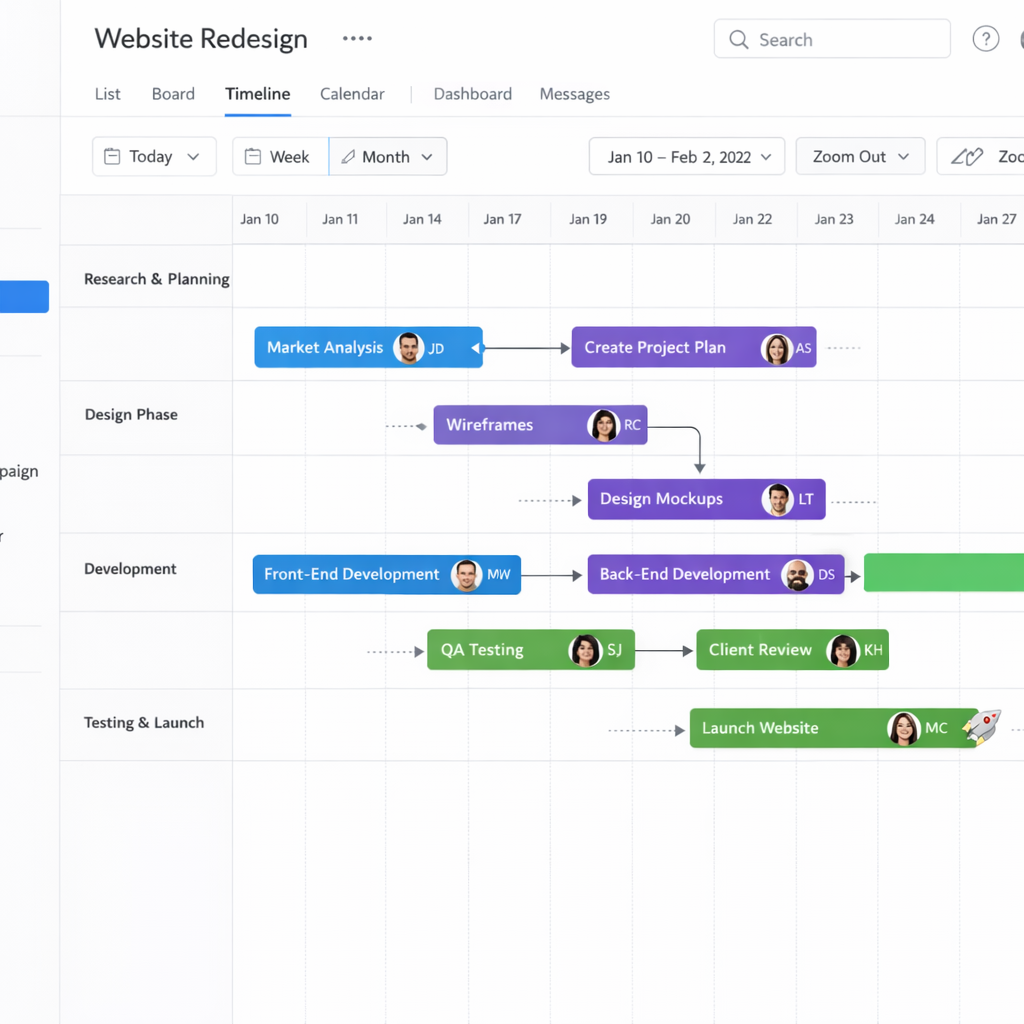
The free plan supports up to 15 users and covers the core functionality most small teams need. The paid tiers unlock automation rules, advanced reporting, and portfolio views — features that matter more as your project volume grows.
Asana works particularly well for teams that manage client work, content production, or product development, where tasks have clear dependencies and handoffs between team members.
Monday.com positions itself as a work operating system rather than a pure project management tool, which is either a strength or an overcomplication depending on how your business operates. For entrepreneurs who want to manage projects, track leads, and run internal processes from a single platform, it delivers genuine value.
Its visual interface is one of the most intuitive in the category, and the automation builder — which lets you set rules like when a task moves to Done, notify the client and assign the next task to the account manager — is among the most accessible for non-technical users.
The pricing structure is per seat with a minimum of three users, which makes it less cost-effective for solo operators but competitive for small teams.
ClickUp is the most feature-dense option on this list and is worth mentioning specifically because its free plan is genuinely generous compared to competitors. For entrepreneurs who want a single tool to replace their task manager, doc editor, goal tracker, and time tracker, ClickUp makes a strong case.
The trade-off is a steeper learning curve. The platform has so many configuration options that new users often spend more time setting it up than using it. The solution is to start with a minimal setup — use only the views and features your team actually needs — and add complexity only when a specific problem demands it.
Notion:
Notion sits at the intersection of project management and knowledge management. It is not the strongest pure project management tool on this list, but for small teams that need a combination of structured docs, wikis, and basic project tracking, it fills a unique gap.
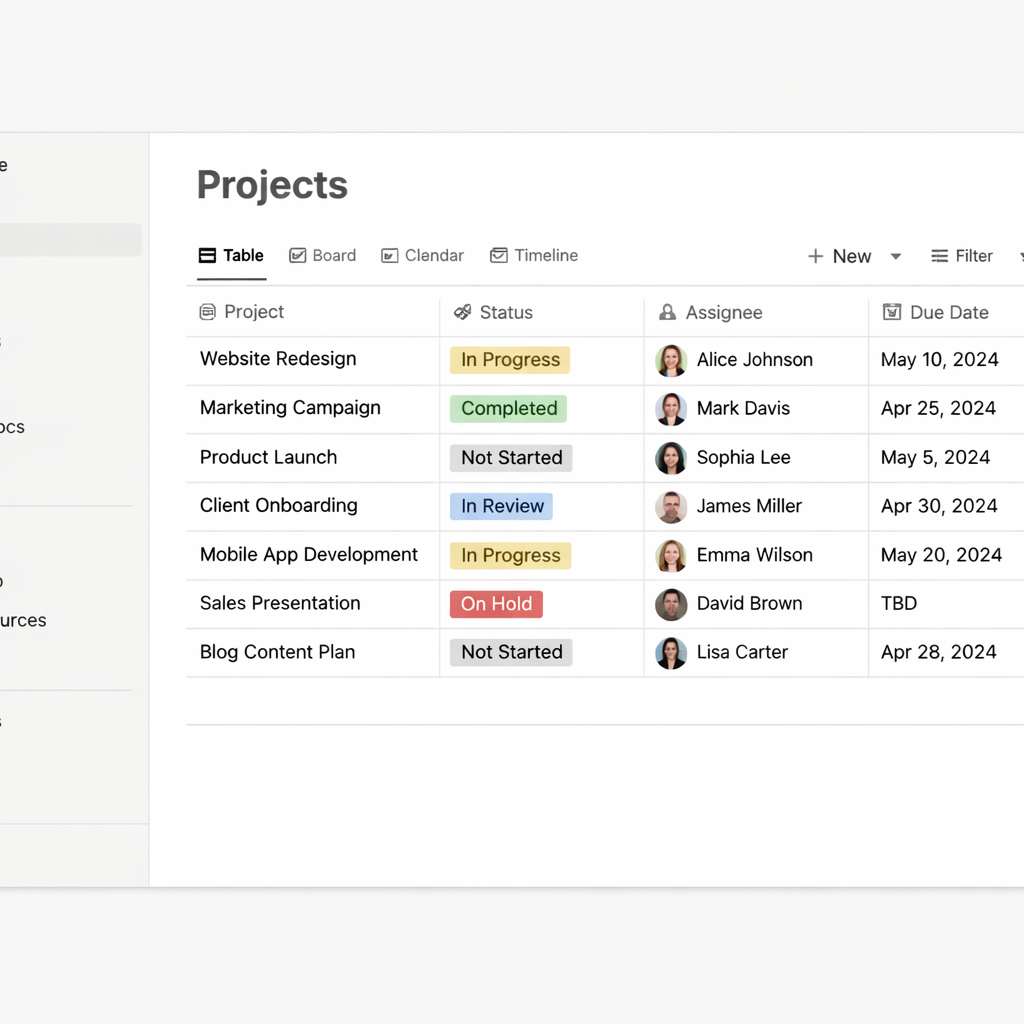
Its database system — where a single piece of content can be viewed as a table, a kanban board, a calendar, or a gallery — makes it particularly useful for content teams, consultants, and agencies that produce a lot of documentation alongside their project work.
Notion’s project management capabilities have improved significantly with recent updates, but teams that need robust task dependencies and timeline management will likely find Asana or ClickUp more capable.
Trello :
Trello is the simplest entry point on this list and remains one of the best project management software options for solo entrepreneurs or very small teams running straightforward workflows. Its kanban board — columns of cards that move from left to right as work progresses — is immediately understandable without any training.
The limitation is that Trello does not scale well into complex, multi-project environments. As soon as you need timeline views, cross-project dependencies, or detailed reporting, you will find yourself working around the tool rather than with it.
For freelancers, early-stage startups, or teams piloting a project management system for the first time, Trello is an excellent starting point with minimal friction.
How to choose without overthinking it
The decision framework is simpler than most comparison articles suggest. Answer these four questions and the right tool becomes obvious.
How many people need access? If you are under five people, almost every tool on this list works at a reasonable cost. Above that, pricing per seat starts to differentiate your options meaningfully.
How complex are your projects? If your projects involve multiple phases, dependencies, and parallel workstreams, you need a tool with timeline and dependency features — Asana or ClickUp. If your projects are relatively linear, Trello or Notion may be sufficient.
How technical is your team? If your team resists new software or has limited technical comfort, Monday.com or Trello will see higher adoption. If your team is comfortable with configuration, ClickUp’s depth becomes an asset.
What is your budget? All five tools have free plans worth testing before you commit. Run a real project on the free tier for two weeks before making a purchasing decision.
The methodology you choose also influences which tool fits best — a point covered in detail in agile project management: why most small teams get it wrong, where the connection between workflow method and tool selection is explored directly.
What to avoid when evaluating tools
The most common mistake entrepreneurs make when choosing project management software is selecting based on features they might use rather than features they will use. A platform with 200 integrations is not more valuable than one with 20 if your team only connects to three.
The second mistake is choosing a tool based on what a larger company uses. Enterprise platforms are built for enterprise problems — approval chains, compliance requirements, cross-departmental visibility at scale. Those features add friction for a ten-person team that needs to move fast.
The third mistake is switching tools too frequently. Every migration costs time and disrupts momentum. Choose carefully, commit for at least six months, and build the habit of using the system consistently before evaluating whether the tool is actually the problem.
Conclusion
The best project management software is the one your team opens every morning without being reminded. Start with the tool that matches your current complexity, not the one built for where you hope to be in three years. Pick one, configure it minimally, and run your next project through it end to end. That single cycle will teach you more about what you need than any feature comparison chart.
