

Most project management systems fail before they get a real chance. The team tries a new tool, spends a weekend migrating tasks, announces the change in Slack, and within three weeks half the team is back to managing work through email and the other half is using the tool inconsistently. The platform gets blamed. The real problem was the setup how to set up a project management system.
Knowing how to set up a project management system correctly is not about mastering software features. It is about designing a structure that matches how your team actually works, building clear conventions everyone follows, and creating enough early momentum that the system becomes the default rather than an extra step.
This page walks through that process from the beginning. If you have not yet chosen a platform, the best project management tools guide for 2026 covers the full evaluation framework before you get into setup. If you have already made that decision, start here.
Define your operational structure before touching the software
The most common setup mistake is opening the tool and starting to build before you have defined what you are building. The result is a workspace that reflects the software’s default structure rather than your team’s actual workflow.
Before you create a single project or task, answer three questions:
What types of work does your team actually do? Most small teams run two or three distinct categories of work simultaneously ongoing operations, client projects, and internal initiatives, for example. Each category has a different rhythm, a different ownership model, and different visibility requirements. Your project management system needs to reflect those distinctions, not flatten them into a single undifferentiated task list.
Who owns what? Define ownership at three levels: the workspace level who maintains the system), the project level who is accountable for overall delivery how to set up a project management system , and the task level (who executes each piece of work). Without clear ownership at all three levels, accountability diffuses and the system starts to feel like a suggestion rather than a operating structure.
What does done look like? Define your status stages before you build anything. Most teams default to the software’s preset statuses To Do, In Progress, Done — and never customize them. Those generic stages rarely reflect how work actually moves through your operation. A content team might need Draft, In Review, Approved, Scheduled, and Published. A client services team might need Scoping, Active, In Review, Delivered, and Closed.
Build your workspace architecture
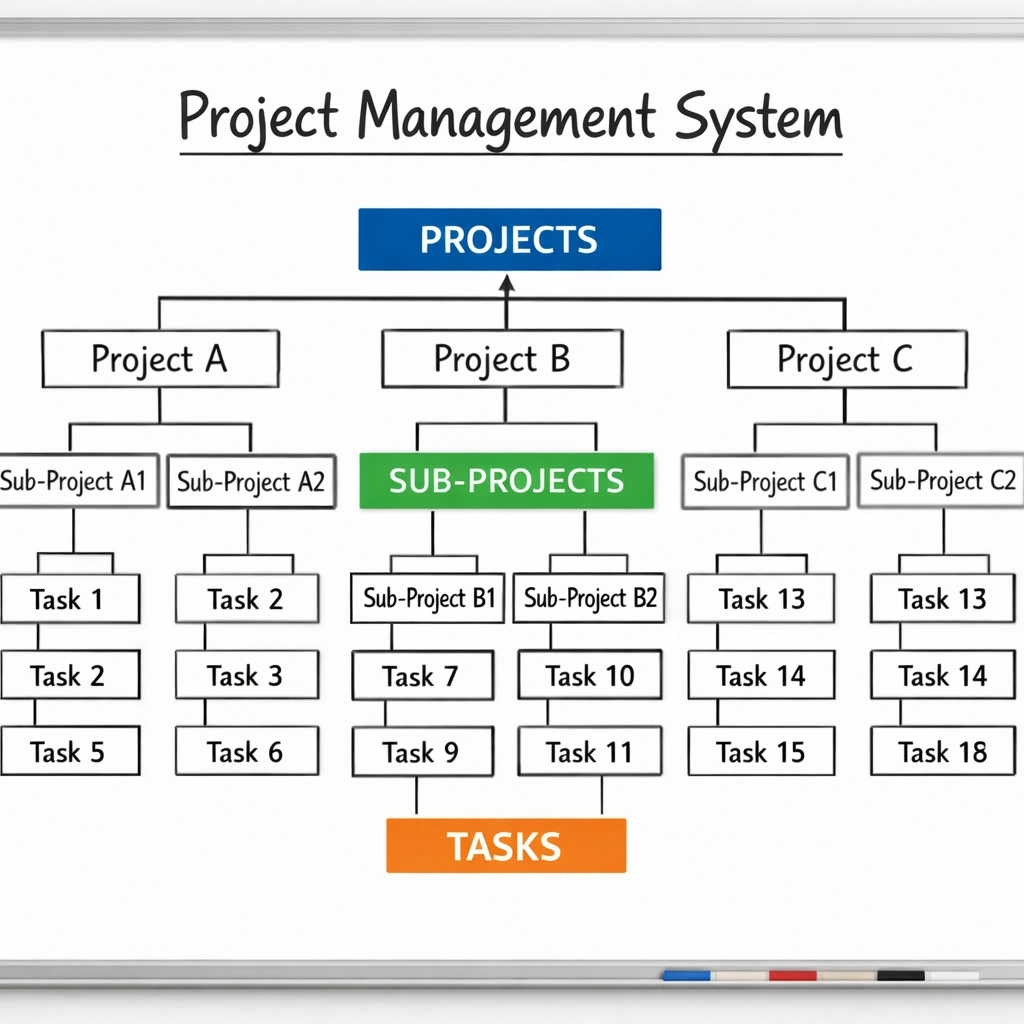
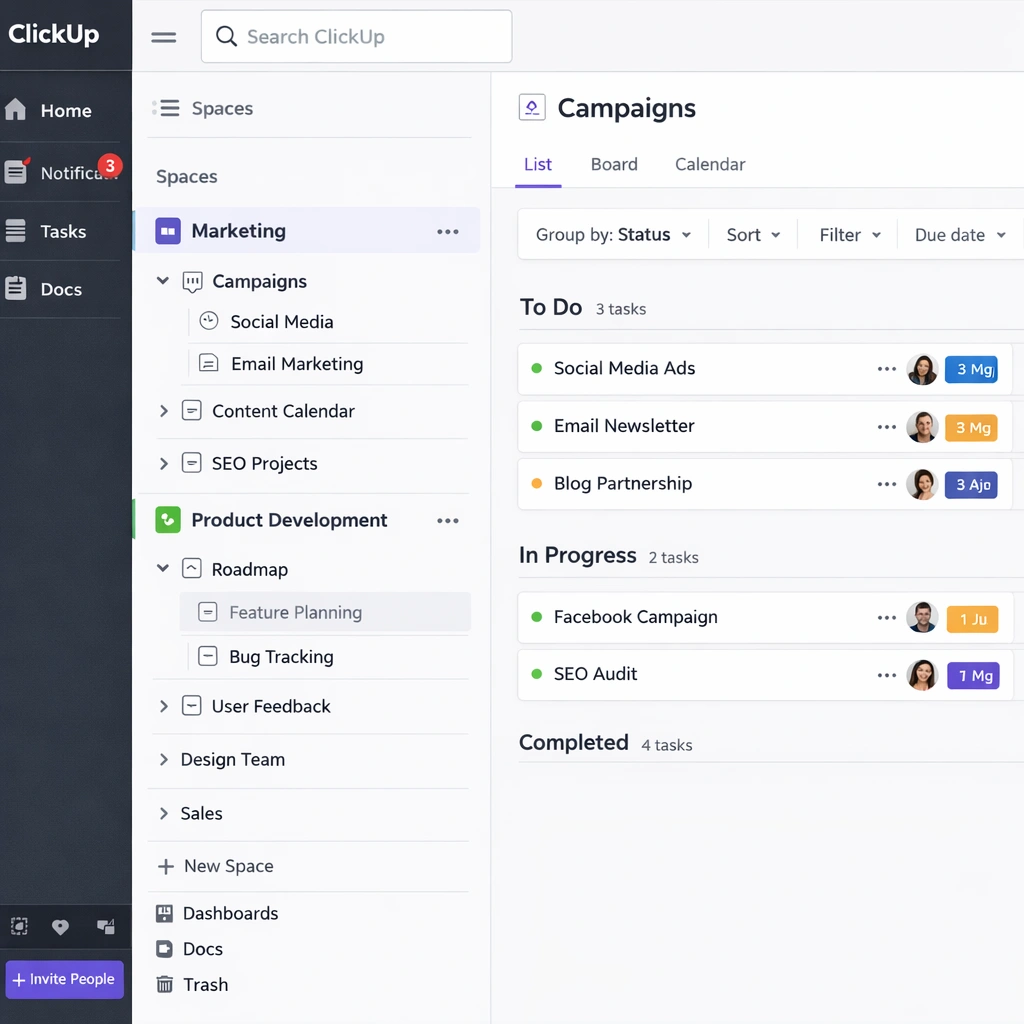
Once you have defined your operational structure on paper, translate it into the tool. The terminology varies by platform ClickUp uses Spaces, Folders, and Lists; Asana uses Teams, Projects, and Tasks; Notion uses databases and pages but the underlying architecture principle is the same across all of them.
Top level: workstream categories. Create a top-level container for each major category of work your team manages. Keep this list short three to five categories maximum. More than five top-level categories creates navigation complexity that slows the team down.
Mid level: projects or folders. Within each category, create individual projects. A client services team would have one project per active client. A product team would have one project per feature or release cycle. A marketing team would have one project per campaign.
Task level: the work itself. Tasks live inside projects. At this level, consistency matters more than anything else. Define a naming convention and stick to it. A task named “homepage” tells nobody anything. A task named Write homepage headline copy draft by Friday gives the assignee everything they need to execute without asking a follow-up question.
For remote teams setting up this architecture across a distributed workforce, best project management software for remote teams covers how to configure visibility and ownership settings specifically for async environments.
Set your conventions and document them
A project management system without documented conventions degrades within weeks. Different team members develop different habits, naming becomes inconsistent, and the system loses the clarity that made it useful in the first place.
Document four things before you launch the system to your team:
Naming conventions. Define how projects and tasks get named. Include examples of correct and incorrect naming so the standard is unambiguous.
Status definitions. Write a one-sentence definition for each status stage. What does “In Review” mean specifically? Who triggers that status change? What is expected to happen next? Those definitions prevent the ambiguity that turns status fields into decorative elements nobody trusts.
Update cadence. Define when tasks get updated. Daily? When status changes? At the end of each workday? The answer depends on your team’s rhythm, but the expectation needs to be explicit. Without it, the system becomes a snapshot of last week rather than a live picture of current work.
Escalation path. Define what happens when a task is blocked. Who gets notified? Through what channel? Within what timeframe? A blocked task with no escalation path sits in “In Progress” indefinitely and poisons the reliability of your project views.
Migrate one project, not everything
The instinct when setting up a new system is to migrate everything at once — all active projects, all backlog items, all historical tasks. Resist that instinct how to set up a project management system.
Start with one active project. Run it fully through the new system for two weeks. Let the team experience the difference between a structured workflow and an unstructured one before you ask them to migrate their entire workload.
This approach does three things. It gives you a low-stakes environment to test your conventions before they are applied at scale. It creates a reference implementation — a real project your team can point to as the model for how the system is supposed to work. And it generates early wins that build the team’s confidence in the new system before they are fully committed to it.
After two weeks, evaluate what worked and what did not. Adjust your conventions based on what you observed. Then migrate the next project, and the next, until the full operation is running through the system.
For teams managing this transition across a distributed workforce, project management tools for small teams covers the adoption strategies that work best for lean operations with limited change management bandwidth.

Build the automation layer after the foundation is stable
Automation is where most teams want to start. It is also where most teams create problems by moving too fast.
Automation built on top of an unstable foundation amplifies inconsistency. If your status conventions are not clear, automating status-based triggers creates chaos. If your naming conventions are not established, automating task creation produces a backlog of identically named tasks nobody can navigate.
Wait until the team has been running the system consistently for three to four weeks before adding automation. At that point, you have real behavioral data about where manual work is concentrated and where automation would actually reduce friction rather than add it.
The first automations worth building are the ones that reduce repetitive administrative work: automatic due date reminders, status change notifications, recurring task creation for weekly or monthly processes, and automatic assignment when a task moves to a specific stage.
For a detailed look at which automation features deliver the fastest return across the major platforms, project management tools with automation covers the specific workflows worth building first.
Run a system review at the 30-day mark
No project management system survives first contact with reality unchanged. The conventions you defined in week one will need adjustment based on how the team actually used them. The workspace architecture you built will have gaps you did not anticipate.
Schedule a 30-minute system review at the 30-day mark. Ask three questions: What is working well and should be protected? What is creating friction and needs to change? What is missing that the team needs?
Make the adjustments, document the changes, and communicate them clearly. Then run the system for another 30 days before the next review. Over time, the review intervals get longer as the system stabilizes and the team’s habits solidify around it how to set up a project management system.
The goal is not a perfect system on day one. The goal is a system that improves continuously based on real usage and that the team trusts enough to keep using even when it is imperfect.
The bottom line
Setting up a project management system correctly is a design problem before it is a software problem. The structure you define, the conventions you document, and the adoption process you run determine whether the system becomes an operational asset or an abandoned tab in someone’s browser.
Start with structure. Build deliberately. Migrate incrementally. Automate after the foundation is stable. And treat the 30-day review as a non-negotiable part of the process, not an optional follow-up.
A system your team trusts and uses consistently is worth more than any feature the most sophisticated platform can offer.
Conclusion
Setting up a project management system is not a one-afternoon task. It is a deliberate process that starts with understanding how your team actually works, translates that understanding into a clear workspace structure, and builds adoption through consistency rather than mandates how to set up a project management system;
The teams that get this right share one common trait: they treat the system as a living operational asset, not a software installation. They document their conventions, review their setup at regular intervals, and adjust based on real usage rather than theoretical best practices.
The six steps covered on this page are not a rigid prescription. They are a sequence that respects how organizational habits actually form — slowly, through repetition, and with enough early structure to give people something reliable to build on.
If you take one thing from this page, let it be this: start smaller than feels right. One project, two weeks, real feedback. That single cycle will teach you more about what your team needs from a project management system than any feature comparison or vendor demo ever will.
The system that sticks is the one built around your team’s actual behavior, not the one built around what the software makes possible. Get the foundation right first. Everything else follows from there.
