

There is a moment every entrepreneur building a SaaS product eventually reaches. The product is working, users are signing up, and the infrastructure bill arrives with line items that did not exist at a hundred users but are suddenly very visible at a thousand. Authentication costs. Database read charges. Storage bandwidth fees. Function invocation counts. The managed backend platform that felt free during development has quietly become one of the largest recurring costs in the business.
The open-source backend as a service model exists specifically to eliminate that dynamic. Instead of renting backend infrastructure from a vendor who charges per operation, you deploy a complete backend platform on a server you control paying a fixed monthly fee that does not move regardless of how many users sign up, how many database queries run, or how many files get uploaded.
This is not a niche strategy for developers with deep infrastructure experience. Platforms like Appwrite, Nhost, and Parse Server have made open-source BaaS self-hosting accessible enough that a solo founder with basic command-line familiarity can have a production-ready backend running in an afternoon. The question is no longer whether self-hosting is feasible — it is which platform fits your product and how to set it up correctly from the start.
This guide covers the full landscape: what open-source BaaS self-hosting actually involves, the three platforms worth serious consideration in 2026, the infrastructure requirements for each, and the security and maintenance practices that keep a self-hosted backend reliable in production. By the end, you will have a clear picture of which path fits your product and your team — and exactly what to do next.
What open-source BaaS self-hosting actually means for your business
Before comparing platforms, the foundational concept is worth defining precisely — because the term gets used loosely in ways that obscure the real business implications.
A backend as a service is a pre-packaged server-side system that handles the infrastructure work every application needs. User authentication, data storage, file uploads, serverless functions, push notifications, and API management — all of it ships in a single platform rather than requiring you to build or wire together individual services. You connect your frontend to the BaaS and build the product, not the infrastructure.
The open-source part means the platform’s source code is publicly available and free to use, modify, and deploy without a license fee. There is no vendor who can change pricing, deprecate features you depend on, or shut down the service with ninety days’ notice.
The self-hosting part means you run that platform on infrastructure you control. A VPS from Hetzner or DigitalOcean, a dedicated server, or a private cloud environment — the platform runs where you put it, and the data it stores never leaves your infrastructure without your explicit action.
The vendor lock-in problem that self-hosting solves
Managed BaaS platforms create dependency that compounds over time. Your authentication system, your database schema, your file storage structure, and your serverless function architecture all conform to the managed platform’s API design. Migrating away from Firebase or Supabase is not a weekend project — it is an engineering effort that typically takes weeks and introduces risk at every layer of the application.
Open-source BaaS self-hosting removes that dependency entirely. The platform is yours, the data is yours, and the migration path — if you ever need one — goes from your server to another server running the same open-source software. No vendor negotiation, no data export limitations, no timeline set by someone else’s business decision.
For entrepreneurs building in regulated industries — healthcare, legal tech, fintech, education — data residency and compliance requirements make this distinction even more concrete. Storing user data in a managed platform’s shared cloud infrastructure creates compliance questions that self-hosting resolves by design.
The complete business case for choosing self-hosted backend as a service over managed alternatives — including the cost comparison at different user volumes — is detailed in the guide to self-hosted backend as a service and why it beats vendor lock-in.
Appwrite self-hosting: the fastest way to launch your own backend
If you have never self-hosted a backend platform before, Appwrite is the most forgiving place to start. Not because it sacrifices capability for simplicity — the feature set is genuinely comprehensive — but because the installation experience is designed around the assumption that the person deploying it is a product builder first and an infrastructure engineer second.
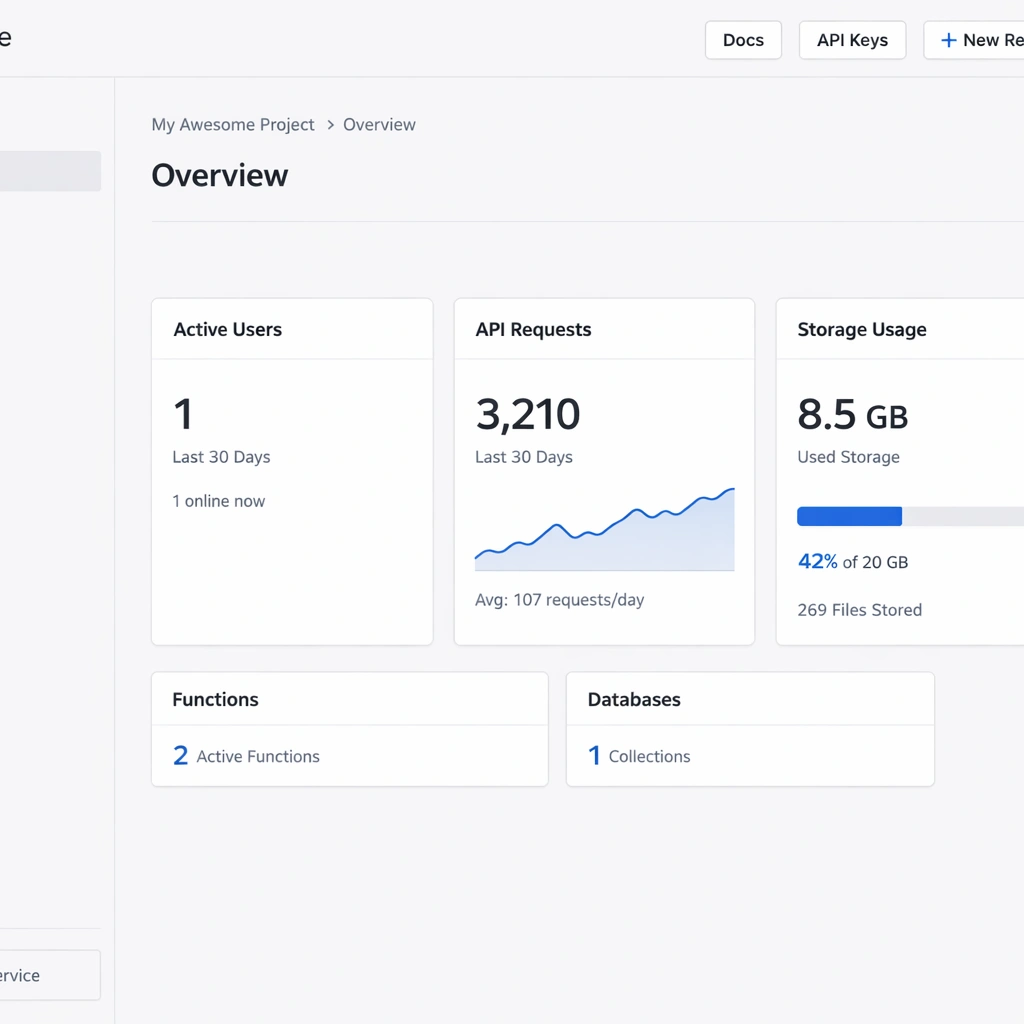
Appwrite ships as a single Docker Compose stack. One command pulls every service — the API server, the database, the storage engine, the cache layer, the background worker, and the realtime server — and starts them in a coordinated deployment that takes under ten minutes on a fresh VPS. The installer prompts you for your domain and port preferences, provisions an SSL certificate automatically through Let’s Encrypt, and produces a working console you can log into immediately after the process completes.
For a bootstrapped founder whose time is the most constrained resource in the business, that installation experience has real value. You are not learning a new infrastructure discipline. You are running one command and getting a backend.
What Appwrite covers out of the box
The feature set Appwrite delivers in a self-hosted deployment matches or exceeds what most managed BaaS platforms charge significant monthly fees to provide.
Authentication in Appwrite supports email and password login, magic link email, OAuth with more than twelve providers including Google, GitHub, Apple, and Discord, phone OTP, and anonymous sessions. Each provider activates from a single toggle in the console with a credential input field. JWT configuration, session management, and token refresh are handled automatically — your frontend connects through an official SDK and the authentication layer works without custom backend code.
The database layer uses a document model — collections of JSON objects with custom attributes you define in the console. The query API supports filtering, sorting, pagination, and full-text search. For products with relatively flat data requirements, this model is fast to work with and covers most querying needs without SQL knowledge. The permission system operates at the collection and document level, letting you configure exactly which roles can read, write, update, or delete data.
File storage handles uploads, downloads, image transformations, and access control through a buckets model. Each bucket has configurable permissions and file size limits. Appwrite processes image transformations — resizing, cropping, format conversion — on request without requiring a separate image processing service.
Serverless functions run in isolated containers triggered by API calls, scheduled cron expressions, or platform events like user creation and file upload. Node.js, Python, PHP, Ruby, Dart, and several other runtimes are supported. For a SaaS product that needs backend automation — welcome emails on signup, webhook handlers for payment processing, scheduled data cleanup — Appwrite Functions handles all of it without a separate service.
Where Appwrite self-hosting fits best
Appwrite is the strongest choice for solo founders and small teams building their first SaaS product, a mobile application, or a content platform where the data model is relatively straightforward. The console UI reduces the time spent on backend configuration, the SDK coverage across JavaScript, Flutter, Swift, and Kotlin means your frontend team works in familiar territory, and the Docker-based deployment means updates and rollbacks follow standard container workflows.
The constraint worth naming honestly is the data model. Appwrite’s document-based database does not support joins or relationship queries across collections. For products where data relationships are simple — a user owns tasks, a user creates posts — this is not a meaningful limitation. For products where relational queries are frequent and complex, the absence of a native JOIN capability creates API overhead that compounds as the product grows.
The full Appwrite self-hosted setup process including Docker installation, console configuration, authentication provider setup, and database permission configuration — is covered step by step in the Appwrite self-hosted setup and deployment guide.
Nhost self-hosting: GraphQL and Postgres without the monthly bill
Nhost occupies a specific and valuable position in the open-source BaaS landscape. It is not trying to be the easiest platform to install or the one with the broadest runtime support. It is trying to be the most architecturally correct backend for products with relational data — and for that use case, it delivers something no other open-source BaaS platform matches cleanly.
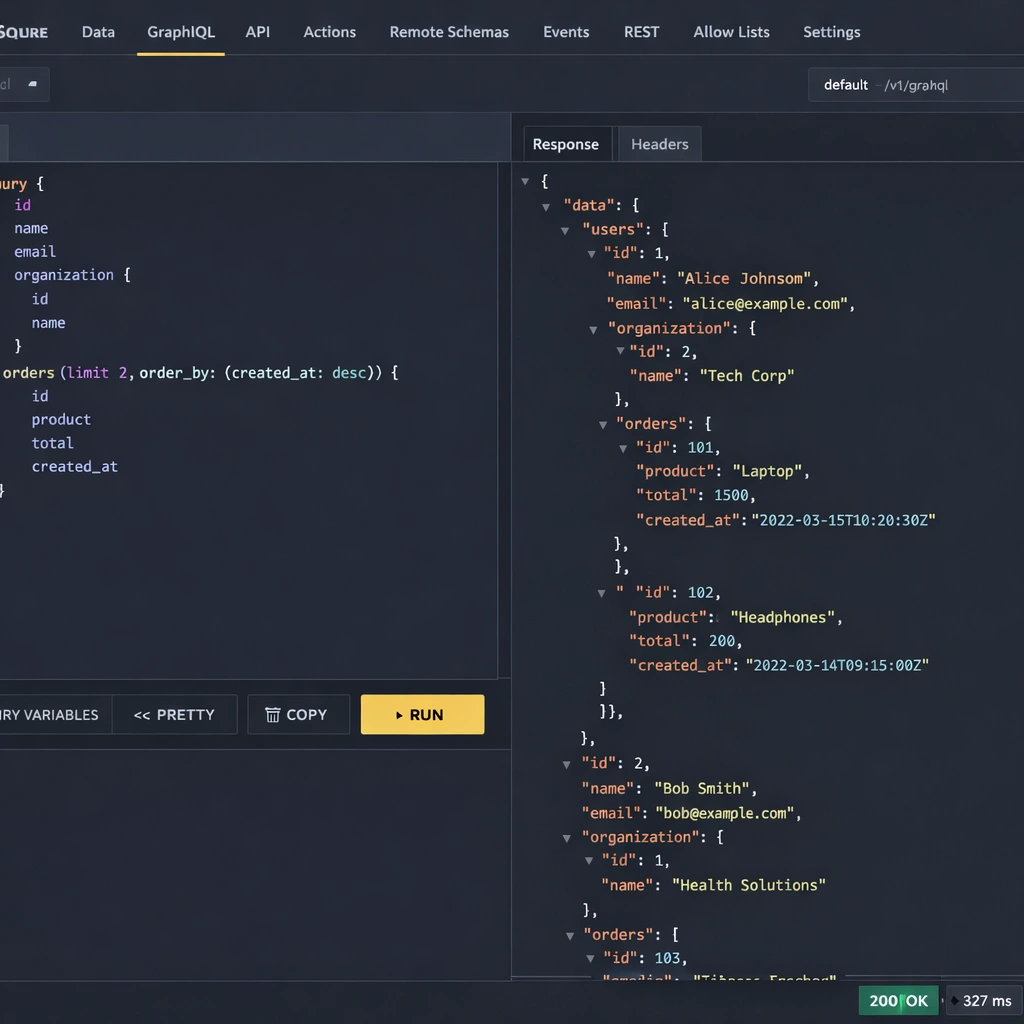
The core of Nhost self-hosting is the combination of Postgres and Hasura. Postgres is the database — fully relational, ACID-compliant, and capable of handling the data complexity that serious SaaS products accumulate over time. Hasura is a GraphQL engine that sits on top of Postgres and auto-generates a complete GraphQL API from your database schema. Define a table in Postgres, track it in Hasura, and you immediately have queries, mutations, subscriptions, and relationship traversals available through a typed API — without writing a single resolver.
For an entrepreneur building a product where data relationships matter — users belong to organizations, resources are owned by accounts, events connect to multiple entities — this architecture eliminates an entire layer of backend development work that would otherwise require a custom API server.
The Nhost self-hosted stack in detail
Understanding what you are deploying matters before you run the first command. Nhost self-hosting is not a single service it is a coordinated set of containers that function as a unified backend.
Postgres is the foundation. Every piece of application data lives in a Postgres database you have full access to — you can connect directly with any Postgres client, run raw SQL, create custom functions and triggers, and use every Postgres feature the database supports. There are no API restrictions between you and your data layer.
Hasura generates your GraphQL API automatically from the Postgres schema. When you add a table and define its relationships in the Hasura Console, the API reflects those relationships immediately. A query that fetches a user’s profile alongside their organization, their subscription tier, and their recent activity is a single GraphQL operation — no multiple round trips, no custom resolver chain, no JOIN logic written by hand in application code.
Nhost Auth handles user authentication with support for email and password, magic links, OAuth providers including Google, GitHub, Apple, and Spotify, and SMS OTP. The authentication system integrates directly with Hasura’s permission layer through JWT claims — when a user logs in, the JWT Nhost generates includes their role and user ID as Hasura-readable values, which means your GraphQL permission rules activate automatically without additional middleware configuration.
Nhost Storage manages file uploads through a MinIO instance — an S3-compatible object storage system — running inside your deployment. Files never leave your infrastructure, access control applies per file or bucket, and image transformation runs on request without an external service dependency.
Nhost Functions runs serverless Node.js code for backend logic that belongs outside the database layer — webhook handlers, third-party API integrations, scheduled jobs, and event-driven automation triggered by Hasura database events.
Hasura permissions: the feature that changes your security architecture
The permission system Hasura provides is the most consequential architectural feature in the Nhost self-hosted stack, and it is worth understanding in specific terms rather than in general ones.
In a standard backend architecture, data isolation between users is enforced at the application layer — your API code checks the requesting user’s identity and filters the database query accordingly. This works until it does not: a missed check, a refactored function that loses its guard clause, or a new endpoint that skips the validation pattern creates a data exposure vulnerability.
Hasura’s permission rules enforce isolation at the database query level. A select permission on a projects table with a condition of owner_id: {_eq: "X-Hasura-User-Id"} means the SQL query Hasura generates physically cannot return a project owned by a different user — not because application code filtered the results, but because the WHERE clause in the generated SQL makes it structurally impossible. The security guarantee lives in the data layer, not in code you have to maintain and audit.
For a SaaS product handling sensitive user data, this architecture difference has meaningful compliance and reliability implications. The full Nhost self-hosted configuration — including schema setup, relationship definition, and permission rule configuration is detailed in the Nhost self-hosted GraphQL and Postgres deployment guide.
Infrastructure requirements and realistic deployment cost
Nhost self-hosting requires more server resources than Appwrite because it runs more services in parallel. A server with 4GB of RAM is the practical minimum for a stable deployment — Postgres, Hasura, the auth service, MinIO, and the functions runtime each need memory headroom to operate without competing under load.
A Hetzner CX32 at approximately $9 per month provides 4GB RAM and strong CPU performance for a Nhost self-hosted deployment that handles several thousand concurrent users comfortably. That fixed cost replaces a Supabase or Hasura Cloud bill that scales with your usage — at any meaningful product traction, the VPS cost is a fraction of what the managed equivalent charges.
The VPS sizing guide matching server specifications to traffic tiers for Nhost and the other platforms covered here is detailed in the self-hosted BaaS VPS deployment guide.
Where Nhost self-hosting fits best
Nhost is the right platform for entrepreneurs building products whose data model is genuinely relational and whose teams are comfortable with GraphQL or willing to learn it. The Hasura layer rewards careful schema design with a backend that scales cleanly as the product grows — new tables, new relationships, and new permission rules extend the API automatically without custom code.
The honest tradeoff is setup complexity and resource requirements. Nhost takes longer to configure correctly than Appwrite, and the Hasura migration workflow — capturing every schema change as a versioned migration file — requires a disciplined development process that teams working quickly sometimes skip and later regret. The investment pays off at scale, but it is a real upfront cost that belongs in your planning.
Parse server self-hosting: the battle-tested backend still standing strong in 2026
Every technology landscape has a platform that the hype cycle passed over in favor of newer alternatives, and that quiet platform turns out to be running more production systems than anyone discussing the newer options realizes. Parse Server is that platform in the open-source BaaS space.
Parse was built at a startup, acquired by Facebook in 2013, and used at scale across hundreds of thousands of mobile applications before Facebook open-sourced it in 2016 following the decision to shut down the managed service. Most platforms do not survive that kind of corporate abandonment. Parse did — and the community that rebuilt it as an independent project produced something more resilient and more flexible than the original managed version ever was.
In 2026, Parse Server self-hosting is a legitimate first choice for entrepreneurs who need maximum extensibility, dual database support, or a backend architecture that bends to their product’s requirements rather than constraining them. The decade of production deployments behind it means the edge cases are documented, the scaling patterns are known, and the community answers to hard questions exist before you need to ask them.
What Parse server self-hosting delivers
Parse Server runs as a Node.js application and connects to either MongoDB or Postgres as its primary data store — your choice, made at configuration time and changeable later without rewriting your application code. It exposes both a REST API and a GraphQL API for every collection you define, handles authentication, file storage, push notifications, background jobs, and cloud functions from a single deployable service.
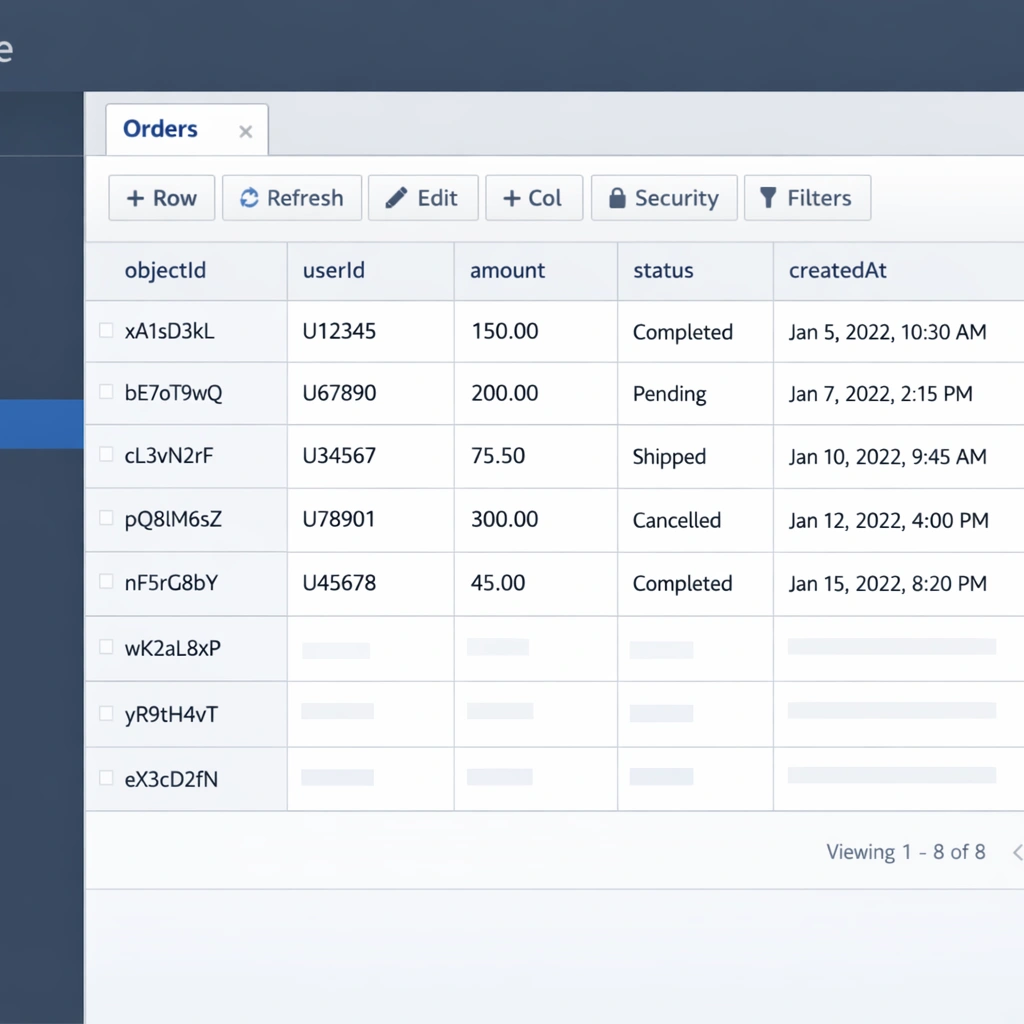
The document model Parse uses maps naturally to MongoDB’s native structure. Collections in Parse correspond to MongoDB collections, and each object is a JSON document with a system-generated identifier alongside your custom fields. When you use Postgres instead, Parse translates the document model into relational tables automatically giving you the flexibility of Parse’s API surface with the query performance and ACID compliance of a relational database underneath.
This dual-database support is a genuine architectural advantage that neither Appwrite nor Nhost offers. For a product that starts on MongoDB for development speed and needs to migrate toward a more structured data layer as the schema stabilizes, Parse Server handles that transition without requiring changes to your frontend code or your cloud function logic.
Cloud functions: Parse Server’s most powerful feature
Parse Server’s cloud functions system is the most mature serverless implementation available in any open-source BaaS platform, and it deserves specific attention because it enables backend architecture patterns that the other platforms handle less cleanly.
Cloud functions in Parse run as JavaScript on the server side. You define them in a dedicated cloud code file that loads when Parse Server starts. They execute in response to direct API calls, database lifecycle events, or scheduled triggers — and the lifecycle event system is where Parse earns its extensibility reputation.
A beforeSave trigger fires synchronously before any object is written to the database. Inside that trigger, you can validate incoming data, normalize field values, reject the save operation with a descriptive error, or enrich the object with computed fields before it reaches storage. A beforeSave trigger on your User collection can enforce email domain restrictions, normalize phone number formats, and attach a default role assignment — all in a single function that runs automatically for every user creation event without requiring your frontend to handle that logic.
An afterSave trigger fires after the write completes. This is where event-driven automation lives — sending a welcome email through SendGrid when a user registers, creating a default workspace for a new account, triggering a Stripe customer creation when a subscription object is saved. All of that runs inside your Parse server self-hosted instance, triggered automatically, with no external orchestration service required.
The maturity of this system — a decade of production use across complex applications — means the patterns for handling errors, managing async operations, and testing cloud function logic are well established. The full Parse server self-hosted setup and cloud function configuration process is covered in the Parse server self-hosting guide.
Authentication and access control in Parse Server
Parse Server includes a built-in user authentication system with email and password login, email verification, and password reset flows. Third-party OAuth providers integrate through Parse’s auth adapter system — each adapter is a configuration block that tells Parse how to validate tokens from Google, Apple, GitHub, Twitter, or any custom identity provider you implement.
The auth adapter interface is the most extensible authentication implementation in the open-source BaaS space. For enterprise SaaS products that need to support customer identity providers — SAML, corporate SSO, or custom token validation flows — Parse’s adapter system handles those requirements as first-class integrations rather than workarounds.
Access control in Parse operates at two levels. Class-level permissions define which operations — read, write, create, delete, add fields — are available to anonymous users, authenticated users, and specific roles across an entire collection. Object-level access control lists define per-document read and write permissions for specific users or roles. The combination gives you precise data isolation that enforces at the API layer without application code managing every access decision.
Where Parse server self-hosting fits best
Parse Server is the right choice in three specific situations that come up regularly among entrepreneurs building real products.
The first is a product migrating from an existing backend with a similar document model or from Parse’s original managed service. The migration path is shorter and more direct than any other open-source BaaS offers, and the architectural continuity reduces the risk of data model decisions that made sense in the original system failing to translate cleanly to a new platform.
The second is a product with complex backend logic requirements — multi-step validation, event-driven automation across multiple collections, or webhook integration patterns that require synchronous interception of database operations. Parse’s cloud function system handles those requirements more expressively than the serverless implementations in either Appwrite or Nhost.
The third is a team with existing Node.js expertise. Parse Server’s entire extension surface is standard JavaScript. Onboarding to the cloud functions system takes hours rather than days for a team that already builds in Node.js, and the debugging workflow familiar logging patterns, standard error handling, conventional async patterns — does not require learning a new runtime model.
Appwrite vs Nhost vs Parse: choosing the right open-source BaaS for your startup
The comparison between these three platforms is one of the most practically useful decisions an entrepreneur building in 2026 can make deliberately because the cost of choosing wrong is not immediate, and that delay is exactly what makes it dangerous. You build on a platform, your data model conforms to its API, your team learns its patterns, and six months later the limitation that was theoretical at the start is a real constraint on a feature your users are waiting for.
The goal of this section is not to declare a winner. All three platforms are legitimate production choices with real deployments behind them. The goal is to map each platform’s genuine strengths and genuine constraints to the product types and team profiles where those characteristics matter most — so your choice is based on your actual situation rather than which platform had the best launch week on Hacker News.
Setup experience: where your first hour goes
The setup experience difference between the three platforms is significant enough to affect which one a solo founder or small team will actually complete versus abandon partway through.
Appwrite installs with a single Docker command that pulls and starts every service in a coordinated deployment. The process takes under ten minutes, requires no pre-configuration, and produces a working console you can log into immediately. For a founder who wants to spend their first day building product features rather than configuring infrastructure, Appwrite removes every avoidable obstacle from the installation path.
Nhost installs through its CLI tool, which manages a multi-service Docker Compose stack. The process is more involved initializing a project directory, configuring environment variables, starting the stack, and verifying that each service reached a healthy state and takes approximately thirty minutes for a first deployment. That additional time is not wasted: the configuration you produce during setup defines your schema migration workflow and your permission architecture from the start, which pays dividends as the project grows.
Parse Server requires the most manual setup of the three. Installing Node.js, configuring a database separately, writing a JavaScript configuration file, setting up a process manager, and configuring a reverse proxy for SSL — these steps give you precise control over every aspect of the deployment, but they demand more upfront work than either of the other platforms. A production-ready Parse Server setup takes one to two hours for someone working through it carefully for the first time.
Data model: the decision that compounds over time
The data model each platform uses is the most consequential architectural difference in the comparison, and it is the one most likely to determine whether your platform choice ages well.
Appwrite’s document model is fast to work with and covers most querying needs for products with relatively flat data structures. The absence of native JOIN support means cross-collection queries require multiple API calls assembled at the application layer a pattern that is manageable at small scale and increasingly costly at larger ones.
Nhost’s relational model with Hasura’s auto-generated GraphQL API is the strongest available architecture for products with genuine data complexity. The permission system enforces row-level isolation at the database query level rather than the application layer, and the relationship queries Hasura generates from your schema handle data access patterns that would require significant custom code on any other platform. The investment in schema design upfront pays off consistently as the product grows.
Parse Server’s flexible model supporting both MongoDB and Postgres with a consistent API surface across both — is the right choice when your data model is uncertain at the start or when you are migrating from an existing system. The ability to begin with MongoDB’s flexible schema and migrate to Postgres’s relational structure without changing application code is an architectural option neither Appwrite nor Nhost provides.
Serverless functions: the extensibility layer that defines your ceiling
All three platforms include serverless function capabilities, but the design philosophy and maturity level differ enough to affect product architecture decisions for anything beyond basic automation.
Appwrite Functions supports the broadest range of runtimes — Node.js, Python, PHP, Ruby, Dart, and others — and triggers on schedule, API call, or platform events. The execution model is straightforward and the deployment process is well documented. For a product that needs standard automation — email triggers, webhook handlers, scheduled cleanup jobs — Appwrite Functions covers those requirements cleanly.
Nhost Functions runs Node.js exclusively and focuses on HTTP-triggered functions. Hasura event triggers — firing a function when a database row is inserted, updated, or deleted — are configured separately in the Hasura Console, which adds a setup step but gives precise control over the trigger conditions and payload structure. The integration between Hasura events and Nhost Functions is the most powerful event-driven architecture available in the three platforms for products built around database state changes.
Parse Server’s cloud functions system is the most mature of the three. The synchronous beforeSave and beforeDelete triggers — which intercept database operations before they complete and can modify or reject them — enable validation and transformation patterns that neither Appwrite nor Nhost replicates as cleanly. For products with complex backend logic requirements, this synchronous lifecycle access is the feature that makes Parse the strongest extensibility choice.
Infrastructure cost at three stages of product growth
The infrastructure cost comparison between the three platforms is most useful when it accounts for realistic traffic tiers rather than theoretical minimum specifications.
At the early stage — under one thousand monthly active users — all three platforms run comfortably on servers in the $6 to $12 per month range. Appwrite on a Hetzner CX22 at $4.50 per month, Parse Server on a comparable 2GB VPS, and Nhost on a Hetzner CX32 at approximately $9 per month all handle early-stage traffic without resource pressure.
At the growth stage — one thousand to ten thousand monthly active users — Appwrite and Parse Server remain on 2GB to 4GB server configurations in the $10 to $20 per month range. Nhost benefits from a 4GB to 8GB server as Hasura’s query planning and Postgres’s buffer cache grow with query volume, pushing the server cost to approximately $20 to $35 per month.
At the scale stage — ten thousand or more monthly active users — all three platforms benefit from separating the database onto a dedicated server or managed database instance. The application server cost stays predictable while the database scales independently. Even at this stage, the combined infrastructure cost for a self-hosted deployment is a fraction of what managed platforms charge at equivalent user volumes.
The detailed VPS configuration — including provider recommendations, server sizing by traffic tier, and the Nginx reverse proxy setup that applies to all three platforms — is covered in the self-hosted BaaS VPS deployment guide.
Making the decision: a framework that cuts through the noise
The Appwrite vs Nhost vs Parse decision maps cleanly onto three questions that cut through the feature comparison noise.
The first question is about your data. If your product’s core data has real relationships — entities that belong to other entities, queries that need to traverse those relationships efficiently — Nhost’s relational architecture with Hasura is the right foundation. If your data is relatively flat or document-oriented, Appwrite or Parse Server both handle it well without the additional configuration investment Nhost requires.
The second question is about your timeline. If your priority is launching a working product as quickly as possible and your data model does not require relational complexity, Appwrite’s setup experience gives you the fastest path from zero to a production backend. If you have a week to invest in infrastructure setup and your product will benefit from it over the following year, Nhost or Parse Server reward that investment.
The third question is about your team. If your team builds primarily in JavaScript and needs maximum control over backend logic, Parse Server’s cloud functions system and Node.js-native configuration model fit that profile precisely. If your team works across multiple languages or frameworks and wants SDK support across all of them, Appwrite’s broad SDK coverage and Nhost’s GraphQL API — which is language-agnostic by nature — serve that requirement better.
The full side-by-side breakdown — including feature-by-feature comparison, real infrastructure cost numbers, and platform-specific deployment considerations — is covered in the Appwrite vs Nhost vs Parse comparison guide.
Self-hosted BaaS on a VPS: the infrastructure layer that makes it all work
The platform decision — Appwrite, Nhost, or Parse Server — gets most of the attention in conversations about open-source BaaS self-hosting. The infrastructure decision gets significantly less, and that imbalance is worth correcting. Choosing the right platform and deploying it on the wrong server configuration produces an unreliable backend that makes the platform choice irrelevant. Choosing the right server, configuring it correctly, and pairing it with a basic monitoring setup produces a backend that runs without intervention for months at a time.
This section covers the infrastructure layer in practical terms: which VPS providers offer the best price-to-performance ratio for self-hosted BaaS deployments in 2026, how to match server specifications to each platform’s requirements, and the foundational server configuration that every production deployment needs before a BaaS platform is installed.
VPS providers worth considering in 2026
Three providers dominate the conversation for bootstrapped founders running self-hosted BaaS deployments: Hetzner, DigitalOcean, and Vultr. Each has a distinct positioning that matters depending on your product’s geographic requirements and your preference for ecosystem depth versus raw price performance.
Hetzner is the price-performance leader by a margin that is difficult to overstate. Their CX22 plan — 2 vCPU cores, 4GB RAM, 40GB SSD, and 20TB monthly bandwidth — costs approximately $4.50 per month as of 2026. The equivalent specification on DigitalOcean costs roughly three times more. For a bootstrapped founder where every dollar of infrastructure spend is a dollar not available for product development or marketing, that difference compounds significantly over a year of operation.
Hetzner’s data centers cover Germany, Finland, and the United States. For European products or those with EU data residency requirements, the German and Finnish locations are the obvious choice. For US-focused products, their Ashburn, Virginia location handles latency to American users cleanly.
DigitalOcean’s advantage is ecosystem depth. Their documentation covers common server configurations in more detail than any other provider, their managed database add-ons make it straightforward to offload your database to a dedicated service when your product outgrows a single-server setup, and their one-click application marketplace includes Appwrite as a pre-configured deployment that reduces initial setup time. For a founder who values documentation quality and community resources alongside price, DigitalOcean justifies its premium over Hetzner.
Vultr sits between the two on price and ecosystem maturity. Their High Frequency compute plans offer strong single-core performance — relevant for Node.js workloads like Parse Server — at competitive pricing. Their global data center coverage is broader than either Hetzner or DigitalOcean, which matters for products with geographically distributed users who need low-latency API responses across multiple regions.
Matching server specifications to platform requirements
The minimum server specifications for a stable self-hosted BaaS deployment vary by platform, and running below the minimum produces unpredictable behavior under load rather than a clean failure you can diagnose and fix.
Appwrite runs stably on 2GB RAM for a product with under five thousand monthly active users. The services that consume the most memory are the MariaDB database and the background worker handling async tasks. A Hetzner CX22 at $4.50 per month or a DigitalOcean 2GB droplet at $12 per month covers an early-stage Appwrite deployment cleanly. When your product reaches five thousand to fifteen thousand monthly active users, upgrading to 4GB RAM eliminates the memory pressure that affects query response times at higher concurrency.
Nhost requires 4GB RAM as a genuine minimum rather than a conservative recommendation. Postgres, Hasura, the auth service, MinIO, and the functions runtime all run as separate containers, and each needs headroom to operate without competing for memory under load. A Hetzner CX32 at approximately $9 per month provides 4GB RAM and strong CPU performance — an unusually strong price-to-performance ratio for a Nhost deployment that handles several thousand concurrent users comfortably.
Parse Server’s Node.js runtime is the most memory-efficient of the three. A 2GB VPS handles a MongoDB-backed Parse deployment comfortably for early-stage traffic. A Postgres-backed Parse deployment benefits from 4GB RAM when database connection pooling and query concurrency increase, but the Node.js process itself stays lean regardless of which database runs underneath.
Foundational server configuration before BaaS installation
The steps from a provisioned VPS to a server ready for BaaS installation are consistent across all three providers and take approximately fifteen minutes. Skipping them creates security and reliability risks that are entirely avoidable.
After connecting to your server via SSH with the root credentials your provider supplies, create a non-root user with sudo privileges. Running your BaaS platform services as root is a security exposure that a single additional command eliminates at setup time.
Configure UFW — Ubuntu’s built-in firewall — to allow only the ports your application requires and block everything else. SSH on port 22, HTTP on port 80, and HTTPS on port 443 cover the inbound traffic a self-hosted BaaS deployment needs. Every other port — including database ports and internal service ports your platform opens during installation — stays inaccessible from the public internet.
Install Docker Engine and Docker Compose using Docker’s official installation script. Both Appwrite and Nhost deploy as Docker Compose stacks, and even Parse Server benefits from running in a containerized environment for consistent behavior across development and production.
Point your domain’s DNS A record at your server’s IP address before running your BaaS installation. SSL certificate provisioning through Let’s Encrypt — which all three platforms use — requires your domain to resolve correctly at installation time. DNS propagation can take up to a few hours after you update your records, so verifying resolution before starting the installation saves a common and frustrating failure mode.
Backup and monitoring: the two non-negotiable operational steps
A self-hosted BaaS deployment without backups is an infrastructure decision that transfers all the risk of a managed platform’s data loss guarantee onto your own server, with none of the engineering investment the managed platform made to prevent it. A deployment without monitoring is one where your users discover outages before you do.
Both steps are simpler to implement than most founders expect, and both belong in your setup process before your product has real users rather than after.
For backups, the strategy that works for most early-stage self-hosted products is a nightly database dump uploaded to an S3-compatible storage bucket. Backblaze B2 charges approximately $6 per terabyte per month — storing seven daily backups of a small SaaS database costs under $0.50 per month. A cron job that runs mysqldump for Appwrite, pg_dump for Nhost or a Postgres-backed Parse deployment, or mongodump for a MongoDB-backed Parse deployment, and uploads the result with rclone, automates the entire process after a one-time configuration.
For monitoring, UptimeRobot’s free tier checks your BaaS API endpoint every five minutes and sends an email or SMS alert when it stops responding. This single tool covers the most important monitoring requirement — knowing your backend is down within five minutes rather than when a user files a support ticket. Paired with Netdata for server resource visibility and Docker health checks for container status, this monitoring stack costs nothing and eliminates the most common operational blind spots.
The complete VPS deployment guide — covering provider selection, server sizing by traffic tier, Nginx reverse proxy configuration, SSL setup, and the backup automation scripts for each platform — is detailed in the self-hosted BaaS VPS deployment guide.
Self-hosted BaaS security: hardening your backend before your first real user arrives
Security on a self-hosted backend is the responsibility that managed platforms handle quietly on your behalf and that becomes entirely yours the moment you provision a VPS and install an open-source BaaS platform on it. Most entrepreneurs who self-host for the first time do not skip security configuration deliberately — they simply do not have a clear list of which steps are non-negotiable and which are optional refinements.
This section provides that list. The configurations covered here represent the minimum viable security posture for a production self-hosted BaaS deployment. None of them require a security engineering background, none of them take more than an afternoon to implement, and all of them address attack vectors that are actively exploited against unprotected VPS deployments every day.
Firewall configuration: closing the attack surface before anything else
A freshly provisioned VPS exposes every port to the public internet by default. Your BaaS platform opens additional ports during installation. Without a firewall restricting inbound traffic to only the ports your application requires, your server’s entire port surface is reachable by any automated scanner on the internet — and those scanners are running continuously.
UFW handles this with four commands that take under two minutes to execute:
ufw default deny incoming
ufw default allow outgoing
ufw allow OpenSSH
ufw allow 80/tcp
ufw allow 443/tcp
ufw enable
This configuration blocks all inbound traffic except SSH, HTTP, and HTTPS. Every database port, every internal service port, and every development endpoint your platform exposes during installation becomes inaccessible from outside the server immediately.
Hardening SSH beyond the default configuration eliminates the most commonly attacked entry point on any public-facing server. Disabling password authentication and requiring SSH key authentication means brute force password attacks produce no results regardless of how long they run. Edit /etc/ssh/sshd_config, set PasswordAuthentication no, and restart the SSH service. From that point forward, only a client with the corresponding private key can authenticate.
Secrets management: the credentials that need rotation on a schedule
Every BaaS platform generates secrets during installation — master keys, JWT signing secrets, database passwords, and API keys for connected services. The defaults generated at installation time are random and deployment-specific, which is a reasonable starting point. The problem is that most self-hosting founders never rotate those secrets after the initial setup, and never audit which services and team members have access to them.
Appwrite’s master key — stored in the Docker Compose environment file — grants unrestricted access to every project and every piece of data in your instance. It should never appear in frontend code, never be committed to a version control repository, and should be rotated on a quarterly schedule at minimum. Updating the key value in your .env file and restarting the Appwrite stack re-encrypts sensitive data with the new key automatically.
Nhost’s JWT secret signs and verifies every authentication token your application issues. Rotating it invalidates all existing user sessions — a planned rotation during a low-traffic window with advance notice to active users is the right approach rather than an unannounced change that logs everyone out simultaneously.
Parse Server’s master key is the highest-privilege credential in the system. Any API request that includes it bypasses all access control rules entirely. It belongs exclusively in server-side cloud functions and administrative tooling — embedding it in a mobile application binary or a frontend JavaScript bundle where it can be extracted is the single most serious security mistake a Parse Server deployment can make.
Platform-specific access control configuration
Default permission configurations on all three platforms are intentionally permissive — appropriate for development environments where restricting access slows down exploration, and inappropriate for production environments where restricting access is the point.
Appwrite’s default collection permissions allow any authenticated user to read and write any document in the collection. For a multi-tenant SaaS product, this means every user can read every other user’s data until you explicitly configure document-level ownership restrictions. Setting read and write permissions to user:[userId] on user-owned collections is the production baseline that enforces data isolation at the API layer.
Nhost’s Hasura permission system enforces row-level isolation at the database query level — a structurally stronger guarantee than application-layer filtering. Configuring select permissions with owner_id: {_eq: "X-Hasura-User-Id"} conditions on user-owned tables means the SQL Hasura generates physically cannot return another user’s data, regardless of how the GraphQL query is constructed. Auditing your permission configuration with the Hasura Console’s API Explorer — switching role context and attempting queries that should be blocked — is the verification step that confirms your rules work as intended before real users interact with the system.
Parse Server’s class-level permissions require explicit production configuration. Disabling the Add fields permission across all collections is the most important single change — with it enabled, any authenticated user can add arbitrary fields to any object in any collection, creating both a data integrity risk and a potential vector for storage abuse. Setting Get, Find, Create, Update, and Delete to authenticated users only, and leaving anonymous access disabled, is the production baseline for most SaaS products.
The complete access control configuration for each platform — including role-based permission patterns for multi-tenant SaaS products — is covered in the open-source BaaS security hardening guide.
SSL enforcement and transport security
Running a self-hosted backend over HTTP in production exposes every API request — authentication tokens, session cookies, user data — to interception on any network path between your users and your server. SSL is not an optional refinement for a production deployment. It is a baseline requirement.
All three platforms support automatic SSL provisioning through Let’s Encrypt. Appwrite handles this during installation when you provide a valid domain. Nhost and Parse Server rely on an Nginx reverse proxy with Certbot for certificate management. After SSL is configured, enforce HTTPS at the Nginx layer by redirecting all HTTP traffic and adding HTTP Strict Transport Security headers that instruct browsers to refuse unencrypted connections to your domain for a full year after the first HTTPS visit.
Rate limiting and automated attack prevention
A self-hosted backend without rate limiting on its authentication endpoints is vulnerable to credential stuffing attacks — automated tools that test large lists of username and password combinations against your login API until something works. These attacks are not targeted. They run continuously against any publicly accessible authentication endpoint that does not enforce request limits.
Nginx handles rate limiting at the reverse proxy layer before requests reach your BaaS platform. Configuring a limit of ten authentication requests per minute per IP address — with a burst allowance for legitimate users who occasionally exceed that rate — stops automated credential stuffing attacks from producing results without affecting normal user behavior.
Fail2ban complements rate limiting by monitoring your server logs and automatically blocking IP addresses that produce repeated authentication failures. An IP address that fails SSH authentication five times in ten minutes gets blocked for an hour. An IP address hammering your authentication endpoint beyond the Nginx rate limit gets banned from further requests automatically. Both protections activate without manual intervention after the initial configuration.
Monitoring that tells you when something is wrong
The security monitoring setup that keeps a self-hosted backend reliable over time does not require a dedicated security operations function or expensive tooling. Three lightweight tools cover the requirements for an early-stage product without meaningful cost.
UptimeRobot monitors your backend API endpoint every five minutes and sends an alert when it stops responding. This is the single most important monitoring step — knowing your backend is down within five minutes rather than when a user reports it changes your response time from hours to minutes.
Logwatch sends a daily email digest of your server’s log activity — failed SSH attempts, Nginx error rates, system authentication events — without requiring you to monitor logs manually. Patterns that indicate active reconnaissance or brute force activity become visible in your inbox before they produce successful intrusions.
Docker container health checks — available through docker compose ps on Appwrite and Nhost deployments — show the health status of each service container. A container reporting an unhealthy state is often the first indicator of a configuration problem or resource exhaustion that has not yet produced visible errors in your application.
The complete production security checklist — including firewall rule templates, secrets rotation schedules, backup automation scripts, and the monitoring configuration for each platform — is detailed in the open-source BaaS security hardening guide for production self-hosting.
Conclusion
The managed BaaS era solved a real problem. It gave entrepreneurs a fast path to a working backend without infrastructure expertise, and for a long time the cost of that convenience was acceptable. That calculation has changed. Usage-based pricing at scale, vendor lock-in that compounds with every feature you build, and data residency requirements that managed platforms handle poorly have made open-source BaaS self-hosting the more rational choice for a growing number of founders building serious products in 2026.
The platforms covered in this guide represent the best open-source backend options available right now — each with a distinct profile that fits a specific product type and team situation better than the others.
Appwrite is the right starting point for solo founders and small teams who need a complete, production-ready backend running as fast as possible. The single-command Docker installation, the polished console, and the broad SDK coverage across every major frontend framework make it the most accessible entry point in the open-source BaaS space. For products with relatively flat data models and a founder who wants to spend their first week building features rather than configuring infrastructure, Appwrite removes every avoidable obstacle from the path.
Nhost is the right architecture for products with genuine relational data complexity. The combination of Postgres, Hasura’s auto-generated GraphQL API, and a permission system that enforces data isolation at the database query level gives you a backend that handles real product complexity without requiring a backend engineering team to build and maintain it. The upfront configuration investment is real, and the reward for making it is a data layer that scales cleanly as your product grows without requiring rewrites.
Parse Server is the right choice for teams who need maximum extensibility, dual database flexibility, or a backend that bends to complex product requirements rather than constraining them. A decade of production deployments behind it means the hard problems are documented and solved. The cloud functions system — particularly the synchronous lifecycle triggers — enables backend architecture patterns that the newer platforms do not replicate. For a JavaScript-native team building something with genuine complexity, Parse Server in 2026 is still one of the most capable choices available.
The infrastructure layer that runs all three platforms is simpler and cheaper than most entrepreneurs assume before they look at it directly. A Hetzner or DigitalOcean VPS in the $6 to $20 per month range handles an early-stage product on any of these platforms comfortably. The firewall configuration, SSL provisioning, backup automation, and monitoring setup that make a self-hosted deployment production-reliable take an afternoon to implement and run without intervention after that.
The security configuration is the step most often deferred and most consequential when skipped. Firewall rules, secrets rotation, platform-specific access controls, rate limiting, and basic log monitoring are not complex — they are specific, and they address attack vectors that are actively exploited against unprotected deployments every day. Implementing them before your first real user arrives is the decision that separates a self-hosted backend you can trust from one that is technically operational but not production-ready.
Open-source BaaS self-hosting is not a workaround for founders who cannot afford the real thing. It is a deliberate infrastructure strategy that puts ownership, cost control, compliance, and long-term architectural flexibility back in the hands of the people building the product. The platforms are mature, the infrastructure is affordable, and the knowledge required to run it reliably is documented and accessible. For an entrepreneur building something with real ambition and a long time horizon, this is the backend foundation worth getting right from day one.
