

Most conversations about open-source BaaS platforms in 2026 orbit around Appwrite and Nhost. Parse Server rarely gets the headline, and that absence says more about the hype cycle than it does about the platform’s capability. Parse server self-hosted has been running production applications for a decade. It has survived the shutdown of its original corporate sponsor, two major framework rewrites, and every wave of “Firebase killer” platforms that arrived and quietly faded.
That track record is not nostalgia. It is a signal worth taking seriously.
For entrepreneurs building products that need a stable, flexible, and deeply extensible backend — without committing to the architectural opinions of newer platforms Parse server self-hosted remains one of the most capable options available. This guide covers what the platform actually offers in 2026, how the self-hosted setup works, and which types of products it serves better than its more fashionable competitors.
The history that makes Parse server self-hosted trustworthy
Parse was originally built at a startup, acquired by Facebook in 2013, and used at scale across thousands of mobile applications before Facebook open-sourced it in 2016 following the decision to shut down the managed service. That transition — from a corporate product to a community-maintained open-source project — is the event that defines Parse’s modern identity.
Most platforms do not survive that kind of transition. Parse did, and the community that maintained it through that period built something more resilient in the process. The codebase was refactored, the dependency on Facebook’s infrastructure was removed entirely, and Parse Server emerged as a genuinely independent project with active maintainers and a contributor base that has grown steadily ever since.
The complete guide to open-source BaaS self-hosting: Appwrite, Nhost, and Parse covers how Parse compares to Appwrite and Nhost across the full feature set. The short version is that Parse trades some of the newer platforms’ convenience-first design for flexibility and maturity — a tradeoff that favors certain product types significantly.
What Parse server self-hosted actually gives you
Parse Server runs as a Node.js application. It connects to either MongoDB or Postgres as its primary data store — your choice, made at configuration time — and exposes a REST API and a GraphQL API for every collection you define. The platform handles authentication, file storage, push notifications, background jobs, and cloud functions from a single deployable service.
The data layer
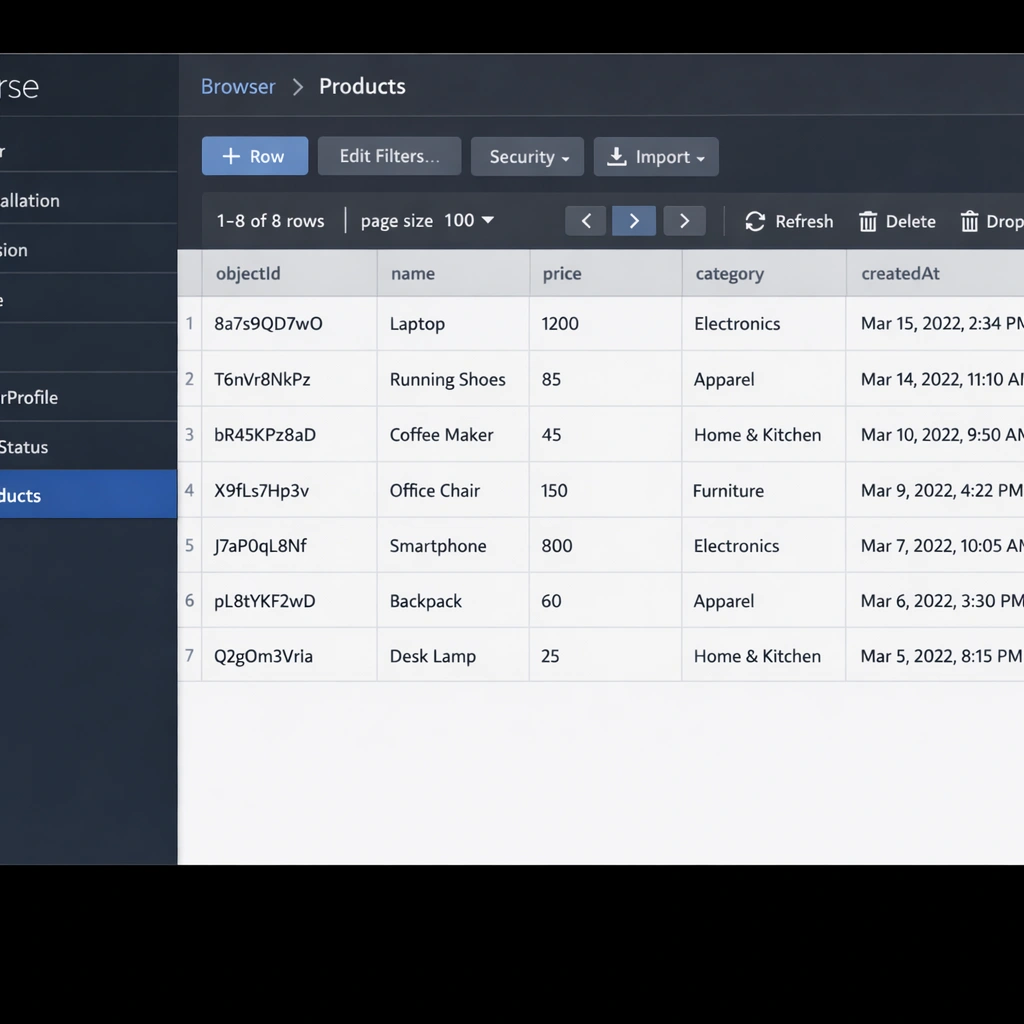
Parse Server’s document model maps directly to MongoDB’s native structure when you use MongoDB as the backend. Collections in Parse correspond to MongoDB collections, and each object in a collection is a JSON document with a system-generated objectId, createdAt, and updatedAt field alongside your custom fields.
When you use Postgres instead, Parse Server translates the document model into relational tables automatically. This gives you the flexibility of Parse’s API surface — which was designed around a document model — with the query performance and ACID compliance of a relational database underneath. For a SaaS product that started on MongoDB and needs to migrate toward a more structured data layer, this dual-database support is a genuine architectural advantage.
Cloud functions and triggers
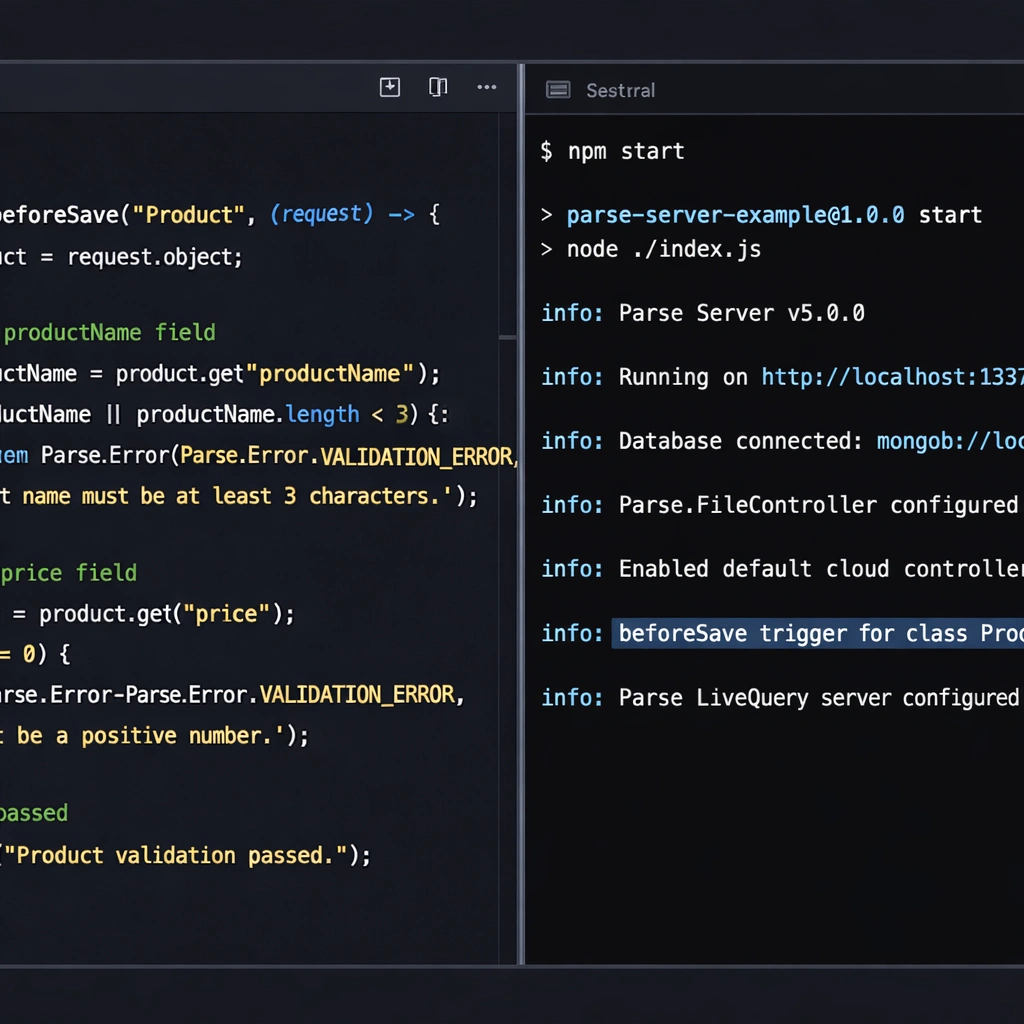
Cloud functions are where Parse server self-hosted earns its reputation for extensibility. You write JavaScript functions that run server-side in response to API calls, database events, or scheduled triggers. A beforeSave trigger fires before any object is saved to the database — useful for validation, data normalization, or enrichment. An afterSave trigger fires after the save completes — useful for sending notifications, updating derived data, or calling external APIs.
This event-driven architecture lets you build complex backend logic without standing up a separate microservice. A user signs up, an afterSave trigger on the User collection fires, your cloud function sends a welcome email through SendGrid and creates a default workspace for the new account. All of that runs inside your Parse server self-hosted instance, triggered automatically, with no external orchestration required.
Authentication
Parse Server includes a built-in user authentication system with email and password login, email verification, and password reset flows. Third-party OAuth providers — Google, Apple, Facebook, Twitter, GitHub — integrate through Parse’s auth adapter system. Each adapter is a small configuration block that tells Parse how to validate tokens from the external provider.
For products that need custom authentication logic — single sign-on through a corporate identity provider, for example, or a custom token validation flow — Parse’s auth adapter interface is extensible in a way that most newer BaaS platforms are not. You implement the interface, register the adapter in your configuration, and Parse handles the session management from that point forward.
Setting up Parse server self-hosted
Parse Server installs as an npm package and runs as a Node.js process. The setup is more manual than Appwrite’s single-command Docker installation, but the configuration flexibility that comes with that approach is the point.
Install Node.js 18 or later and either MongoDB 6+ or Postgres 14+ on your server first. Then install Parse Server:
npm install parse-serverCreate your server configuration file. A minimal production configuration looks like this:
const { ParseServer } = require('parse-server');

const api = new ParseServer({
  databaseURI: 'mongodb://localhost:27017/myapp',
  appId: 'your-app-id',
  masterKey: 'your-master-key',
  serverURL: 'https://yourdomain.com/parse',
  publicServerURL: 'https://yourdomain.com/parse',
  appName: 'Your App Name',
  verifyUserEmails: true,
  emailAdapter: {
    module: '@parse/simple-mailgun-adapter',
    options: {
      apiKey: 'your-mailgun-key',
      domain: 'yourdomain.com',
      fromAddress: '[email protected]'
    }
  }
});
Start the server with Node.js directly, or use PM2 — a process manager for Node.js applications — to keep it running as a background service with automatic restarts on failure.
For the Parse Dashboard — the web-based UI for browsing your data and managing your application — install it as a separate package and run it as a companion service:
npm install parse-dashboardThe VPS configuration that pairs well with a Parse server self-hosted deployment — including Nginx reverse proxy setup and SSL configuration — is covered in the self-hosted BaaS VPS deployment guide.
Parse server self-hosted versus Appwrite and Nhost in 2026
The honest comparison between these three platforms comes down to what you value most in a backend architecture.
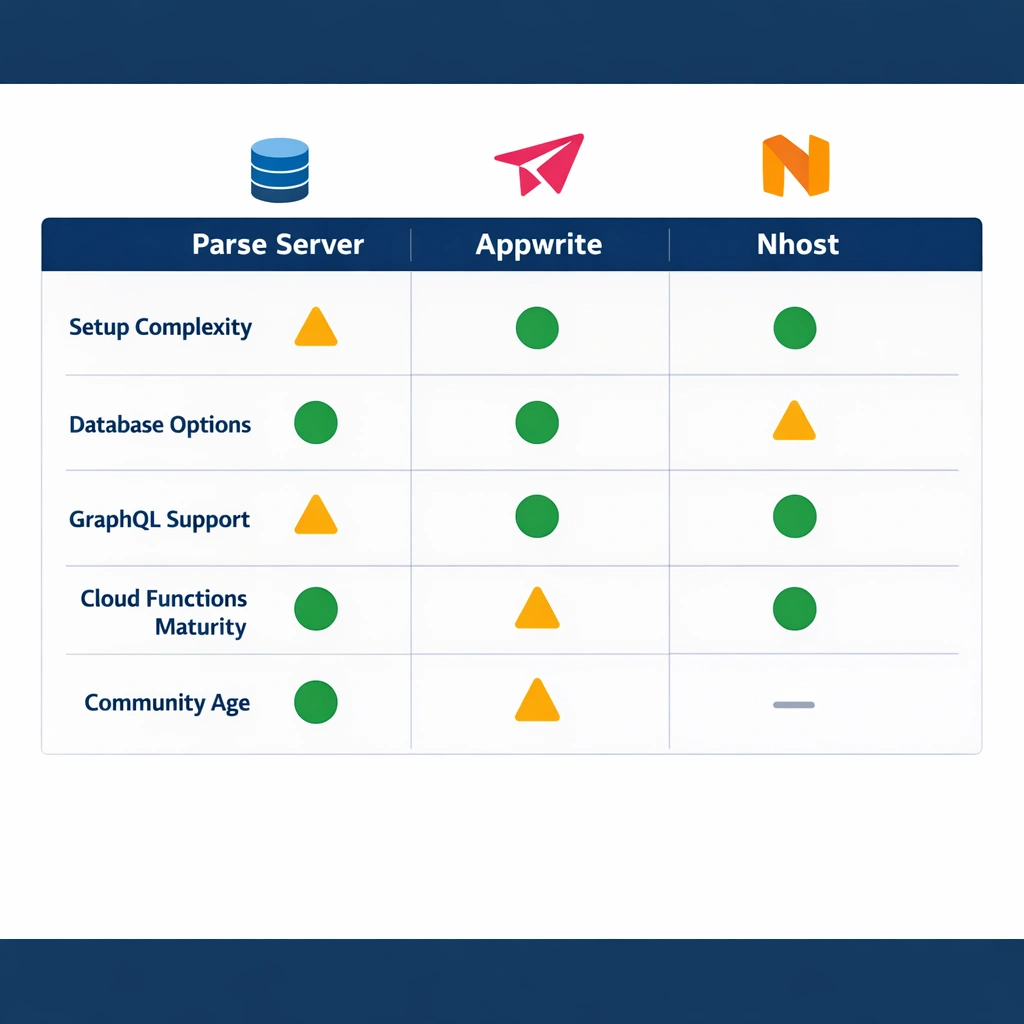
Appwrite wins on ease of setup and breadth of built-in features. The single Docker command installation, the polished console UI, and the realtime subscriptions out of the box make it the fastest path from zero to a working backend. For founders who want to minimize infrastructure time and get to product development quickly, Appwrite is the right starting point.
Nhost wins on relational data architecture. If your product’s data model is genuinely relational and your team is comfortable with GraphQL, the Hasura layer that Nhost self-hosted provides generates query capabilities that would take months to build manually. The Nhost self-hosted guide covers that setup in full detail.
Parse Server wins on extensibility and database flexibility. The cloud functions system is more mature and more expressive than the serverless function implementations in either Appwrite or Nhost. The dual MongoDB and Postgres support means you are not locked into a data layer choice at deployment time. And the ten-year track record means the edge cases — the weird query behaviors, the migration gotchas, the scaling patterns — are documented and solved by a community that has seen them before.
The use cases where Parse server self-hosted is the strongest choice
Parse server self-hosted is the right platform for three specific situations that come up regularly among entrepreneurs building real products.
The first is migration from a legacy backend. If you are rebuilding a product that originally ran on Parse’s managed service before the 2016 shutdown, or if you are migrating from any platform that exposed a REST API with a similar document model, Parse Server is the closest architectural match. The migration path is shorter and the data model translation is more direct than any other open-source BaaS offers.
The second is a product that requires deep backend customization. If your business logic is complex enough that you need to intercept, validate, and transform data at multiple points in its lifecycle, Parse’s trigger system handles that without requiring you to build a custom middleware layer. SaaS products with complex billing logic, multi-tenant data isolation requirements, or heavy webhook integration needs fall into this category.
The third is a team with existing Node.js expertise. Parse Server’s configuration and extension points are all standard JavaScript. If your team already builds in Node.js, onboarding to Parse’s cloud functions system takes hours rather than days. Appwrite and Nhost both support multiple languages, but neither integrates as naturally into a JavaScript-first workflow as Parse does.
Production considerations for Parse server self-hosted
Running Parse Server in production requires a few deliberate setup steps that the initial installation guide does not cover.
Database indexing is the most commonly skipped step and the one with the most visible performance impact. Parse Server does not auto-index your collections. As your data grows, queries that ran instantly on small datasets slow to seconds on large ones without appropriate indexes. Identifying your most frequent query patterns early and adding indexes to the corresponding fields in MongoDB or Postgres is a task worth doing before you need it.
File storage defaults to the local filesystem, which means uploaded files live on your server’s disk. For a production deployment, configuring Parse Server to use an S3-compatible storage adapter pointing at AWS S3, Backblaze B2, or a self-hosted MinIO instance — keeps your files separate from your application server and makes horizontal scaling possible without data loss.
Security hardening including master key rotation, access control lists on sensitive collections, and network-level firewall configuration follows the same principles that apply to any self-hosted backend. The full production security checklist is detailed in the open-source BaaS security hardening guide.
Conclusion
Parse server self-hosted does not chase trends, and that is precisely what makes it reliable. A decade of production deployments, a flexible database layer, a mature cloud functions system, and a community that has solved the hard problems already these are the qualities that matter when you are building something you expect to run for years. For entrepreneurs who need a backend that bends to their product’s requirements rather than the other way around, Parse Server in 2026 is still one of the most capable choices on the table.
