

Picking the wrong backend platform at the start of a product does not kill you immediately. It costs you six months later, when you need a feature the platform does not support, when your data model has grown beyond what the API can express cleanly, or when the migration you have been avoiding becomes unavoidable because the infrastructure bill crossed a line you cannot justify Appwrite vs Nhost vs Parse.
The Appwrite vs Nhost vs Parse decision is worth getting right the first time. All three are open-source, all three are self-hostable, and all three cover the core backend requirements a SaaS product needs. The differences between them are real, and they matter at different stages and for different product types.
This comparison cuts through the feature marketing and focuses on what actually determines which platform fits your situation data model requirements, deployment complexity, extensibility, and the real cost of running each one in production.
Why this comparison matters more than the managed alternatives
Before going into the platforms themselves, it is worth grounding the comparison in the broader context. The complete guide to open-source BaaS self-hosting: Appwrite, Nhost, and Parse covers why the self-hosting decision itself is the right starting point for most entrepreneurs building in 2026. The short version is that managed BaaS platforms have repriced themselves out of the bootstrapped founder’s budget, and the open-source alternatives have matured to the point where self-hosting is a legitimate first choice rather than a fallback.
Within that self-hosting decision, Appwrite vs Nhost vs Parse is the most consequential choice you make. Getting it wrong is recoverable but expensive. Getting it right means your infrastructure supports your product’s growth without requiring a rewrite at the worst possible time.
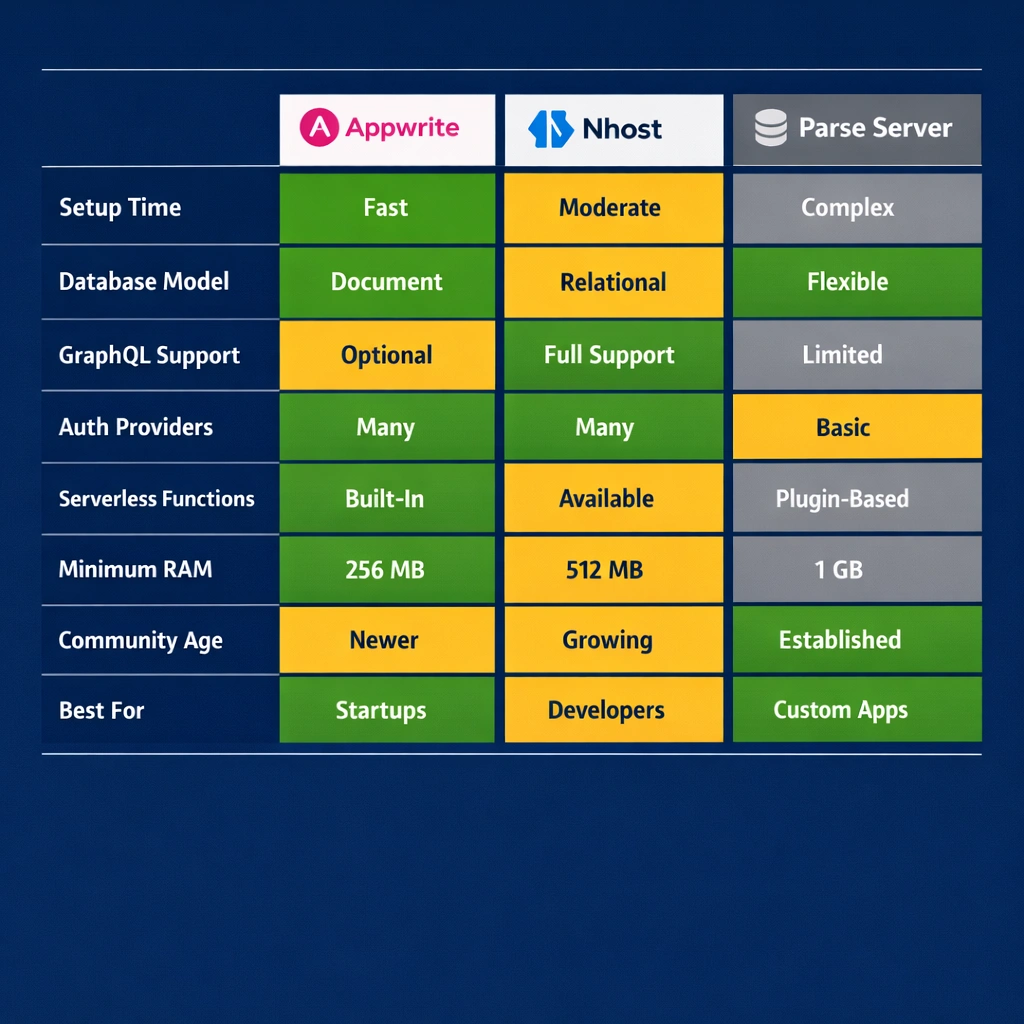
Appwrite vs Nhost vs Parse: the setup experience
Setup complexity is where the three platforms diverge most visibly, and it is worth being specific about what that complexity actually involves rather than rating them on a vague scale Appwrite vs Nhost vs Parse.
Appwrite
Appwrite installs with a single Docker command that pulls and starts every service in one coordinated operation. The process takes under ten minutes on a fresh server and requires no configuration before you see a working console. The installation prompts you for your domain and port preferences, handles SSL provisioning automatically through Let’s Encrypt, and produces a fully operational backend with authentication, database, storage, and functions ready to use.
For a founder who wants the fastest possible path from zero to a running backend, Appwrite is the clear winner. The full setup walkthrough is covered in the Appwrite self-hosted setup guide.
Nhost
Nhost installs through its CLI tool, which manages a Docker Compose stack of five or six services. The process is more involved than Appwrite you initialize a project directory, configure environment variables, and start the stack but it remains accessible to anyone comfortable with a terminal. The additional configuration time is approximately twenty to thirty minutes for a first deployment.
The tradeoff is that Nhost gives you a more architecturally complete starting point. The Hasura GraphQL engine, the Postgres database, and the authentication service are all configured to work together from the first start, with the permission system ready to receive your schema. The full Nhost self-hosted setup process is detailed in the Nhost self-hosted GraphQL and Postgres guide.
Parse Server
Parse Server requires the most manual setup of the three. You install Node.js, configure a database separately, write a JavaScript configuration file, and start the server process — steps that give you precise control over every aspect of the deployment but demand more upfront work than the other two platforms. A production-ready Parse Server setup with PM2 process management, Nginx reverse proxy, and SSL takes approximately one to two hours for someone working through it for the first time.
The full Parse server self-hosted setup process is covered in the Parse server self-hosting guide.
The data model decision: document versus relational versus flexible
This is the most technically significant difference between the three platforms, and it is the one most likely to determine which choice ages well for your specific product.
Appwrite’s document model
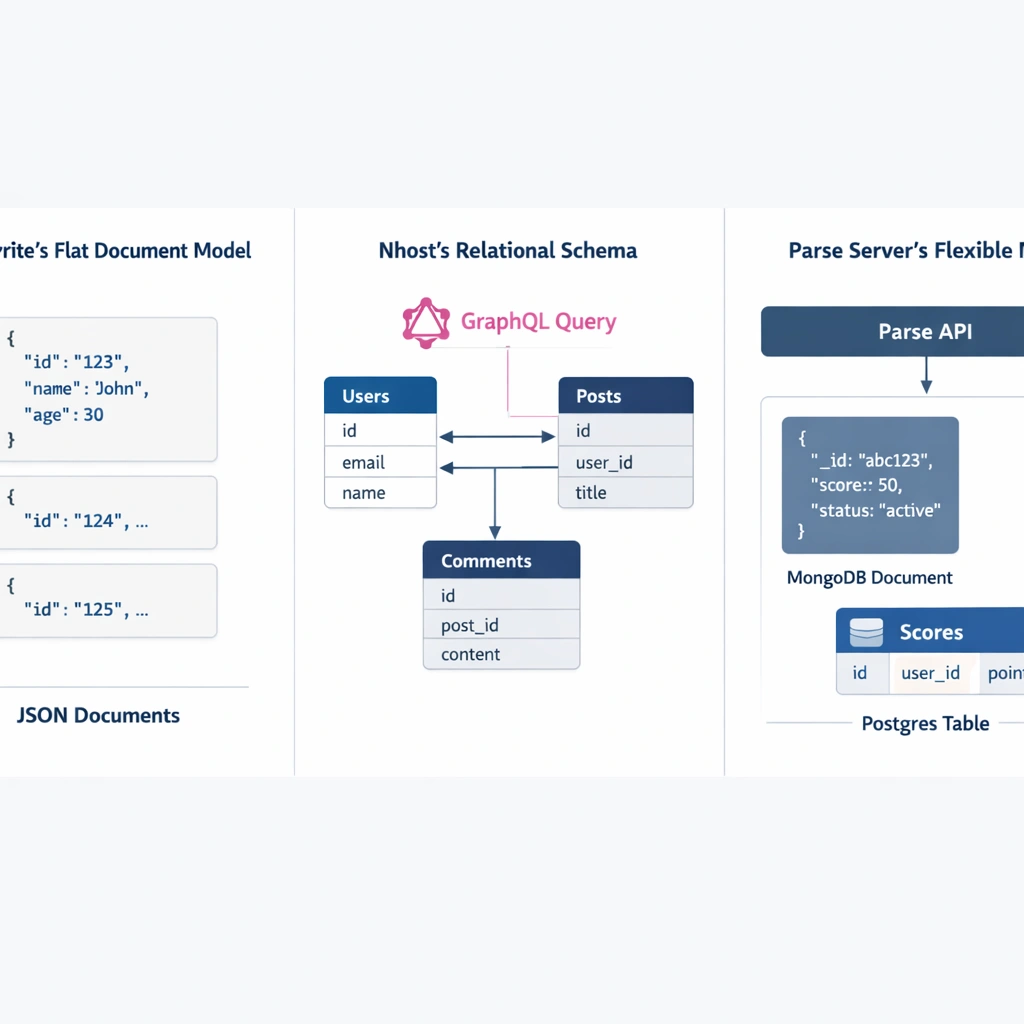
Appwrite stores data in collections of documents — JSON objects with custom attributes you define in the console. The query API supports filtering, sorting, and pagination, but it does not support joins or relationship queries across collections. If you need data from two collections in a single request, you make two requests and assemble the result on the client or in a server function Appwrite vs Nhost vs Parse.
For products with relatively flat data models — a task manager, a CMS, a simple marketplace — this is not a meaningful limitation. For products where relational queries are frequent and complex, it creates API overhead that compounds as the product grows.
Nhost’s relational model with GraphQL
Nhost’s data layer is Postgres with a Hasura GraphQL engine on top. Your schema is fully relational — foreign keys, indexes, constraints and the GraphQL API Hasura generates reflects those relationships directly. A single query can fetch a user’s profile, their subscription tier, their recent activity, and the teammates in their organization in one round trip.
For a SaaS product with genuine data complexity, this architecture eliminates an entire class of backend development work. The permission system enforces row-level data isolation at the database query level, which means your API is secure by default rather than by convention.
Parse Server’s flexible model
Parse Server supports both MongoDB and Postgres, and the choice is made at configuration time. With MongoDB, you get a document model with flexible schema and strong support for hierarchical data. With Postgres, you get relational structure with ACID compliance. Parse’s API surface is consistent regardless of which database you choose underneath.
This flexibility is most valuable for teams migrating from an existing system or building a product whose data model is genuinely uncertain at the start. You can begin with MongoDB for speed and migrate to Postgres for structure without changing your application code.
Authentication capabilities across all three platforms
All three platforms cover the authentication requirements most SaaS products need. The differences are in depth and configurability rather than basic coverage.
Appwrite supports email and password, magic links, OAuth with twelve or more providers, phone OTP, and anonymous sessions. The console makes activating each provider a single toggle with a credential input field. JWT configuration is handled automatically.
Nhost Auth integrates directly with Hasura’s permission system through JWT claims. When a user logs in, the JWT Nhost generates includes their role and user ID as Hasura-readable claims, which means your GraphQL permission rules activate automatically without additional configuration. This tight integration between auth and data access is Nhost’s most elegant architectural feature.
Parse Server’s authentication system is the most customizable of the three. The auth adapter interface lets you implement any external authentication source SAML, custom token validation, corporate SSO as a first-class integration. For enterprise SaaS products that need to support customer identity providers, Parse’s approach handles those requirements more naturally than the other two platforms.
Serverless functions: where the platforms diverge significantly
All three platforms include serverless function capabilities, but the maturity and design philosophy differ enough to affect product architecture decisions.
Appwrite Functions supports Node.js, Python, PHP, Ruby, Dart, and several other runtimes. Functions trigger on schedule, on API call, or on platform events like user creation or file upload. The deployment process connects to a Git repository or accepts a direct upload. Execution is isolated per function invocation.
Nhost Functions runs Node.js exclusively and focuses on HTTP-triggered functions rather than event-driven triggers. The integration with Hasura events — firing a function when a database row is inserted or updated — requires configuring Hasura event triggers separately, which adds a setup step but gives you precise control over the trigger conditions.
Parse Cloud Functions is the most mature implementation of the three. The beforeSave, afterSave, beforeDelete, and afterDelete triggers run synchronously within the request lifecycle, which means a beforeSave function can modify or reject an incoming object before it reaches the database. This synchronous execution model enables validation and transformation logic that neither Appwrite nor Nhost replicates as cleanly.
Infrastructure cost comparison in real numbers
All three platforms run on standard VPS infrastructure. The server cost depends on the platform’s minimum resource requirements and your traffic volume.
Appwrite runs stably on a 2GB RAM server in the $6 to $10 per month range for an early-stage product. The single Docker Compose stack is memory-efficient relative to what it delivers.
Nhost self-hosted requires 4GB RAM as a practical minimum, putting the entry-level server cost at $12 to $20 per month. The additional services Hasura, MinIO, and the auth service running alongside Postgres — consume more memory than Appwrite’s stack.
Parse Server runs comfortably on a 2GB server for moderate traffic loads, though a Postgres-backed deployment benefits from 4GB when database query volume increases. The Node.js runtime is lean, and the absence of a GraphQL engine layer keeps the memory footprint lower than Nhost at equivalent traffic levels.
The VPS configuration details including which providers offer the best price-to-performance ratio for each platform are covered in the self-hosted BaaS VPS deployment guide.
Which platform fits which founder
The Appwrite vs Nhost vs Parse decision maps cleanly onto product type and team profile once you strip away the feature comparison noise.
Choose Appwrite if you are a solo founder or small team building your first SaaS product, your data model is relatively straightforward, and your priority is getting a working backend running as fast as possible without investing significant infrastructure time. Appwrite’s setup experience and console UI are designed for exactly this situation.
Choose Nhost if your product’s data is genuinely relational — users belong to organizations, resources are owned by accounts, events connect to multiple entities — and you want a GraphQL API that reflects that structure without writing a custom backend layer. Nhost rewards teams that invest in schema design upfront with a backend that scales cleanly as the product grows.
Choose Parse Server if you need maximum extensibility, if you are migrating from an existing backend with a similar document model, or if your team’s primary language is JavaScript and you want the most natural extension points available. Parse’s cloud functions system and dual database support make it the most flexible option for products with complex or evolving backend requirements.
Conclusion
Appwrite vs Nhost vs Parse is not a question with a universal answer, but it is a question with a right answer for your specific product. The setup experience, the data model, the serverless function architecture, and the infrastructure cost all point in different directions depending on what you are building and how your team works. The three platforms covered here represent the best open-source self-hosted backend options available in 2026 — choosing between them deliberately, based on your actual requirements, is one of the highest-leverage infrastructure decisions you make at the start of a product.
