

At some point, almost every growing team lands on the same three names: Asana, Monday, and ClickUp. They dominate search results, show up in every tool comparison, and get recommended in every startup community. The problem is that most comparisons treat them as interchangeable slightly different flavors of the same product.
They are not. The differences between Asana, Monday, are meaningful enough to affect how your team operates daily, how much time you spend on setup, and how far the platform scales before it starts working against you asana vs monday vs clickup.
This page breaks down the Asana vs Monday vs ClickUp decision the way it actually needs to be made — by use case, team type, and operational priority, not by feature checklist. If you are still in the early stages of evaluating what kind of tool your team needs before narrowing to these three, the best project management tools guide for 2026 gives you the full selection framework first.
How these three platforms are fundamentally different
Understanding the core design philosophy behind each tool changes how you evaluate them.
Asana was built around tasks and accountability. Its core assumption is that work is a collection of tasks assigned to people with deadlines. Everything in Asana — projects, portfolios, timelines — exists to support that task-centric model. It is clean, opinionated, and relatively easy to learn.
Monday was built around visual workflow management. Its core unit is a board, and boards are highly customizable grids where columns can represent almost anything — status, owner, budget, priority, date. It is more flexible than Asana but requires more configuration to get right.
ClickUp was built to replace every other tool. Its core assumption is that teams should not need separate platforms for tasks, docs, goals, and reporting. It is the most feature-dense of the three and rewards teams that invest time in building their workspace structure.
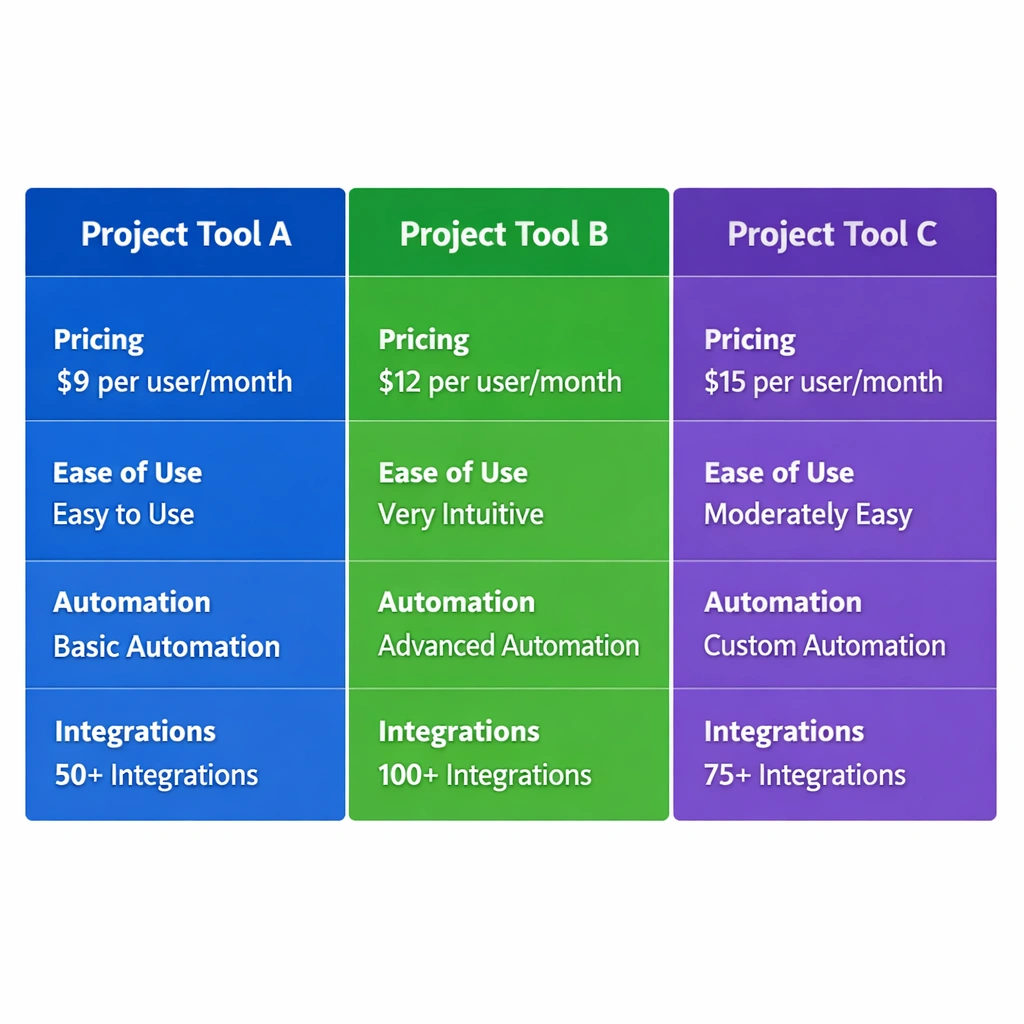
Asana vs Monday vs ClickUp: feature by feature
Task management
Asana handles task management with the most polish. Subtasks, dependencies, custom fields, and task templates are all well-implemented and easy to navigate. The interface does not overwhelm new users, which matters when you are onboarding a team member who has never used project management software.
Monday’s task management is built around its board system. Every item on a board functions like a task, but the column structure means you can attach much more contextual information to each item than a traditional task card allows. The trade-off is that it takes longer to set up a board that actually reflects your workflow.
ClickUp’s task management is the most granular of the three. You can assign multiple people to a single task, set priorities, add custom statuses, track time directly on tasks, and nest subtasks several levels deep. That depth is powerful for complex projects and genuinely limiting for teams that just need a simple to-do list asana vs monday vs clickup.
Automation
All three platforms offer automation, but the implementation and accessibility differ significantly.
Asana’s automation called Rules is available on paid plans starting at the Premium tier. You can set triggers based on task status changes, due date approaches, or field updates. The interface is clean and the logic is easy to follow, but the automation depth is shallower than ClickUp.
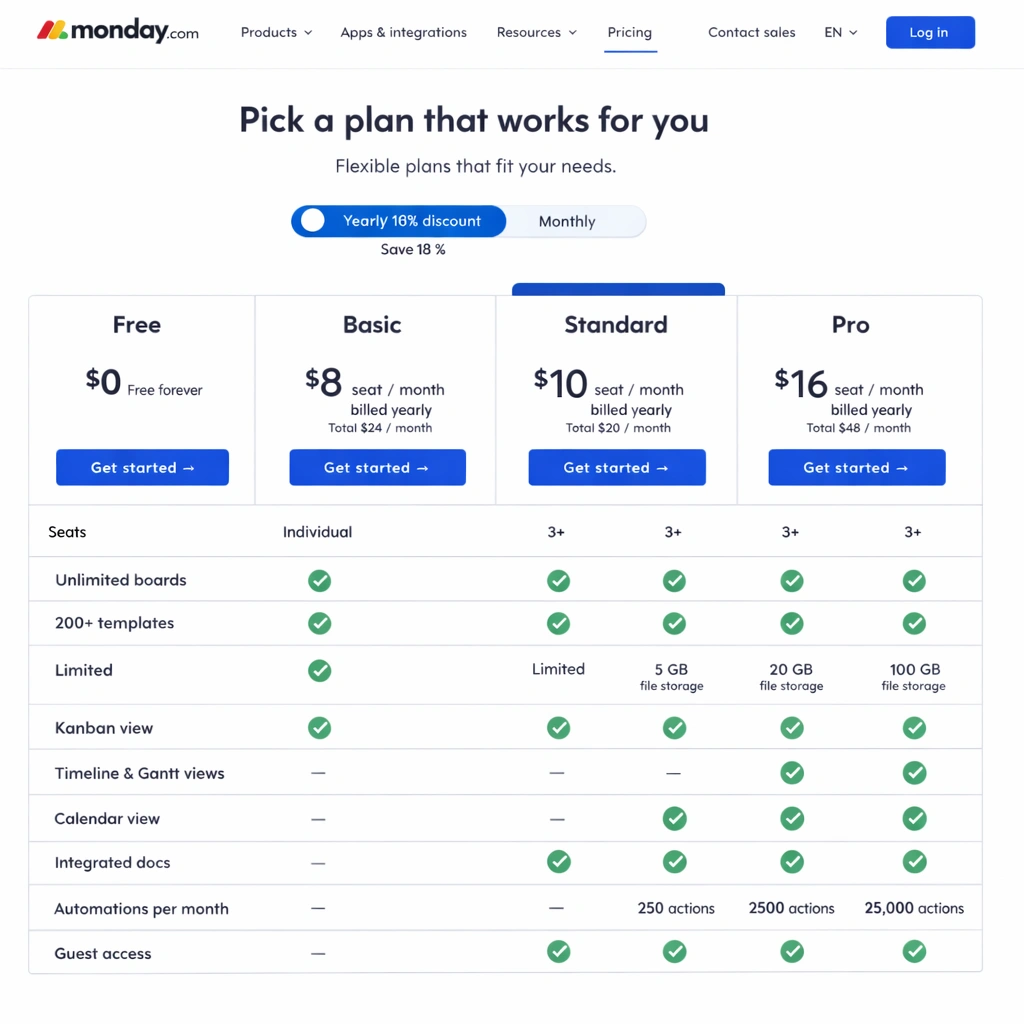
Monday’s automations are among the most user-friendly in this category. The trigger-action interface uses plain language and covers a wide range of scenarios including cross-board automations and integrations with external tools. The 250 actions per month on the basic plan is a real constraint for teams with active workflows.
ClickUp’s automation engine is the most powerful of the three. You can build multi-step automations, use conditional logic, and connect automations across spaces and projects. The free plan limits you to 100 automation runs per month, but the unlimited plan removes that ceiling entirely. For teams that want to eliminate manual work systematically, project management tools with automation covers how to build those workflows in practice.
Reporting and visibility
Asana’s reporting on paid plans is strong. Portfolio views, workload management, and goal tracking give team leads a clear picture of capacity and progress across multiple projects simultaneously. For founders managing several workstreams, that visibility is valuable.
Monday’s reporting is highly visual. Dashboard widgets can pull data from multiple boards and display it as charts, numbers, or timelines. The customization is impressive, but building a dashboard that actually tells you something useful takes time and intentional setup.
ClickUp’s reporting is comprehensive but complex. Goals, sprints, time tracking reports, and custom dashboards are all available. The challenge is that the depth can make it harder to surface the specific insight you need quickly.

Pricing comparison
Pricing is where the Asana vs Monday vs ClickUp decision often gets made in practice asana vs monday vs clickup.
Asana offers a free plan for up to 15 users with core task management features. The Premium plan starts at $10.99 per user per month billed annually and unlocks timeline view, reporting, and automation rules. The Business plan at $24.99 per user per month adds portfolios, workload management, and advanced integrations.
Monday offers a free plan for up to two seats, which makes it essentially non-functional for teams. The Basic plan starts at $9 per user per month billed annually with a three-seat minimum. The Standard plan at $12 per user per month is where the platform becomes genuinely useful, unlocking automations, integrations, and timeline view.
ClickUp offers the most generous free plan of the three, with unlimited users and a strong feature set at zero cost. The Unlimited plan at $7 per user per month unlocks unlimited storage, integrations, and automation. The Business plan at $12 per user per month adds advanced reporting and custom permissions.
For teams exploring what is available before committing to any budget, the best free project management tools page covers exactly what each platform delivers at the free tier.
Which platform fits which team
This is the question the feature comparison cannot fully answer on its own. The right platform depends on how your team thinks and operates.
Choose Asana if your team is task-focused, values a clean interface, and needs strong accountability structures. It is the best choice for teams managing client deliverables, product launches, or any workflow where task ownership and deadline tracking are the primary operational concerns. It is also the easiest of the three to onboard non-technical team members onto.
Choose Monday if your team manages complex data alongside tasks budgets, client information, resource allocation and needs a highly visual interface that non-project-managers can read at a glance. It works particularly well for operations, sales, and marketing teams that manage work across multiple stakeholders.
Choose ClickUp if your team wants a single platform to replace multiple tools and is willing to invest time in setup to get there. It is the right choice for technical founders, product teams, and operations-heavy businesses that need deep customization and automation without paying enterprise prices.
For teams that are also thinking about how remote collaboration fits into this decision, best project management software for remote teams covers how each platform handles async work, timezone visibility, and distributed team coordination.
The bottom line
Asana, Monday, and ClickUp are all strong platforms. The comparison is not about finding the best tool in absolute terms it is about finding the best fit for how your specific team operates. Asana wins on clarity and ease of adoption. Monday wins on visual flexibility and data-rich workflows. ClickUp wins on depth, customization, and value at every price point.
Make the decision based on your team’s natural working style, not on which platform has the longer feature list. The tool your team uses consistently will always outperform the tool they use reluctantly.
Conclusion
The Asana vs Monday vs ClickUp debate does not have a universal winner. It has a right answer for your specific team, your specific workflow, and your specific stage of growth.
Asana is the safest choice for teams that need fast adoption and clean task accountability without a steep learning curve. Monday is the strongest option for teams that manage complex, data-rich workflows and need a visual system that non-technical stakeholders can read instantly. ClickUp is the most powerful choice for founders who want one platform to run their entire operation and are willing to invest the setup time to get there.
The mistake most teams make is choosing based on popularity or a friend’s recommendation rather than an honest assessment of how their team actually works. A tool that fits your workflow gets used. A tool that does not fit gets abandoned, and you restart the whole evaluation process three months later at the cost of real time and operational momentum.
Pick the platform that matches your team’s natural rhythm today. You can always migrate when your needs outgrow it. What you cannot afford is another month running your business on a patchwork of chat threads and shared spreadsheets while you wait for the perfect decision.
