

There is a specific moment most entrepreneurs recognize. The business is growing revenue is up, the team is expanding, new customers are coming in but instead of feeling like progress, it feels like pressure. Every new order creates more coordination work. Every new employee creates more management overhead. Every new product line creates more data to track across more disconnected tools.
That moment is not a strategy problem. It is an infrastructure problem. And it is exactly the problem that AI ERP software was built to solve.
An ERP, or enterprise resource planning system, connects every major function of your business — finance, inventory, operations, sales, HR — into a single platform. When machine learning and predictive automation are layered on top of that foundation, the system stops being a passive record-keeper and starts being an active operational engine. It anticipates problems before they occur, automates decisions that don’t require human judgment, and surfaces the information that does require your attention — without waiting for someone to pull a report.
This guide covers everything an entrepreneur needs to know about AI ERP software in 2026: what it is, which platforms are worth considering, how the cost breaks down, how to implement it without disrupting your operations, and which specific features deliver the highest return. Each section connects to a deeper resource for entrepreneurs who want to go further on any individual topic.
What AI ERP software actually is and what it is not
The term gets used loosely enough in vendor marketing that it is worth establishing a clear definition before anything else.
A traditional ERP system centralizes your business data and standardizes your processes. It replaced spreadsheets and siloed departmental tools with a single database that every function feeds into and draws from. That was transformative when it arrived. It is table stakes now.
AI ERP software goes further in three specific directions.
Prediction. The system analyzes historical patterns sales cycles, supplier lead times, cash flow behavior, demand seasonality — and generates forecasts that update continuously. You are not reviewing last month’s performance. You are looking at a probabilistic view of what is likely to happen next week, next month, and next quarter.
Automation. Routine decisions get removed from the human workflow entirely. Reorder thresholds trigger purchase orders. Invoice amounts that match purchase orders route for payment without manual review. Payroll processes on schedule. Approval chains execute without email follow-ups. The system handles the predictable volume; your team handles the exceptions.
Recommendation. When something unusual happens — a supplier delay, a demand spike, a cash flow gap forming on the horizon — the system surfaces it with context and a suggested response. It is the operational equivalent of having an experienced analyst watching your business around the clock.
What AI ERP software is not is a magic layer that fixes poorly defined processes or compensates for bad data. The intelligence the system produces is a direct function of the quality of the data and the precision of the configuration you put into it. A well-configured platform running on clean data is transformative. A poorly configured one running on inconsistent data is expensive noise.
For a complete foundation on this category before evaluating any specific platform, what is AI ERP software and why it’s a game-changer covers the architecture, the use cases, and the distinction between AI ERP and simpler automation tools in full detail.
Best AI ERP software platforms worth considering in 2026
Not every platform that markets itself as AI-native delivers on that claim with equal depth. Some are traditional ERPs with a predictive analytics module bolted on. Others were built from the ground up with machine learning at the core. The distinction matters because it affects how the intelligence layer performs over time — a natively integrated AI system learns and calibrates continuously, while a third-party add-on updates on a separate cycle and often has limited visibility into the full operational dataset.
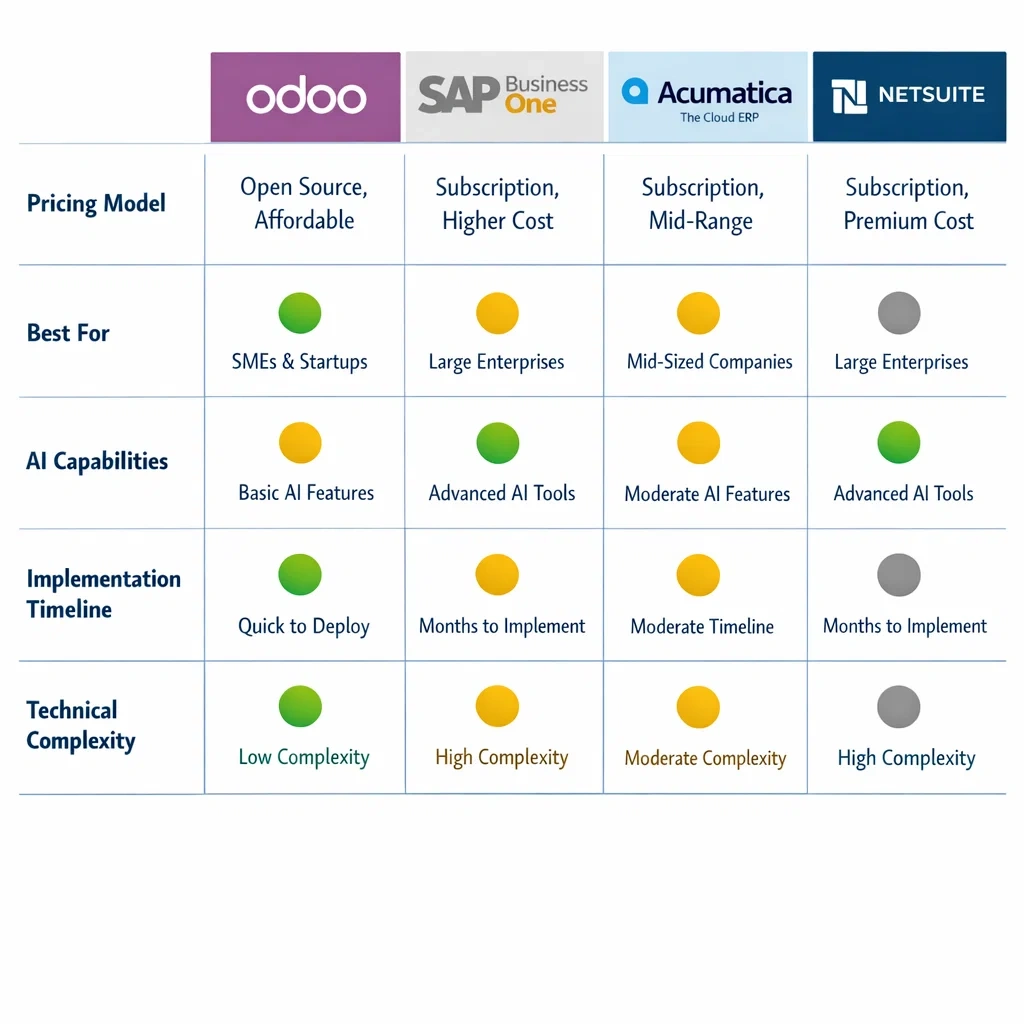
The platforms below represent the options most consistently worth evaluating for small and mid-size businesses in 2026. Each one serves a different type of operator, and the right choice depends on your industry, your team’s technical comfort level, and your growth trajectory more than it depends on any single feature comparison.
Odoo
Odoo is the most flexible option in this category for businesses that want modular adoption without committing to a full suite from day one. Its open-source foundation keeps licensing costs manageable, and the AI capabilities embedded in recent versions — demand forecasting, automated reordering, invoice matching — are native to the platform rather than third-party integrations.
The honest tradeoff is implementation complexity. Odoo rewards businesses that invest time in precise configuration upfront. Rushed implementations produce systems that require constant manual correction, which defeats the purpose. For entrepreneurs with a clear operational map and realistic implementation expectations, it is one of the strongest value propositions in the mid-market.
SAP Business One
SAP Business One is the entry point into the SAP ecosystem for small and mid-size businesses. It covers financials, sales, purchasing, inventory, and production in a single platform, with the AI layer delivered through SAP’s Business Technology Platform adding predictive analytics and automated reporting on top of the core ERP functions.
It is not the entry-level price point in this category, but for businesses in manufacturing, wholesale distribution, or any industry with complex inventory and compliance requirements, the depth of functionality and the breadth of the implementation partner ecosystem justify the investment. Implementation typically runs three to four months with a certified partner.
Acumatica
Acumatica’s most distinctive characteristic is its consumption-based pricing model — it charges by resource usage rather than per user. For small businesses with seasonal teams or part-time staff who need occasional system access, this translates to meaningful cost savings compared to per-seat platforms.
The platform covers financials, project accounting, inventory, and CRM, with an AI layer that handles cash flow forecasting, automated dunning, and anomaly detection in financial data. The cloud-native architecture produces faster implementation timelines than on-premise alternatives, and the interface adapts well to non-technical users.
NetSuite
NetSuite is the platform most product-based businesses graduate to when they have outgrown QuickBooks and basic inventory tools. It handles multi-entity consolidation, advanced revenue recognition, and global compliance — capabilities that become relevant as soon as a business starts operating across multiple locations or currencies.
The AI capabilities in NetSuite concentrate heavily in the financial intelligence layer: automated anomaly detection, predictive close processes, and intelligent cash flow planning. The SuiteCommerce integration makes it one of the more complete end-to-end options for businesses with significant e-commerce volume.
The honest caveat: NetSuite sits at the higher end of the pricing spectrum, and the implementation process requires either a strong internal project lead or a reliable certified partner. Neither of those is a reason to avoid it — they are reasons to plan for them explicitly.
Choosing the right platform for your specific operation
The platform selection process goes wrong most often when entrepreneurs evaluate features in the abstract rather than against their actual operational requirements. A platform with fifty modules is only as valuable as the three or four modules your business actually needs to run efficiently.
Before requesting a single demo, define the following with precision. Which workflows currently consume the most manual time in your operation. Which decisions your team makes repeatedly that follow a consistent enough pattern to be automated. Which data gaps are currently causing the most costly mistakes — inventory miscounts, cash flow surprises, fulfillment errors. And what your realistic implementation budget is, including not just licensing but implementation, data migration, and training.
Those four inputs narrow the platform selection significantly. They also give you the foundation for a vendor conversation that produces useful information rather than a rehearsed demo that answers questions you did not actually have.
For a detailed breakdown of how the top platforms compare on features, pricing, and implementation requirements for small businesses specifically, best AI ERP software for small business that actually delivers covers each option with an honest assessment of where it performs best and where it falls short.

AI ERP vs traditional ERP: understanding the strategic difference
Before committing to any platform, entrepreneurs who are currently running on a legacy system need to answer one foundational question: is the operational gap between what you have and what AI ERP delivers large enough to justify the transition cost and the implementation disruption?
The answer depends on understanding what that gap actually consists of — not in abstract technology terms, but in concrete operational consequences that show up in your business every week.
The architecture difference that drives everything else
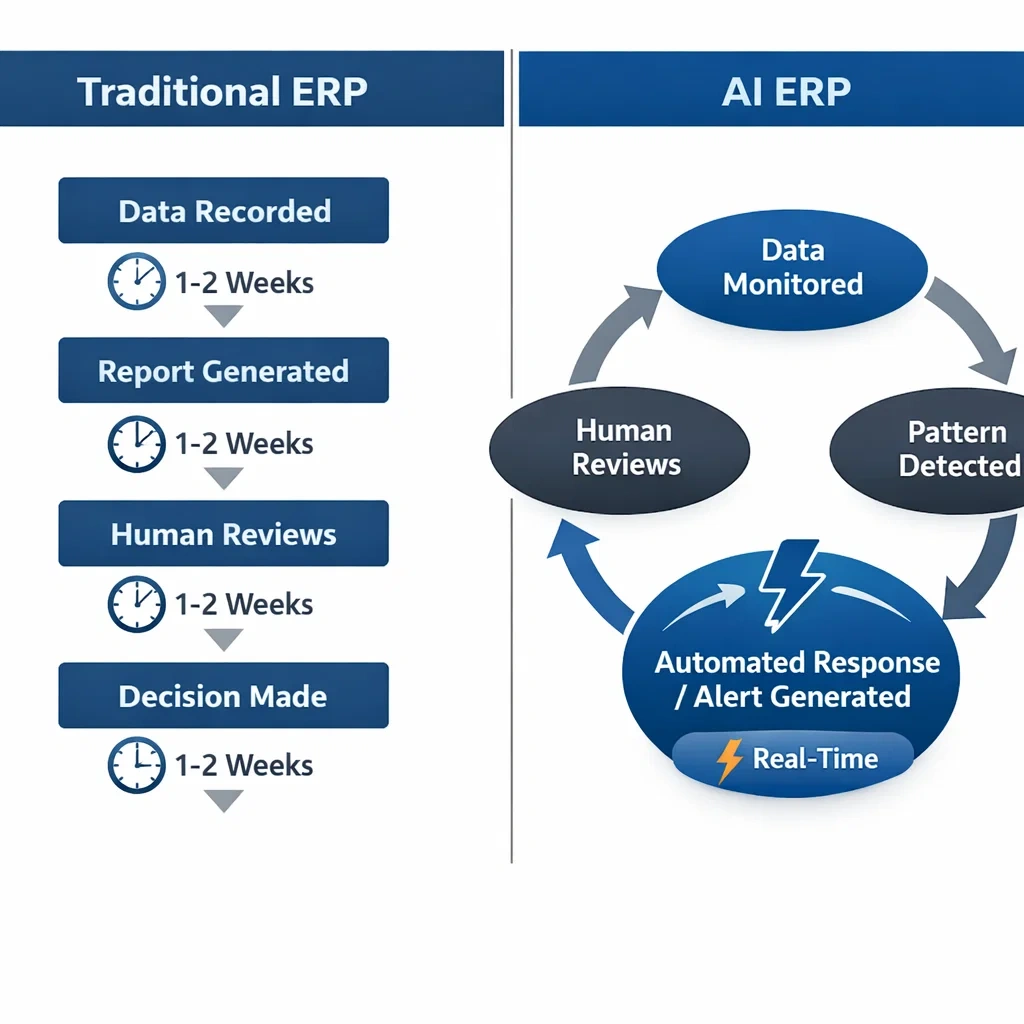
Traditional ERP systems were built on a reactive architecture. Data flows in, gets recorded, and sits in a database until a human requests a report. The system’s job is storage and display. The human’s job is interpretation and response.
That model worked reasonably well when business moved more slowly and decision windows were measured in weeks rather than days. In 2026, it creates a structural lag that compounds across every function it touches.
AI ERP software operates on an anticipatory architecture. The system does not wait to be asked. It monitors your operational data continuously, identifies patterns and anomalies against established baselines, generates forecasts from current signals rather than historical snapshots, and initiates automated responses to predictable situations before they require human intervention.
The practical consequence of that architectural difference is not incremental improvement. It is a fundamentally different operational rhythm. Teams running on AI ERP spend their time on decisions and relationships. Teams running on traditional ERP spend a significant portion of their time on data handling, report generation, and exception management that the newer architecture eliminates.
Where traditional ERP creates the most friction for growing businesses
The friction points that traditional ERP creates are not evenly distributed across business functions. They concentrate in three areas that happen to be the most operationally sensitive for scaling businesses.
Cash flow visibility. Traditional ERP generates financial reports on a schedule. By the time a cash flow statement lands in front of a decision-maker, the underlying data is already days or weeks old. For an entrepreneur managing a growth phase where cash is tight and timing matters, that lag is not a minor inconvenience — it is a structural blind spot.
Inventory management. Traditional ERP records stock movements and alerts when thresholds are crossed. It does not predict when thresholds will be crossed based on current demand velocity. The difference between reactive and predictive inventory management shows up as stockouts, emergency reorders at premium pricing, and excess inventory that ties up cash — all of which are preventable with the right system.
Operational coordination. In a traditional ERP environment, the handoffs between departments — sales to operations, operations to finance, procurement to inventory — require manual communication and data entry at each step. Each handoff is a point where information gets delayed, duplicated, or lost. As a business grows and the volume of these handoffs increases, the coordination overhead scales with it.
The honest case for a measured transition
The AI ERP vs traditional ERP comparison does not resolve as a universal recommendation to switch immediately. There are legitimate scenarios where staying on a traditional platform in the near term is the correct decision.
Businesses operating under strict regulatory compliance frameworks — certain healthcare, financial services, or government contracting environments — may face auditability requirements that the automation variability of an AI-native system does not accommodate cleanly. Businesses with highly stable, low-complexity operations may not generate enough operational variability for the AI layer to act on meaningfully. And businesses with deeply customized legacy implementations may face migration costs that outweigh near-term operational benefits.
The evaluation framework is straightforward. Quantify the weekly operational cost of your current system’s limitations — the hours spent on manual processes, the cost of inventory errors, the value of decisions made on delayed information. Compare that against the total cost of ownership of an AI ERP implementation over three years. If the operational cost exceeds the transition cost within that window, the switch pays for itself. If it does not, the timing is wrong even if the direction is right.
What the transition actually looks like
For businesses where the analysis supports moving forward, the transition from traditional to AI ERP follows a more structured path than most vendors communicate upfront. It is not a software swap. It is an operational redesign that happens to involve new software.
The most successful transitions start with workflow documentation — mapping every major process at the step level before any platform evaluation begins. That documentation serves two purposes. It clarifies exactly what the new system needs to do, which drives better platform selection. And it creates the configuration blueprint the implementation team works from, which drives faster and more accurate setup.
The second critical element is data preparation. Traditional ERP systems accumulate years of inconsistent data — duplicate records, legacy account structures, discontinued products that were never archived, supplier records with outdated information. Migrating that data directly into a new system imports the chaos. Cleaning it before migration produces a foundation that the AI layer can actually learn from accurately.
For entrepreneurs who want a complete breakdown of where the AI ERP vs traditional ERP comparison lands across cost, capability, and transition risk, AI ERP vs traditional ERP — the brutal truth for entrepreneurs covers every dimension of that decision in detail, including the scenarios where staying on a legacy system is the right call.
How to implement AI ERP software without breaking your operations
Selecting the right platform is a research problem. Implementing it correctly is an execution problem. The two require entirely different skill sets, and most of the expensive failures in this category happen not because the wrong platform was chosen but because the right platform was deployed without the operational discipline the process requires.
The implementation phase is where the investment either compounds into a structural advantage or collapses into a costly disruption that sets the business back six to twelve months. The difference between those two outcomes is almost entirely determined by the preparation work that happens before anyone touches the new system.
The preparation phase that most businesses skip
Every ERP vendor has an implementation methodology. Most of them start with system configuration. That is the wrong starting point.
The correct starting point is operational documentation — a comprehensive map of every major workflow in your business at the process level. Not a high-level description of what each department does, but a step-by-step breakdown of how work actually moves through your organization. What triggers each process. What decisions get made at each step and on what basis. Where the current process breaks down or creates delays. What data goes in and what output comes out.
This documentation exercise typically takes two to four weeks for a small business with ten to thirty employees. It consistently surfaces two categories of discovery that are valuable before implementation begins.
The first is undocumented variation. Most businesses have workflows that three people handle three different ways. The ERP implementation is the forcing function that standardizes those workflows — but you need to identify the variation before you can standardize it. If you configure the system around one person’s version of a process without knowing the other two exist, the other two people will work around the system rather than through it.
The second is legacy workarounds. Every business that has operated for more than two or three years has accumulated process patches — manual steps that exist because a previous system couldn’t handle something, or because a problem occurred once and someone added a check that never got removed. These workarounds often disappear naturally in a well-configured AI ERP implementation, but only if the implementation team knows they exist and understands what operational need they were serving.
Phased implementation: the only approach that works consistently
The question of how to implement AI ERP software at the sequencing level has a clear answer supported by a consistent pattern across successful implementations: phases, not a big bang.
A big-bang implementation — activating every module simultaneously across all departments on a single go-live date — concentrates every risk into a single moment. If something goes wrong with inventory configuration, it affects purchasing, which affects operations, which affects finance, which affects reporting. The interdependencies that make a fully integrated ERP powerful in steady state make a simultaneous cutover fragile at go-live.
A phased approach isolates risk, builds team confidence progressively, and produces measurable wins early in the process that sustain organizational momentum through the longer implementation timeline.
The sequencing that works best for most small businesses follows a consistent logic.
Finance and accounting first. This module has the highest visibility, the clearest success metrics, and the most direct impact on the decision-making data the entrepreneur depends on. Automated bank reconciliation, invoice matching, and cash flow reporting deliver immediate, tangible proof that the system works. A successful finance go-live creates organizational confidence that carries every subsequent phase.
Inventory and procurement second. Once the financial foundation is stable, connecting inventory and purchasing workflows activates the AI layer’s most visible operational capabilities — demand forecasting, automated reordering, supplier performance tracking. The impact is measurable in reduced stockouts, lower emergency purchasing costs, and hours recovered from manual monitoring.
Sales and customer operations third. With live inventory and financial data flowing through the system, the customer-facing modules become significantly more powerful. Order management, fulfillment tracking, and customer communication automation all draw on the operational data established in the first two phases.
Reporting and analytics fourth. The final phase configures the executive dashboard and automated reporting that gives the entrepreneur real-time operational visibility. This phase is last because it is most valuable when all the data sources feeding it are already live and stable.
Data migration: the variable that determines go-live success
No element of how to implement AI ERP software has more direct impact on go-live quality than data migration, and no element is more consistently underestimated in implementation planning.
The migration process involves extracting your existing data from current systems, cleaning and standardizing it, mapping it to the new platform’s data structure, importing it, and validating that the imported data matches the source accurately. Each of those steps takes longer than it sounds, and the cleaning step in particular routinely consumes two to three times the estimated effort.
The most operationally impactful data cleanup investments for small businesses are straightforward to prioritize.
Customer records require deduplication and address standardization. Duplicate customer records create split order histories, billing errors, and inaccurate sales reporting. A clean customer master going into the new system produces accurate CRM data from day one rather than after months of manual correction.
Product and inventory data requires SKU standardization, current stock count verification, and discontinued product archiving. The demand forecasting and reorder automation that the AI layer delivers are calibrated against your product catalog — a clean catalog produces accurate automation, a messy one produces noise.
Historical transaction data requires a deliberate decision about migration depth. Not every legacy transaction needs to live in the new system. Migrating two to three years of transaction history gives the AI layer enough data to identify meaningful patterns. Migrating ten years of inconsistently structured legacy data often creates more problems than it solves.
Change management: the implementation variable most entrepreneurs underestimate
Technology implementations fail at the human layer more often than the technical one. A platform that your team does not trust, does not understand, or actively works around delivers no operational return regardless of how well it was configured.
Effective change management for an ERP implementation is not a communication campaign. It is a specific set of actions taken at specific points in the implementation timeline.
Before configuration begins, involve the operational leads from each affected department in the workflow documentation exercise. People who helped define how the system will work are significantly more likely to use it correctly than people who had a system imposed on them. This is not a democratic process — the entrepreneur makes the final decisions — but the input from the people who run the processes daily produces better configuration and higher adoption simultaneously.
During configuration, designate an internal champion in each department. These are the people who receive deeper training, who test workflows in the sandbox environment before go-live, and who become the first point of contact for their colleagues’ questions after launch. Vendor support handles technical issues. Internal champions handle the human ones.
Before go-live, communicate the change explicitly — not just the training schedule, but the reasoning. What problem is this implementation solving. What will be different about how each team member’s day works. What will be easier and what will require adjustment. People adopt change faster when they understand its purpose.
The first thirty days after go-live
The go-live date is not the completion of the implementation. It is the beginning of the most operationally sensitive phase in the entire process.
During the first thirty days, monitor three metrics specifically. The exception rate — how many transactions the system flags for manual review compared to the volume it processes automatically — tells you whether your automation thresholds are calibrated correctly. A high exception rate means the rules need refinement, not that the system is failing. The forecast accuracy rate — how closely the system’s inventory and cash flow predictions match actuals — tells you whether the AI layer has enough clean data to produce reliable outputs. And the team adoption rate — what percentage of the processes you configured are actually being used through the system versus being handled manually outside it — tells you whether your change management was effective or needs reinforcement.
Issues identified in the first thirty days are configuration problems, not platform problems. They are solvable with adjustments to workflow rules, threshold settings, or user training. Issues that are not identified and addressed in the first thirty days become embedded operational habits that are significantly harder to correct later.
For a complete step-by-step walkthrough of the full implementation process — from workflow documentation through the first thirty days post-launch — how to implement AI ERP software without disrupting your business covers every phase in the sequence it actually needs to happen, including the specific preparation steps most vendors skip in their onboarding documentation.
AI ERP software without breaking your operations
Selecting the right platform is a research problem. Implementing it correctly is an execution problem. The two require entirely different skill sets, and most of the expensive failures in this category happen not because the wrong platform was chosen but because the right platform was deployed without the operational discipline the process requires.
The implementation phase is where the investment either compounds into a structural advantage or collapses into a costly disruption that sets the business back six to twelve months. The difference between those two outcomes is almost entirely determined by the preparation work that happens before anyone touches the new system.
The preparation phase that most businesses skip
Every ERP vendor has an implementation methodology. Most of them start with system configuration. That is the wrong starting point.
The correct starting point is operational documentation — a comprehensive map of every major workflow in your business at the process level. Not a high-level description of what each department does, but a step-by-step breakdown of how work actually moves through your organization. What triggers each process. What decisions get made at each step and on what basis. Where the current process breaks down or creates delays. What data goes in and what output comes out.
This documentation exercise typically takes two to four weeks for a small business with ten to thirty employees. It consistently surfaces two categories of discovery that are valuable before implementation begins.
The first is undocumented variation. Most businesses have workflows that three people handle three different ways. The ERP implementation is the forcing function that standardizes those workflows — but you need to identify the variation before you can standardize it. If you configure the system around one person’s version of a process without knowing the other two exist, the other two people will work around the system rather than through it.
The second is legacy workarounds. Every business that has operated for more than two or three years has accumulated process patches — manual steps that exist because a previous system couldn’t handle something, or because a problem occurred once and someone added a check that never got removed. These workarounds often disappear naturally in a well-configured AI ERP implementation, but only if the implementation team knows they exist and understands what operational need they were serving.
Phased implementation: the only approach that works consistently
The question of how to implement AI ERP software at the sequencing level has a clear answer supported by a consistent pattern across successful implementations: phases, not a big bang.
A big-bang implementation — activating every module simultaneously across all departments on a single go-live date — concentrates every risk into a single moment. If something goes wrong with inventory configuration, it affects purchasing, which affects operations, which affects finance, which affects reporting. The interdependencies that make a fully integrated ERP powerful in steady state make a simultaneous cutover fragile at go-live.
A phased approach isolates risk, builds team confidence progressively, and produces measurable wins early in the process that sustain organizational momentum through the longer implementation timeline.
The sequencing that works best for most small businesses follows a consistent logic.
Finance and accounting first. This module has the highest visibility, the clearest success metrics, and the most direct impact on the decision-making data the entrepreneur depends on. Automated bank reconciliation, invoice matching, and cash flow reporting deliver immediate, tangible proof that the system works. A successful finance go-live creates organizational confidence that carries every subsequent phase.
Inventory and procurement second. Once the financial foundation is stable, connecting inventory and purchasing workflows activates the AI layer’s most visible operational capabilities — demand forecasting, automated reordering, supplier performance tracking. The impact is measurable in reduced stockouts, lower emergency purchasing costs, and hours recovered from manual monitoring.
Sales and customer operations third. With live inventory and financial data flowing through the system, the customer-facing modules become significantly more powerful. Order management, fulfillment tracking, and customer communication automation all draw on the operational data established in the first two phases.
Reporting and analytics fourth. The final phase configures the executive dashboard and automated reporting that gives the entrepreneur real-time operational visibility. This phase is last because it is most valuable when all the data sources feeding it are already live and stable.
Data migration: the variable that determines go-live success
No element of how to implement AI ERP software has more direct impact on go-live quality than data migration, and no element is more consistently underestimated in implementation planning.
The migration process involves extracting your existing data from current systems, cleaning and standardizing it, mapping it to the new platform’s data structure, importing it, and validating that the imported data matches the source accurately. Each of those steps takes longer than it sounds, and the cleaning step in particular routinely consumes two to three times the estimated effort.
The most operationally impactful data cleanup investments for small businesses are straightforward to prioritize.
Customer records require deduplication and address standardization. Duplicate customer records create split order histories, billing errors, and inaccurate sales reporting. A clean customer master going into the new system produces accurate CRM data from day one rather than after months of manual correction.
Product and inventory data requires SKU standardization, current stock count verification, and discontinued product archiving. The demand forecasting and reorder automation that the AI layer delivers are calibrated against your product catalog — a clean catalog produces accurate automation, a messy one produces noise.
Historical transaction data requires a deliberate decision about migration depth. Not every legacy transaction needs to live in the new system. Migrating two to three years of transaction history gives the AI layer enough data to identify meaningful patterns. Migrating ten years of inconsistently structured legacy data often creates more problems than it solves.
Change management: the implementation variable most entrepreneurs underestimate
Technology implementations fail at the human layer more often than the technical one. A platform that your team does not trust, does not understand, or actively works around delivers no operational return regardless of how well it was configured.
Effective change management for an ERP implementation is not a communication campaign. It is a specific set of actions taken at specific points in the implementation timeline.
Before configuration begins, involve the operational leads from each affected department in the workflow documentation exercise. People who helped define how the system will work are significantly more likely to use it correctly than people who had a system imposed on them. This is not a democratic process — the entrepreneur makes the final decisions — but the input from the people who run the processes daily produces better configuration and higher adoption simultaneously.
During configuration, designate an internal champion in each department. These are the people who receive deeper training, who test workflows in the sandbox environment before go-live, and who become the first point of contact for their colleagues’ questions after launch. Vendor support handles technical issues. Internal champions handle the human ones.
Before go-live, communicate the change explicitly — not just the training schedule, but the reasoning. What problem is this implementation solving. What will be different about how each team member’s day works. What will be easier and what will require adjustment. People adopt change faster when they understand its purpose.
The first thirty days after go-live
The go-live date is not the completion of the implementation. It is the beginning of the most operationally sensitive phase in the entire process.
During the first thirty days, monitor three metrics specifically. The exception rate — how many transactions the system flags for manual review compared to the volume it processes automatically — tells you whether your automation thresholds are calibrated correctly. A high exception rate means the rules need refinement, not that the system is failing. The forecast accuracy rate — how closely the system’s inventory and cash flow predictions match actuals — tells you whether the AI layer has enough clean data to produce reliable outputs. And the team adoption rate — what percentage of the processes you configured are actually being used through the system versus being handled manually outside it — tells you whether your change management was effective or needs reinforcement.
Issues identified in the first thirty days are configuration problems, not platform problems. They are solvable with adjustments to workflow rules, threshold settings, or user training. Issues that are not identified and addressed in the first thirty days become embedded operational habits that are significantly harder to correct later.
For a complete step-by-step walkthrough of the full implementation process — from workflow documentation through the first thirty days post-launch — how to implement AI ERP software without disrupting your business covers every phase in the sequence it actually needs to happen, including the specific preparation steps most vendors skip in their onboarding documentation.
How to implement AI ERP software without breaking your operations
Selecting the right platform is a research problem. Implementing it correctly is an execution problem. The two require entirely different skill sets, and most of the expensive failures in this category happen not because the wrong platform was chosen but because the right platform was deployed without the operational discipline the process requires.
The implementation phase is where the investment either compounds into a structural advantage or collapses into a costly disruption that sets the business back six to twelve months. The difference between those two outcomes is almost entirely determined by the preparation work that happens before anyone touches the new system.
The preparation phase that most businesses skip
Every ERP vendor has an implementation methodology. Most of them start with system configuration. That is the wrong starting point.
The correct starting point is operational documentation — a comprehensive map of every major workflow in your business at the process level. Not a high-level description of what each department does, but a step-by-step breakdown of how work actually moves through your organization. What triggers each process. What decisions get made at each step and on what basis. Where the current process breaks down or creates delays. What data goes in and what output comes out.
This documentation exercise typically takes two to four weeks for a small business with ten to thirty employees. It consistently surfaces two categories of discovery that are valuable before implementation begins.
The first is undocumented variation. Most businesses have workflows that three people handle three different ways. The ERP implementation is the forcing function that standardizes those workflows — but you need to identify the variation before you can standardize it. If you configure the system around one person’s version of a process without knowing the other two exist, the other two people will work around the system rather than through it.
The second is legacy workarounds. Every business that has operated for more than two or three years has accumulated process patches — manual steps that exist because a previous system couldn’t handle something, or because a problem occurred once and someone added a check that never got removed. These workarounds often disappear naturally in a well-configured AI ERP implementation, but only if the implementation team knows they exist and understands what operational need they were serving.
Phased implementation: the only approach that works consistently
The question of how to implement AI ERP software at the sequencing level has a clear answer supported by a consistent pattern across successful implementations: phases, not a big bang.
A big-bang implementation — activating every module simultaneously across all departments on a single go-live date — concentrates every risk into a single moment. If something goes wrong with inventory configuration, it affects purchasing, which affects operations, which affects finance, which affects reporting. The interdependencies that make a fully integrated ERP powerful in steady state make a simultaneous cutover fragile at go-live.
A phased approach isolates risk, builds team confidence progressively, and produces measurable wins early in the process that sustain organizational momentum through the longer implementation timeline.
The sequencing that works best for most small businesses follows a consistent logic.
Finance and accounting first. This module has the highest visibility, the clearest success metrics, and the most direct impact on the decision-making data the entrepreneur depends on. Automated bank reconciliation, invoice matching, and cash flow reporting deliver immediate, tangible proof that the system works. A successful finance go-live creates organizational confidence that carries every subsequent phase.
Inventory and procurement second. Once the financial foundation is stable, connecting inventory and purchasing workflows activates the AI layer’s most visible operational capabilities — demand forecasting, automated reordering, supplier performance tracking. The impact is measurable in reduced stockouts, lower emergency purchasing costs, and hours recovered from manual monitoring.
Sales and customer operations third. With live inventory and financial data flowing through the system, the customer-facing modules become significantly more powerful. Order management, fulfillment tracking, and customer communication automation all draw on the operational data established in the first two phases.
Reporting and analytics fourth. The final phase configures the executive dashboard and automated reporting that gives the entrepreneur real-time operational visibility. This phase is last because it is most valuable when all the data sources feeding it are already live and stable.
Data migration: the variable that determines go-live success
No element of how to implement AI ERP software has more direct impact on go-live quality than data migration, and no element is more consistently underestimated in implementation planning.
The migration process involves extracting your existing data from current systems, cleaning and standardizing it, mapping it to the new platform’s data structure, importing it, and validating that the imported data matches the source accurately. Each of those steps takes longer than it sounds, and the cleaning step in particular routinely consumes two to three times the estimated effort.
The most operationally impactful data cleanup investments for small businesses are straightforward to prioritize.
Customer records require deduplication and address standardization. Duplicate customer records create split order histories, billing errors, and inaccurate sales reporting. A clean customer master going into the new system produces accurate CRM data from day one rather than after months of manual correction.
Product and inventory data requires SKU standardization, current stock count verification, and discontinued product archiving. The demand forecasting and reorder automation that the AI layer delivers are calibrated against your product catalog — a clean catalog produces accurate automation, a messy one produces noise.
Historical transaction data requires a deliberate decision about migration depth. Not every legacy transaction needs to live in the new system. Migrating two to three years of transaction history gives the AI layer enough data to identify meaningful patterns. Migrating ten years of inconsistently structured legacy data often creates more problems than it solves.
Change management: the implementation variable most entrepreneurs underestimate
Technology implementations fail at the human layer more often than the technical one. A platform that your team does not trust, does not understand, or actively works around delivers no operational return regardless of how well it was configured.
Effective change management for an ERP implementation is not a communication campaign. It is a specific set of actions taken at specific points in the implementation timeline.
Before configuration begins, involve the operational leads from each affected department in the workflow documentation exercise. People who helped define how the system will work are significantly more likely to use it correctly than people who had a system imposed on them. This is not a democratic process — the entrepreneur makes the final decisions — but the input from the people who run the processes daily produces better configuration and higher adoption simultaneously.
During configuration, designate an internal champion in each department. These are the people who receive deeper training, who test workflows in the sandbox environment before go-live, and who become the first point of contact for their colleagues’ questions after launch. Vendor support handles technical issues. Internal champions handle the human ones.
Before go-live, communicate the change explicitly — not just the training schedule, but the reasoning. What problem is this implementation solving. What will be different about how each team member’s day works. What will be easier and what will require adjustment. People adopt change faster when they understand its purpose.
The first thirty days after go-live
The go-live date is not the completion of the implementation. It is the beginning of the most operationally sensitive phase in the entire process.
During the first thirty days, monitor three metrics specifically. The exception rate — how many transactions the system flags for manual review compared to the volume it processes automatically — tells you whether your automation thresholds are calibrated correctly. A high exception rate means the rules need refinement, not that the system is failing. The forecast accuracy rate — how closely the system’s inventory and cash flow predictions match actuals — tells you whether the AI layer has enough clean data to produce reliable outputs. And the team adoption rate — what percentage of the processes you configured are actually being used through the system versus being handled manually outside it — tells you whether your change management was effective or needs reinforcement.
Issues identified in the first thirty days are configuration problems, not platform problems. They are solvable with adjustments to workflow rules, threshold settings, or user training. Issues that are not identified and addressed in the first thirty days become embedded operational habits that are significantly harder to correct later.
For a complete step-by-step walkthrough of the full implementation process — from workflow documentation through the first thirty days post-launch — how to implement AI ERP software without disrupting your business covers every phase in the sequence it actually needs to happen, including the specific preparation steps most vendors skip in their onboarding documentation.
AI ERP software features that do the heaviest operational lifting
Features are where vendor conversations spend most of their time and where buying decisions most frequently go wrong. A demo environment is optimized to make every capability look effortless. The question that matters is not whether a feature exists on the platform — it is whether that feature, configured precisely for your specific workflows, eliminates meaningful operational friction in your business on a daily basis.
The features covered in this section are the ones that consistently deliver the highest return across small and mid-size business implementations. Not because they are the most technically sophisticated, but because they address the operational problems that consume the most time and produce the most costly errors in lean, fast-moving organizations.
Intelligent inventory management
For product-based businesses, inventory management is where the gap between traditional ERP and AI ERP software features becomes most immediately measurable. The difference is not incremental — it is the difference between a system that tells you what happened and one that tells you what is about to happen and acts on it before you have to.
Demand forecasting is the capability that anchors everything else in this category. The system analyzes your historical sales patterns, current demand velocity, seasonal indexes, and supplier lead time data simultaneously to generate a rolling forecast for each SKU in your catalog. That forecast updates continuously as new sales data flows in — it is not a static monthly projection but a live prediction that recalibrates in real time.
The operational consequence for an entrepreneur who has historically managed inventory through intuition and periodic stock checks is significant. Stockouts driven by demand spikes that weren’t anticipated disappear. Emergency reorders at premium pricing become rare rather than routine. Excess inventory that ties up cash because purchasing decisions were made on lagging data stops accumulating. The system handles the monitoring and the prediction; your team handles the exceptions that fall outside the forecast range.
Automated reorder rules remove the manual monitoring loop entirely. You define thresholds and lead time parameters once — when SKU X drops below Y units, generate a purchase order to supplier Z for Q quantity. The system executes that rule automatically every time the condition is met, without requiring a human to notice the stock level and initiate the process. For businesses managing hundreds of SKUs across multiple suppliers, the cumulative time recovered from this single feature alone frequently justifies the platform investment.
Supplier performance intelligence is the feature that most businesses activate last and should activate first. The system tracks actual delivery performance against promised lead times for every supplier over time — building a longitudinal record that informs both reorder timing and supplier relationship decisions. When a supplier starts running consistently late, reorder triggers adjust automatically to account for the extended lead time before a stockout occurs. That proactive adjustment is only possible because the system has been observing and recording supplier behavior continuously.
Financial intelligence and cash flow automation
Cash is the constraint that ends businesses that revenue cannot save. The financial intelligence features of a well-configured AI ERP platform are designed specifically around giving entrepreneurs the earliest possible visibility into cash position and the tools to act on that visibility before options narrow.
Automated bank reconciliation converts a recurring time sink into a brief exception review. The system connects directly to your business bank accounts and card feeds, matches incoming transactions against open invoices and recorded expenses automatically, and surfaces only the items it cannot match with confidence. A reconciliation process that previously required hours of manual matching per week becomes a ten-minute review of a short exception list. The hours recovered compound across every week of the year.
Cash flow forecasting is the financial feature with the highest strategic value for entrepreneurs managing growth. The system aggregates your current receivables aging, upcoming payables schedule, recurring expense commitments, and historical collection patterns into a rolling projection that updates daily. You see your projected cash position 30, 60, and 90 days out — with alerts that surface when the forecast shows a gap forming on the horizon.
The distinction between discovering a cash flow problem eight weeks out and discovering it eight days out is the difference between having multiple response options and having a crisis with one exit. Extending a payment term to a major supplier, accelerating collections on a specific receivable, drawing on a credit facility at a planned moment rather than an emergency one — all of those options require lead time that only exists if the forecast exists.
Intelligent invoice matching removes the manual verification step from accounts payable processing. When a supplier invoice arrives, the system matches it automatically against the corresponding purchase order and goods receipt. If the amounts and quantities align within your defined tolerance, the invoice routes for payment without human intervention. If there is a discrepancy, it surfaces with the specific mismatch highlighted — not buried in a document queue. The volume of invoices your finance team processes without touching increases progressively as the system learns your supplier patterns.
Workflow automation and approval routing
The coordination overhead that accumulates in growing businesses is one of the least visible and most consistently underestimated drains on operational capacity. Every approval that travels through an email thread, every handoff that requires a manual data entry step, every status check that requires someone to ask another person a question — these interactions are individually minor and collectively significant.
Configurable approval chains replace email-based approval processes with automated routing that executes based on rules you define once. Purchase orders above a defined value route to the appropriate approver automatically. Expense reports follow the chain specified for the submitting employee’s role. New vendor onboarding triggers a compliance review before payment terms are activated. Every pending approval is visible in a single queue with status and aging — the question of where something is stuck has a real-time answer rather than requiring a follow-up conversation.
Exception-based management is the operational philosophy that AI ERP software features enable at the workflow level — and it represents the most significant shift in how your team spends its time. Standard transactions process automatically. The system surfaces only the situations that fall outside defined parameters. A purchase order that exceeds budget. A fulfillment that misses its committed date. An invoice that does not match its purchase order. Your team’s attention goes exclusively to decisions that actually require human judgment.
The compounding effect of this shift is substantial. A team that previously spent 60 percent of its time on process execution and 40 percent on problem-solving inverts that ratio. The work that requires experience, judgment, and relationship management — the work that actually builds the business — gets more of your best people’s best hours.
Cross-departmental process triggers close the handoff gaps between functions without requiring manual coordination. A confirmed sales order automatically reserves inventory, updates the production schedule if applicable, creates a fulfillment task, and generates a revenue recognition entry — in sequence, without anyone initiating any of those downstream steps manually. The chain of actions that a single business event creates runs automatically and logs every step for audit purposes. The coordination meetings that exist primarily to ensure handoffs happened correctly become shorter or disappear.
Predictive analytics and business intelligence
The reporting capabilities of AI ERP software features determine the quality of the decisions you make at the strategic level — not just the operational one. The shift from scheduled reports that describe the past to continuous monitoring that describes the present and predicts the near future changes the decision-making rhythm of the entire organization.
Real-time executive dashboards replace the reporting ritual with a continuously updated view of the metrics that matter most to your specific operation. Gross margin by product line, cash conversion cycle, inventory turnover, customer acquisition cost, fulfillment rate — configured once against your actual data structure and updated automatically as new transactions flow through the system. The weekly reporting meeting that exists primarily to assemble numbers becomes a meeting that starts with numbers already assembled and focuses on what to do about them.
Anomaly detection operates as a continuous monitoring layer beneath the metrics your dashboard displays. The system establishes baseline patterns for every key business metric and alerts you when something deviates significantly from those patterns — a sudden spike in product returns, an unusual drop in a specific customer’s order frequency, a supplier whose invoice amounts have started running higher than purchase order values. These signals exist in your operational data right now. The difference is whether anyone is systematically looking for them.
Scenario modeling in more sophisticated implementations allows you to test the financial consequences of operational decisions before committing to them. What does gross margin look like if a key raw material cost increases by 15 percent? What happens to cash position if you extend net-60 terms to a major customer? The system runs those scenarios against your actual operational data and returns a projected outcome grounded in your specific business reality — not a generic industry model.
CRM and customer-facing integration
The customer experience consequences of operational disconnection are rarely visible in the systems that create them. A sales representative who doesn’t know a customer has an overdue invoice before offering a new discount. A support team member who doesn’t have order history context when responding to a complaint. A fulfillment team that doesn’t have visibility into the sales commitments made to a customer before those commitments affect their workload.
Unified customer records solve the context problem that disconnected tools create. Every customer interaction — quotes, orders, invoices, support tickets, communication history — lives in a single record accessible to every team member who needs it. The context that improves customer interactions is available automatically rather than requiring someone to pull it from multiple systems before a conversation.
Sales forecasting anchors revenue planning in behavioral data rather than optimistic estimates. The system analyzes pipeline data, historical close rates by stage and representative, deal velocity patterns, and seasonal demand cycles to generate a forecast grounded in how deals actually close in your specific business. For entrepreneurs making hiring, inventory, and cash flow decisions against expected revenue, the accuracy of that forecast has direct operational and financial consequences.
For a complete feature-by-feature breakdown with practical configuration guidance for each capability, AI ERP software features that eliminate your most painful workflows covers every major feature category in detail — including the configuration specificity that separates implementations that transform operations from ones that underdeliver on their potential.
Conclusion
AI ERP software is not a technology trend that is still finding its footing. It is a mature, accessible category of business infrastructure that small and mid-size businesses can deploy, configure, and extract measurable operational return from in 2026 — without an enterprise budget or an internal IT department.
The entrepreneurs who build the most durable operational advantage from this technology share a consistent set of characteristics. They invest in understanding what the platform actually needs to do before they evaluate any vendor. They plan for the full cost of ownership rather than the licensing fee. They implement in phases with clean data rather than rushing a simultaneous cutover. They configure the AI layer with precision rather than accepting generic defaults. And they treat the first thirty days after go-live as a critical calibration period rather than a finish line.
The businesses that struggle with ERP implementations share an equally consistent pattern. They evaluate platforms based on demo environments rather than operational requirements. They underestimate the data preparation work that determines go-live quality. They cut training budgets to reduce upfront costs and pay for it in adoption rates. And they activate a fraction of the features they are paying for because the implementation timeline ended before the configuration was complete.
The gap between those two outcomes is not determined by which platform was chosen. It is determined by the discipline of the process that surrounds the platform.
What the operational return actually looks like
The return on a well-implemented AI ERP platform is not a single metric — it is a structural shift in how the business operates that compounds over time.
In the first year, the return is primarily time-based. Hours recovered from manual reconciliation, inventory monitoring, approval chasing, and report assembly. Those hours do not disappear — they redirect toward the work that actually moves the business forward. Product development, customer relationships, market expansion, team development. The activities that generate revenue rather than manage existing revenue.
In the second and third year, the return becomes increasingly intelligence-based. The AI layer has enough operational history to produce forecasts that are genuinely reliable. The anomaly detection system has established accurate baselines and is surfacing signals that would have been invisible in a traditional reporting environment. The cash flow forecasting is precise enough to inform strategic decisions — hiring timelines, inventory investment, expansion financing — with confidence rather than approximation.
By year three, the compounding effect of better decisions made consistently on more current information, combined with the cumulative hours recovered from manual processes, produces an operational infrastructure that would require significantly more headcount to replicate without the platform. That is the structural advantage that makes AI ERP adoption a growth decision rather than just a technology decision.
The sequencing that makes the difference
If you are reading this at the beginning of your evaluation process, the most valuable thing you can do before touching any vendor material is to spend two weeks documenting your current workflows at the process level. Map every major operational sequence. Identify where the manual steps are. Quantify — even roughly — how much time those manual steps consume per week. Identify where your most costly operational errors originate.
That documentation exercise will clarify your platform requirements, inform your implementation sequencing, and give you the baseline against which to measure the actual return of the system you implement. It will also make your vendor conversations significantly more productive — because you will be evaluating platforms against specific operational requirements rather than reacting to demo features.
The entrepreneurs who approach this category with that level of preparation consistently implement faster, spend less on implementation surprises, and achieve higher adoption rates than those who start the process by requesting demos.
Where to go from here
Each section of this guide connects to a deeper resource for the topics that are most relevant to where you are in your evaluation and implementation process.
If you are still building your foundational understanding of what this category of software actually does and how it differs from simpler automation tools, the satellite resource on what AI ERP software is gives you the complete architectural picture.
If you are in active platform evaluation and need a direct comparison of the options worth considering for a small business budget and timeline, the breakdown of the best platforms available covers each one with an honest assessment of strengths and limitations.
If the transition from a legacy system is your immediate question, the comparison of AI ERP versus traditional ERP addresses every dimension of that decision including the scenarios where staying on a legacy system is the correct near-term call.
If implementation planning is your current priority, the step-by-step implementation guide covers every phase in the sequence it actually needs to happen — including the preparation work that most vendors skip in their onboarding materials.
If budget planning is where you are focused, the full cost breakdown covers every component of total cost of ownership with realistic ranges and specific negotiation strategies for each category.
And if you are evaluating which specific capabilities deliver the highest return for your type of operation, the feature breakdown covers every major capability category with practical configuration guidance rather than generic feature descriptions.
The operational infrastructure you build in the next twelve months will either expand what your business can do without proportional increases in complexity and headcount, or it will become another layer of tools your team manages around rather than through. The difference between those two outcomes is the precision of the decisions you make before the implementation begins.
