

The decision to implement a new ERP system is rarely the hard part. The hard part is executing that transition without your operations grinding to a halt halfway through. Across small and mid-size businesses, failed or delayed ERP implementations share a remarkably consistent set of root causes — not technical failures, but process failures. Unclear ownership, underestimated data migration complexity, undertrained teams, and a go-live date that was chosen for optics rather than readiness.
Knowing how to implement AI ERP software correctly means understanding that the technology itself is the smallest variable in the equation. The platform will do what it’s configured to do. The real work is in the preparation, the sequencing, and the change management that happens before anyone touches the new system.
This guide walks through the full implementation process in the order it actually needs to happen not the order most vendors present it.
Before you get into execution, if you’re still weighing whether the switch from a legacy system is worth it, AI ERP vs traditional ERP — the brutal truth for entrepreneurs gives you the strategic context that makes the implementation investment make sense.
Why most ERP implementations fail before they start
Understanding how to implement AI ERP software requires understanding where implementations break down. The failure points are predictable enough that they can be avoided entirely with the right preparation.
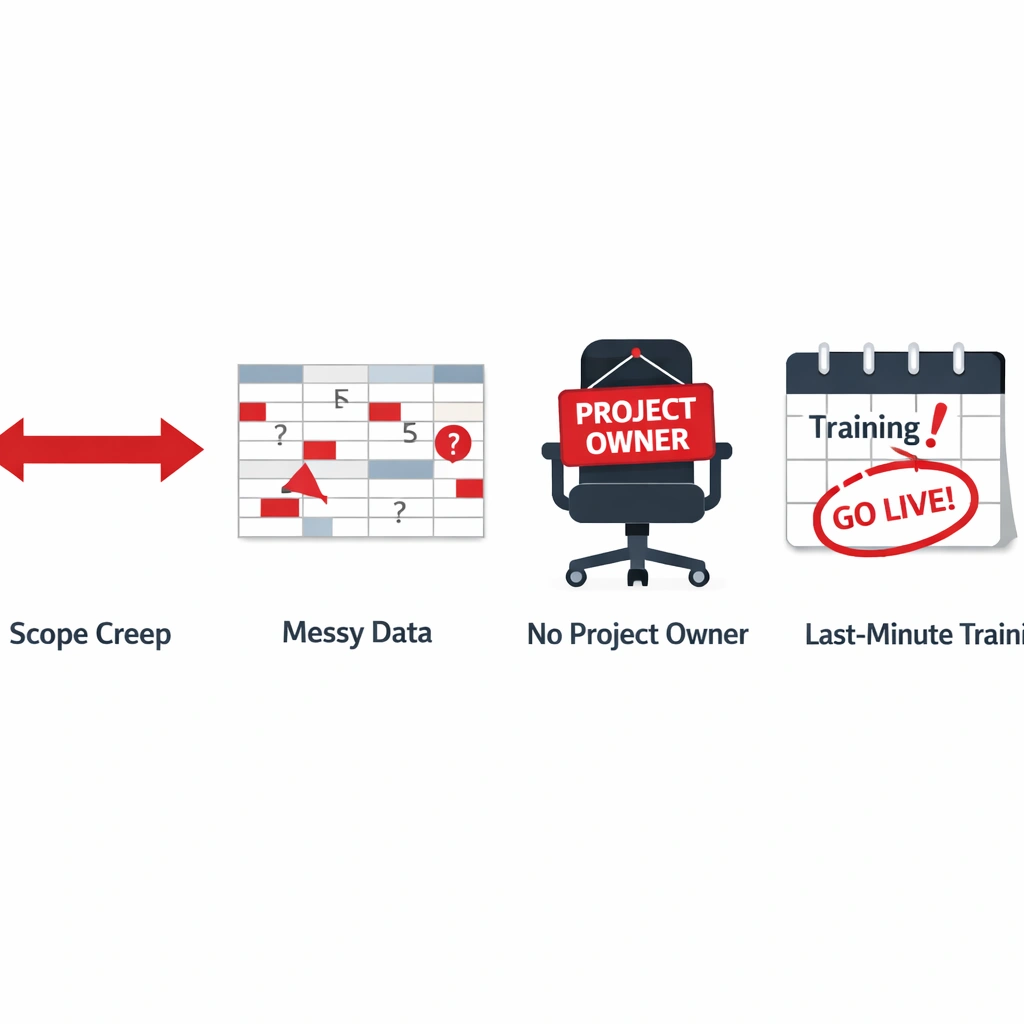
Scope creep from day one. Many businesses try to implement everything simultaneously finance, inventory, HR, CRM, project management all at once. The result is a project that balloons in complexity, misses its timeline, and exhausts the team before the system is even live. A phased approach is not a compromise. It is the correct methodology.
Data migration underestimation. Your existing data customer records, product catalogs, historical transactions, supplier information needs to be cleaned, mapped, and migrated to the new system before go-live. Businesses consistently underestimate how long this takes and how much bad data they’re currently sitting on. Plan for this phase to take two to three times longer than your initial estimate.
No internal project owner. Every successful ERP implementation has a single internal person who owns the project — not the vendor, not the implementation consultant, but someone inside your business who understands your workflows and has the authority to make decisions. Without that person, the project drifts.
Training treated as an afterthought. Software adoption fails when training happens the week before go-live. Users need time to practice in a sandbox environment, make mistakes with no consequences, and build muscle memory before the system goes live with real data.
Phase one: operational mapping before vendor selection
The first phase of how to implement AI ERP software has nothing to do with software. It is a documentation exercise, and it is the most valuable work you will do in the entire process.
Before you evaluate a single platform, map every major workflow in your business at the process level. For each workflow, document the following.
What triggers the process. What steps happen in sequence. Who is responsible for each step. What decisions get made along the way and on what basis. Where the process currently breaks down or creates delays. What data goes in and what output comes out.
This exercise serves two purposes. First, it gives you a clear picture of what you actually need the ERP to do — which prevents you from buying features you don’t need and missing ones you do. Second, it gives you the documentation you need to configure the new system accurately rather than defaulting to the vendor’s generic template.
Most businesses discover during this phase that they have more undocumented processes than they realized. A purchasing workflow that three people handle differently. An invoicing process that has two parallel versions running simultaneously. A reporting routine that one person runs manually because the system doesn’t support it. These discoveries are valuable precisely because they surface before the migration, not during it.
Phase two: data audit and cleanup
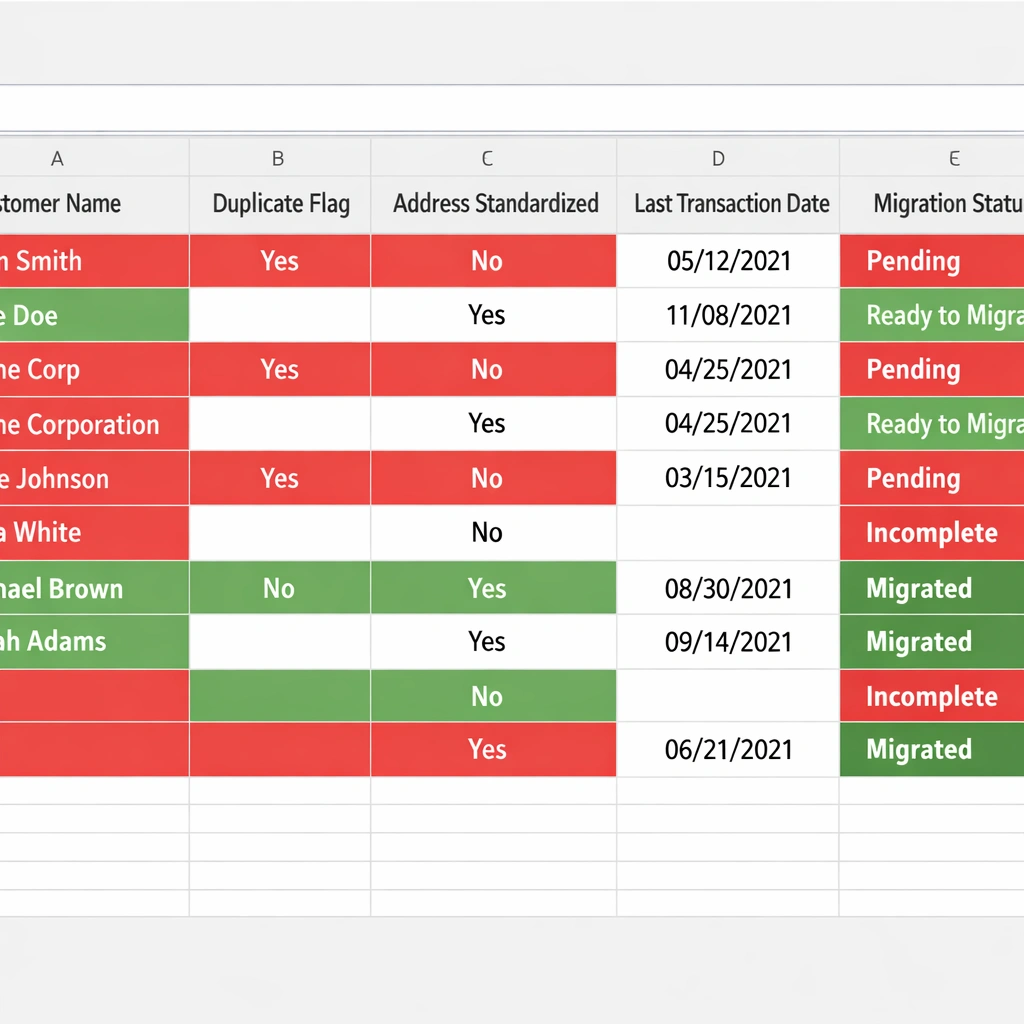
Once your workflows are mapped, the next step in how to implement AI ERP software is a full audit of your existing data. This is the phase most businesses skip or underestimate, and it is consistently the cause of go-live delays.
Your new AI ERP platform is only as intelligent as the data you feed it. If your product catalog has inconsistent naming conventions, your customer records have duplicates, or your historical transaction data has gaps, the system’s forecasting and automation capabilities will be degraded from day one.
A practical data audit covers five areas.
Customer records. Deduplicate, standardize address formats, verify contact information, and flag inactive accounts for archiving rather than migration.
Product and inventory data. Standardize SKU formats, verify current stock counts against physical inventory, and clean up discontinued products that are still cluttering the catalog.
Supplier information. Update contact details, verify payment terms, and consolidate any duplicate supplier records created over time.
Historical transactions. Decide how far back you need to migrate transaction history and in what format. Not every legacy transaction needs to live in the new system — a clean starting point with archived access to historical data is often the better choice.
Chart of accounts. If your financial structure has accumulated years of ad hoc account additions, the migration is the right moment to rationalize it. A cleaner chart of accounts makes the AI layer’s financial intelligence significantly more accurate.
Phase three: phased implementation sequencing
With your workflows documented and your data cleaned, you are ready to begin the actual implementation. The sequencing of how to implement AI ERP software in phases is the single most important structural decision you will make in this process.
The recommended sequence for most small businesses follows a consistent logic: start with the modules that have the highest operational impact and the most straightforward data migration, then layer in complexity as the team builds confidence with the new system.
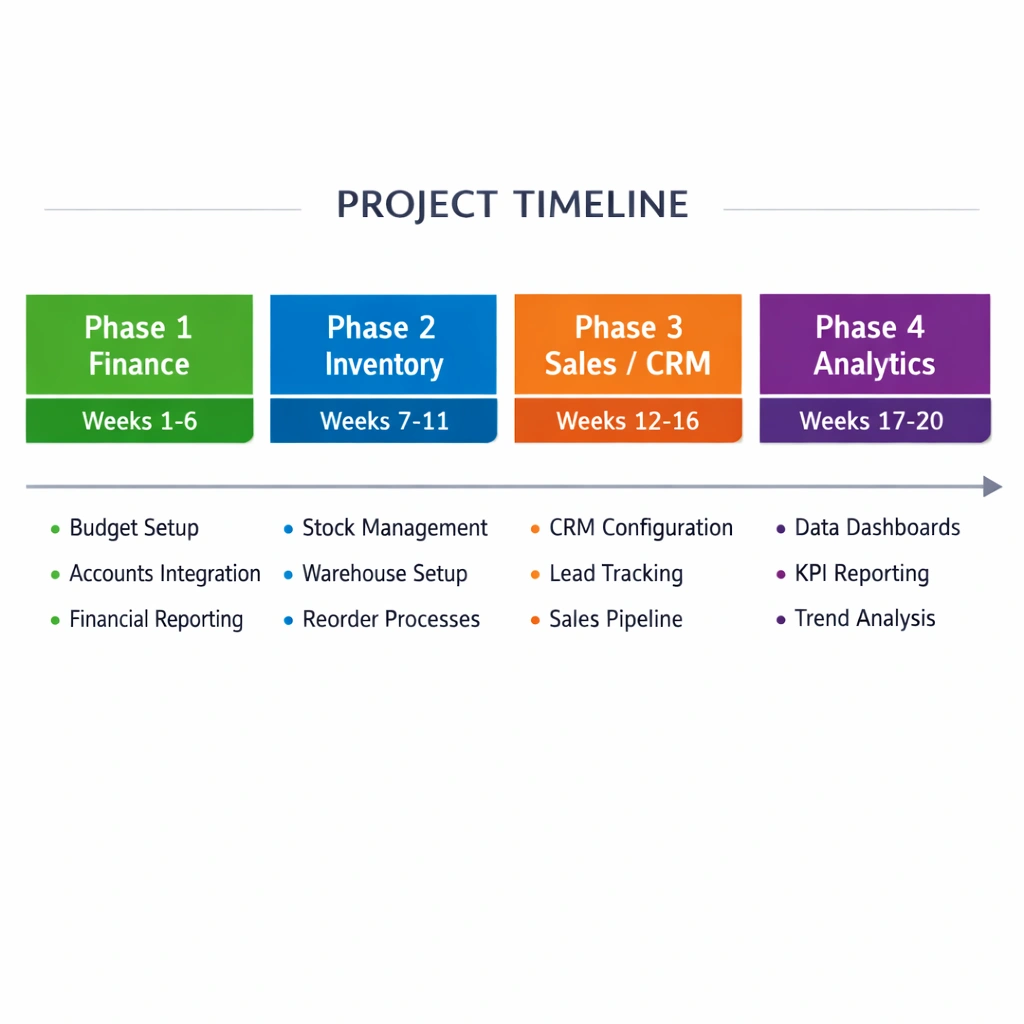
Phase one: finance and accounting. This module affects every other function in your business and provides the clearest ROI signal early. Automated invoice matching, bank reconciliation, and cash flow reporting give your team immediate, tangible proof that the system is working. This phase typically runs four to six weeks.
Phase two: inventory and procurement. Once finance is stable, connect your inventory and purchasing workflows. Automated reorder rules, supplier management, and purchase order processing are the functions where the AI layer delivers the most visible time savings. This phase typically runs three to five weeks.
Phase three: sales and CRM integration. Connect your customer-facing workflows to the operational data now running in the system. Order management, fulfillment tracking, and customer communication automation become significantly more powerful once they have live inventory and financial data to draw from.
Phase four: reporting and analytics. With all core modules live, configure your executive dashboard and automated reporting. This is where the AI layer’s full intelligence becomes accessible — cross-functional insights that weren’t possible when your data lived in separate systems.
For context on what the financial commitment looks like across these phases, AI ERP software cost — what you’ll actually pay in 2026 breaks down the investment by implementation phase.
Phase four: sandbox training and parallel running
One of the most consistently skipped steps in how to implement AI ERP software is the parallel running period — the window where both the old system and the new system run simultaneously before the old one is switched off.
Parallel running serves a specific purpose. It lets you verify that the new system is producing the same outputs as the old one for known inputs. If your legacy system generates a monthly revenue figure of $340,000 and your new ERP generates $312,000 for the same period, you have a data mapping problem that needs to be resolved before go-live. Catching that discrepancy during parallel running costs you time. Catching it after go-live costs you significantly more.
The sandbox training period runs alongside this. Every team member who will use the system needs structured training in a non-production environment — a copy of the system with realistic but non-live data. Training should cover the workflows specific to each person’s role, not a generic platform walkthrough. A finance team member needs to know how to process an invoice and reconcile a bank statement. They don’t need a tour of the inventory module.
Plan for a minimum of three weeks of sandbox access before go-live. For teams with lower technical comfort levels, five to six weeks is more appropriate.
Phase five: go-live and the first thirty days
The go-live moment is not the finish line. It is the beginning of the most operationally sensitive period in the entire implementation. The first thirty days after launch require active monitoring and a clear escalation path for issues.
Designate a specific person — your internal project owner — as the go-live support lead. Their job during the first thirty days is to monitor system outputs daily, collect team feedback on friction points, and escalate issues to the vendor or implementation partner immediately rather than letting them accumulate.
Set realistic expectations with your team before go-live. The system will behave differently from the old one in ways that feel unfamiliar at first. Some of those differences are features. Some are configuration gaps that need to be addressed. The team needs to know the difference and have a clear channel for reporting both.
Measure three things specifically in the first thirty days: the number of manual interventions required for processes that should be automated, the accuracy of the system’s first forecasting outputs compared to actuals, and the time your team is spending on system-related questions versus actual work. Those three metrics tell you whether your implementation is on track or needs recalibration.
The internal change management piece most entrepreneurs ignore
No section on how to implement AI ERP software is complete without addressing the human side of the transition. Technology adoption fails when the people using the system don’t understand why it exists or how it makes their work better.
Before go-live, communicate clearly with every team member who will interact with the new system. Not just a training schedule — a genuine explanation of what is changing, why the business made this investment, and what it means for their specific role. People resist change when it feels arbitrary. They adopt it when they understand the reasoning.
Identify your internal advocates early. In every team, there are one or two people who adapt to new tools quickly and become informal support resources for their colleagues. Invest extra time in training those people. They will do more for your adoption rate than any vendor-provided resource.
Address the job security concern directly if it comes up. Automation raises legitimate questions about roles. Be honest about what the system will handle and what it won’t, and be clear about how your team’s responsibilities will evolve rather than disappear.
For a broader view of how AI ERP fits into your overall automation strategy, AI ERP software — the complete guide to automating your business operations connects the implementation process to the larger picture.
Conclusion
Knowing how to implement AI ERP software correctly is largely a project management and change management exercise with a technology component not the other way around. The businesses that execute successful implementations are the ones that invest in preparation, sequence their phases deliberately, train their teams properly, and treat the first thirty days after go-live as a critical monitoring period rather than a celebration.
The platform you choose matters. The way you implement it matters more.
