

The number that stops most entrepreneurs from self-hosting their backend is not the technical complexity. It is the assumption that running your own infrastructure costs more than paying a managed platform. That assumption is wrong, and the math is not even close.
A self-hosted BaaS on a VPS running Appwrite or Nhost costs between $6 and $20 per month depending on the traffic your product handles. The equivalent infrastructure on Firebase, Supabase, or AWS Amplify — once you account for authentication costs, database reads and writes, storage bandwidth, and function invocations — runs three to ten times higher at any meaningful user volume. The gap widens as your product grows.
This guide covers the VPS providers worth considering, the server specifications that match each platform’s requirements, the deployment process from a fresh server to a running backend, and the monitoring setup that keeps a lean infrastructure reliable in production.
Why a VPS is the right infrastructure choice for self-hosted BaaS
A VPS, or virtual private server, is a dedicated slice of a physical machine running in a data center. You get root access, a fixed allocation of CPU and RAM, and a predictable monthly bill that does not change based on how many API calls your application makes.
That last point is the one that matters most for a self-hosted BaaS VPS deployment. Managed platforms charge per operation — per database read, per authentication event, per gigabyte of storage bandwidth. Those costs are invisible when your product has no users and painful when it gains traction. A VPS flips that model entirely. Your infrastructure cost is fixed at provisioning time and stays fixed regardless of what your users do.
The broader case for self-hosting over managed platforms — including the vendor lock-in and compliance arguments — is covered in detail in the guide to self-hosted backend as a service and why it beats vendor lock-in. This guide assumes you have made that decision and focuses on the infrastructure execution.
Choosing the right VPS provider for your self-hosted BaaS
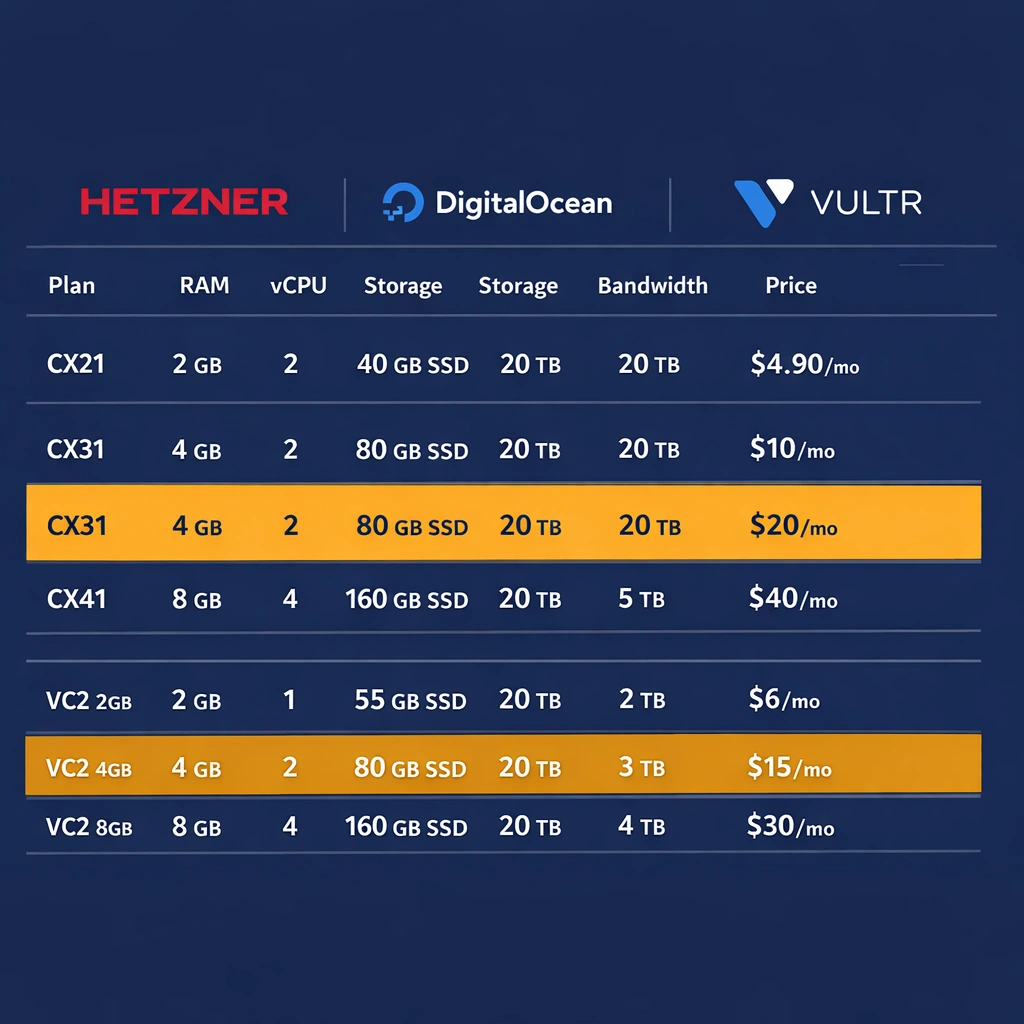
Three providers dominate the conversation for bootstrapped founders running self-hosted BaaS deployments in 2026: Hetzner, DigitalOcean, and Vultr. Each has a distinct positioning worth understanding before you provision a server.
Hetzner
Hetzner is the price-performance leader by a significant margin. Their CX22 plan — 2 vCPU cores, 4GB RAM, 40GB SSD, 20TB monthly bandwidth — costs approximately $4.50 per month as of 2026. For context, a DigitalOcean droplet with equivalent specifications costs roughly three times more.
Hetzner’s data centers are located in Germany, Finland, and the United States. For a European product or one where EU data residency matters for compliance, Hetzner is the obvious choice. For a US-focused product where latency to American users is a priority, their Ashburn, Virginia location covers that requirement cleanly.
The tradeoff with Hetzner is that their support documentation and community resources are less extensive than DigitalOcean’s. For a straightforward self-hosted BaaS VPS deployment, this rarely matters — the setup process is well-documented elsewhere. For complex networking configurations or data center-specific issues, DigitalOcean’s tutorials and community answers are more abundant.
DigitalOcean
DigitalOcean’s basic droplets start at $6 per month for 1GB RAM and $12 per month for 2GB RAM. The 2GB plan is the practical entry point for a self-hosted BaaS VPS running Appwrite, and the 4GB plan at $24 per month is the right starting point for Nhost.
DigitalOcean’s advantage is ecosystem depth. Their documentation covers common server configurations in detail, their managed database add-ons make it easy to offload your database to a dedicated service when your product outgrows a single-server setup, and their one-click application marketplace includes Appwrite as a pre-configured deployment option that reduces initial setup time.
Vultr
Vultr sits between Hetzner and DigitalOcean on price and between them on ecosystem maturity. Their High Frequency compute plans offer strong single-core performance — relevant for Node.js workloads like Parse Server — at competitive pricing. Their global data center coverage is broader than either Hetzner or DigitalOcean, which matters for products with geographically distributed users.
Matching server specifications to each BaaS platform
The minimum server specifications for a stable self-hosted BaaS VPS deployment vary by platform, and running below the minimum produces unpredictable behavior under load rather than a clean failure you can diagnose.
Appwrite on a VPS
Appwrite’s Docker Compose stack runs comfortably on 2GB RAM for a product with under 5,000 monthly active users. The services that consume the most memory are the MariaDB database and the background worker that handles async tasks like email sending and function execution.
A Hetzner CX22 at $4.50 per month or a DigitalOcean 2GB droplet at $12 per month covers an early-stage Appwrite deployment cleanly. When your product reaches 5,000 to 15,000 monthly active users, upgrading to 4GB RAM eliminates the memory pressure that starts affecting query response times at higher concurrency.
Disk space requirements depend primarily on your file storage volume. The base Appwrite installation uses approximately 3GB of disk. Each gigabyte of user-uploaded files adds to that. For a product with significant file storage requirements, configuring Appwrite to use an external S3-compatible storage provider — Backblaze B2 at $6 per terabyte per month — keeps your VPS disk usage lean and your storage costs predictable. The full Appwrite self-hosted configuration, including storage adapter setup, is covered in the Appwrite self-hosted setup guide.
Nhost on a VPS
Nhost’s multi-service stack — Postgres, Hasura, the auth service, MinIO, and the functions runtime — requires 4GB RAM as a genuine minimum rather than a conservative recommendation. Running Nhost on a 2GB server produces out-of-memory errors under moderate query load because Hasura’s query planning and Postgres’s buffer cache compete for the same memory space.
A Hetzner CX32 at approximately $9 per month provides 4GB RAM and 8 vCPU cores — an unusually strong price-to-performance ratio for a Nhost self-hosted BaaS VPS deployment. For a product in early growth, this server handles several thousand concurrent users without resource contention. The Nhost self-hosted configuration details, including the environment variables that control each service’s memory allocation, are covered in the Nhost self-hosted GraphQL and Postgres guide.
Parse Server on a VPS
Parse Server’s Node.js runtime is the most memory-efficient of the three platforms. A 2GB VPS handles a MongoDB-backed Parse deployment comfortably for early-stage traffic. A Postgres-backed Parse deployment benefits from 4GB RAM when database connection pooling and query concurrency increase, but the Node.js process itself stays lean regardless of database choice.
The Parse server self-hosted setup on a VPS benefits from running the database as a separate service rather than on the same machine at scale. MongoDB Atlas’s free tier or a small Postgres instance on a separate $4 Hetzner server keeps your Parse application server’s resource profile predictable. The full Parse Server deployment process is covered in the Parse server self-hosting guide.
Provisioning and configuring a fresh VPS
The steps from a new VPS to a server ready for BaaS installation are consistent across all three providers and take approximately fifteen minutes.
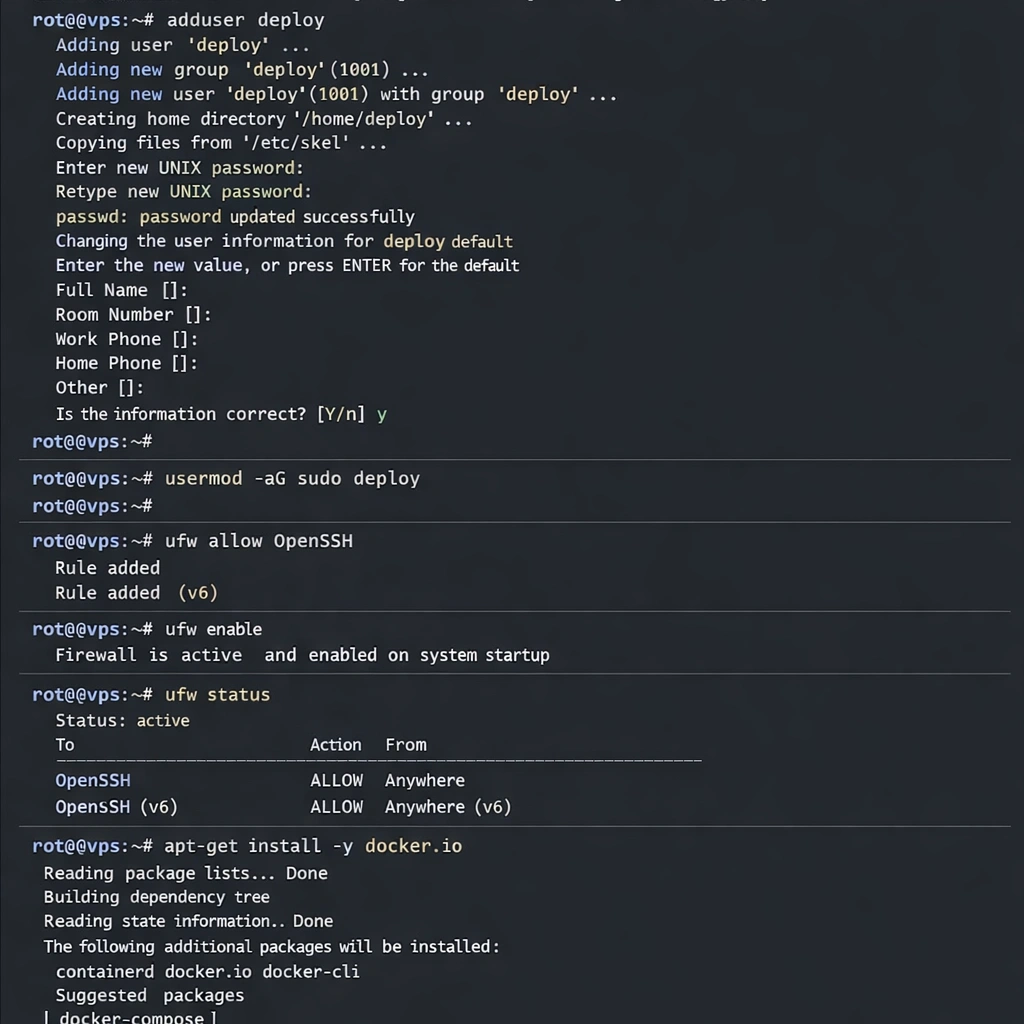
After provisioning your server and receiving the root credentials, SSH into the machine:
ssh root@your-server-ipCreate a non-root user with sudo privileges — running your BaaS services as root is a security risk you should eliminate at setup time:
adduser deploy
usermod -aG sudo deploy
Configure the firewall to allow SSH, HTTP, and HTTPS traffic and block everything else:
ufw allow OpenSSH
ufw allow 80/tcp
ufw allow 443/tcp
ufw enable
Install Docker Engine and Docker Compose using Docker’s official installation script:
curl -fsSL https://get.docker.com | sh
usermod -aG docker deploy
Point your domain’s A record at your server’s IP address in your DNS provider’s dashboard. DNS propagation takes between a few minutes and a few hours. Verify that your domain resolves to your server before running your BaaS installation — SSL certificate provisioning fails if the domain does not resolve correctly at installation time.
Nginx reverse proxy configuration for production deployments
Running your BaaS platform directly on ports 80 and 443 works for simple single-service deployments, but a reverse proxy gives you the flexibility to run multiple services on the same server, handle SSL termination in one place, and add request-level features like rate limiting and access logging without modifying your BaaS configuration.
Install Nginx and Certbot for SSL certificate management:
sudo apt install nginx certbot python3-certbot-nginxCreate a server block configuration for your domain. For an Appwrite deployment running on its default port:
server {
    server_name yourdomain.com;

    location / {
        proxy_pass http://localhost:80;
        proxy_set_header Host $host;
        proxy_set_header X-Real-IP $remote_addr;
        proxy_set_header X-Forwarded-For $proxy_add_x_forwarded_for;
        proxy_set_header X-Forwarded-Proto $scheme;
    }
}
Run Certbot to provision your SSL certificate and automatically update your Nginx configuration:
sudo certbot --nginx -d yourdomain.comCertbot handles the Let’s Encrypt certificate request, the Nginx configuration update to add HTTPS, and the automatic HTTP to HTTPS redirect. It also installs a renewal cron job that refreshes your certificate before it expires.
Monitoring your self-hosted BaaS VPS without a dedicated operations team
A self-hosted BaaS VPS deployment does not require a full monitoring stack to stay reliable, but running with no visibility into server health is the most common way founders discover problems after users have already experienced them.
Three lightweight tools cover the monitoring requirements for an early-stage self-hosted deployment without meaningful cost or configuration overhead.
UptimeRobot monitors your BaaS API endpoint every five minutes and sends an email or SMS alert when it stops responding. The free tier covers five monitors, which is sufficient for most early-stage products. This is the single most important monitoring step — knowing your backend is down within five minutes rather than when a user reports it.
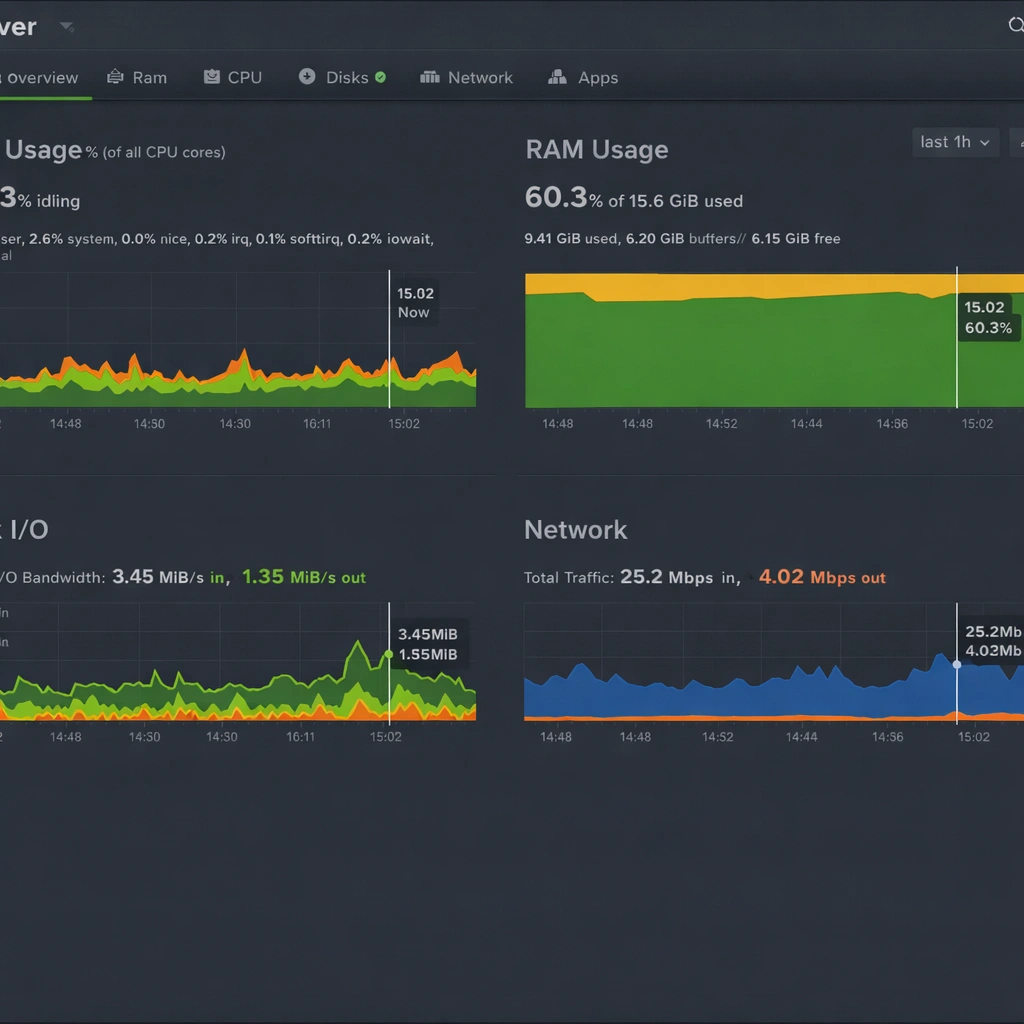
Netdata is an open-source server monitoring agent that installs in one command and provides a real-time dashboard of CPU, RAM, disk I/O, and network metrics. It runs locally on your VPS and exposes a dashboard on a configurable port. For a self-hosted BaaS VPS deployment, the RAM usage graph is the most useful indicator — sustained memory pressure above 85% is the signal to upgrade your server plan before you experience an outage.
Docker health checks are built into the Docker Compose configurations of both Appwrite and Nhost. Running docker compose ps shows the health status of each service container. A container in an unhealthy state is often the first indicator of a configuration problem that has not yet produced visible errors in your application.
Backup strategy for a self-hosted BaaS VPS
Backups on a self-hosted deployment are your responsibility, and the backup strategy that works for most early-stage products is simple enough to set up in under an hour.
For Appwrite, the data that requires backup is the MariaDB database and the file storage directory. A daily cron job that runs mysqldump against the Appwrite database container and uploads the resulting file to a Backblaze B2 bucket covers the database. The storage directory backup follows the same pattern with rsync or rclone.
For Nhost, the Postgres database is the primary backup target. pg_dump against the Postgres container produces a portable backup file. Hasura metadata — the table tracking configuration, relationships, and permission rules — lives in the migrations directory of your Nhost project and should be committed to a Git repository rather than treated as infrastructure state.
For Parse Server, MongoDB backup uses mongodump for a MongoDB-backed deployment and pg_dump for a Postgres-backed one. Parse Server itself has no persistent state beyond the database — the application code and configuration file are the only other items that require version control.
Automate the backup with a cron job that runs nightly and retains the last seven daily backups. At Backblaze B2 pricing, storing seven daily backups of a small-to-medium SaaS database costs under $0.50 per month. The production security hardening steps that complement this backup strategy — including firewall rules, secrets management, and access controls — are detailed in the open-source BaaS security hardening guide.
Conclusion
A self-hosted BaaS on a VPS is not a compromise infrastructure choice — it is a deliberate one that gives you a fixed monthly cost, complete data ownership, and a backend that scales on your terms rather than a vendor’s pricing model. The server providers available in 2026 make the price-to-performance ratio genuinely compelling, the platform options have matured to the point where setup is measured in minutes rather than days, and the monitoring and backup tools required to run it reliably are either free or trivially cheap. For a bootstrapped founder building a product with real long-term ambition, this is the infrastructure foundation worth getting right from day one.
