

Here is the problem every entrepreneur hits about two days into building their first LLM app. The model is impressive in demos — it writes well, reasons clearly, and handles general questions with confidence. Then you deploy it to answer questions about your actual business — your products, your policies, your pricing — and it starts making things upretrieval augmented generation business.
Not because the technology is broken. Because the model was never trained on your data. It knows the world. It does not know your business.
Retrieval augmented generation business — or RAG — is the architectural mechanism that fixes this exact problem. It allows an LLM app to pull relevant information from your specific company content before generating a response, grounding the output in your actual data, tone, and context instead of the model’s general training.
Understanding retrieval augmented generation business is not optional if you want to build LLM apps that perform reliably in production for real enterprises. It is the difference between a demo that impresses and a dependable system your customers and team can trust. For the full strategic context of where RAG fits inside a complete build, the guide to building LLM apps for business covers the end-to-end architecture. If you’re evaluating whether the infrastructure investment makes sense for your budget, the LLM app development cost breakdown gives you the real numbers.
The core problem RAG solves
retrieval augmented generation business Language models are trained on static datasets. That training has a cutoff date, and more importantly, it never included your business data in the first place. Your product documentation, your service policies, your internal SOPs, your past client communications — none of that exists inside the model.
When a customer asks your LLM-powered support agent a specific question about your return policy, one of three things happens without RAG:
The model confidently generates an answer that sounds plausible but is fabricated. This is called hallucination — when a model produces output that is fluent and confident but factually wrong relative to your actual information.
The model gives a generic answer that is technically accurate in a broad sense but useless in the context of your specific business.
The model admits it does not have that information, which is honest but not helpful.
None of these outcomes is acceptable in a production system. RAG eliminates all three by giving the model access to your content at the moment it generates a response.
What RAG actually is, without the jargon
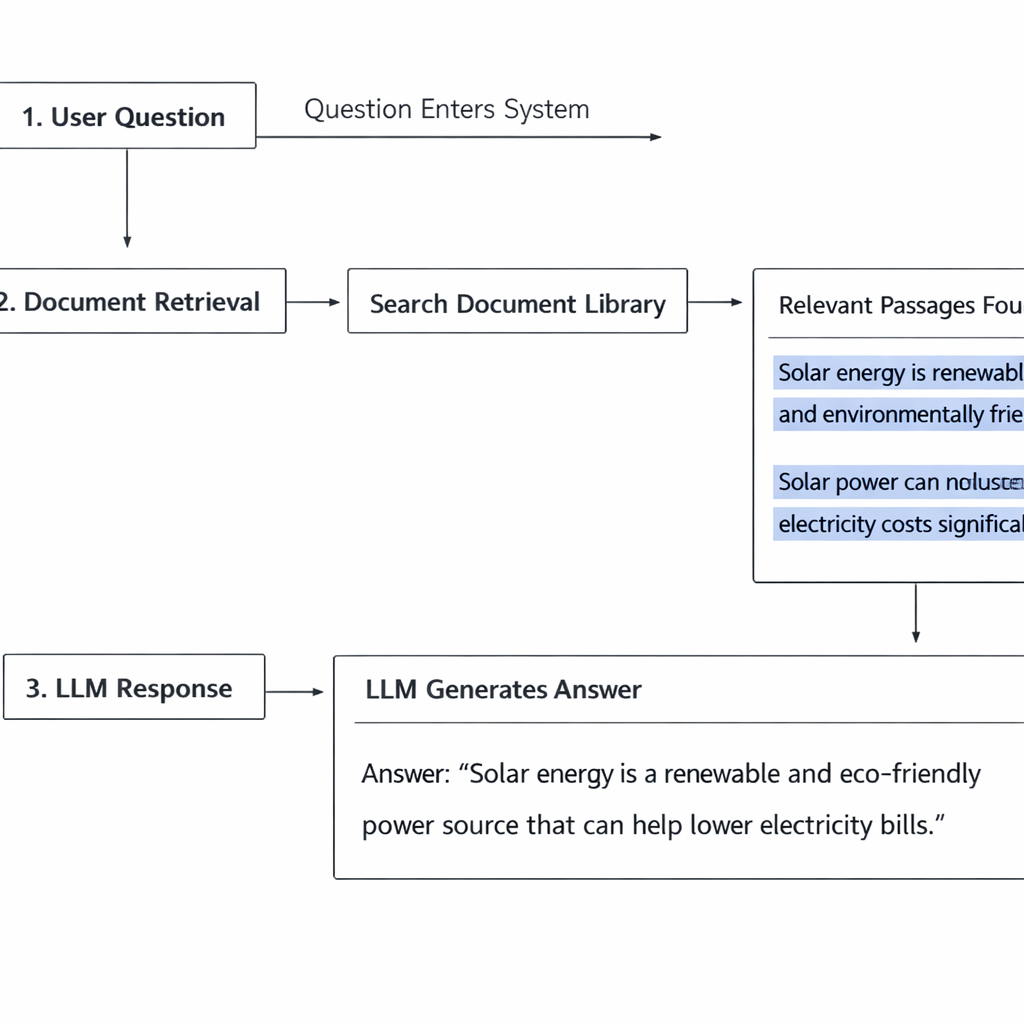
retrieval augmented generation business RAG combines two operations that happen in sequence every time a user sends a message to your LLM app.
Retrieval. Before the model generates anything, the system searches your knowledge base for content that is relevant to the user’s question. It pulls the most relevant passages — not the entire database, just the sections most likely to contain the answer.
Augmented generation. The retrieved content is inserted into the prompt alongside the user’s question. The model now has both the question and the relevant context from your knowledge base. It generates a response grounded in that specific content rather than its general training.
The model does not search the knowledge base itself. A separate retrieval system handles that step and hands the relevant content to the model as part of the input. The model’s job is still generation — but now it is generating from a foundation of your actual information.
That is the complete mechanism. The technical implementations vary in complexity, but the core concept does not change.
How a RAG pipeline works step by step
Building a mental model of the full pipeline helps you make better decisions about every component.
Step one: document ingestion
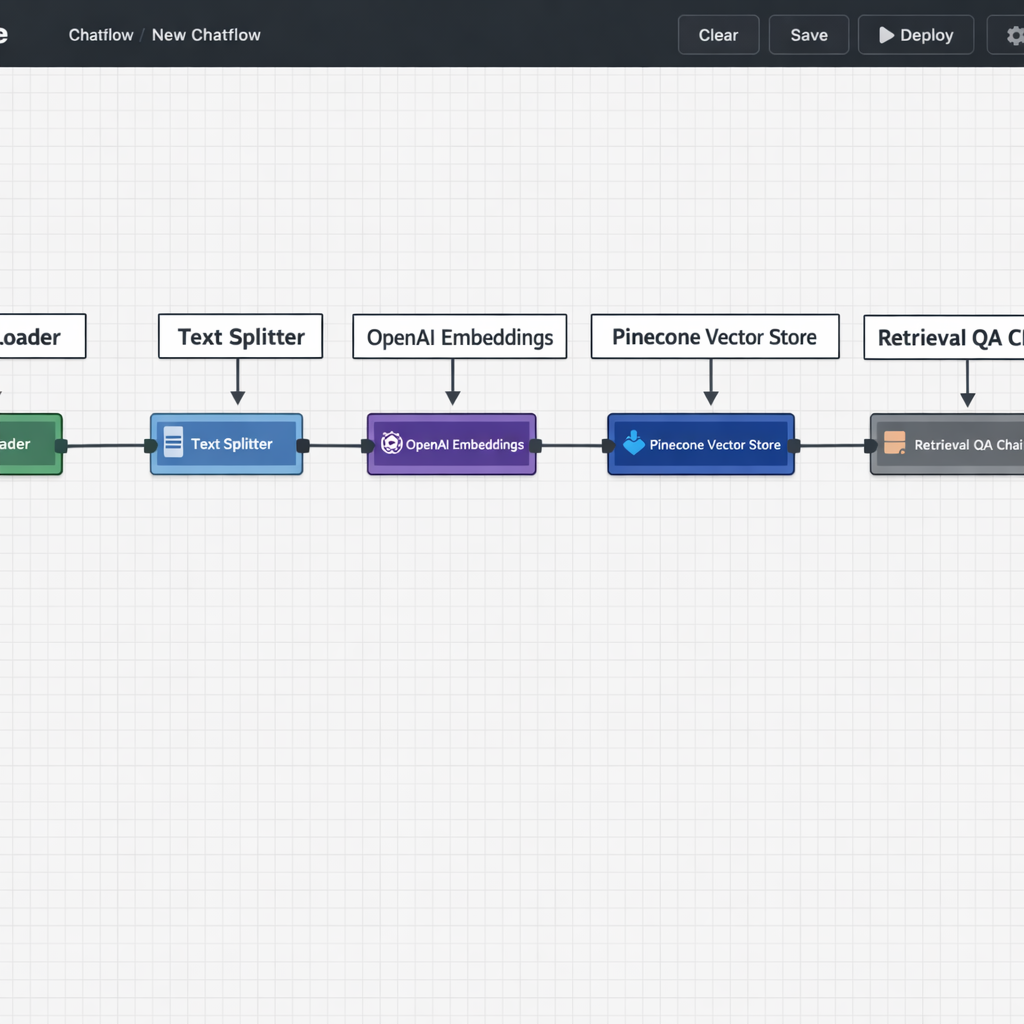
Your source documents — PDFs, web pages, Google Docs, help center articles, product descriptions — are loaded into the system. Each document is broken into smaller chunks, typically a few hundred words each. Chunking matters because you want to retrieve the specific passage that answers the question, not an entire fifty-page manual.
Step two: embedding
Each chunk is converted into an embedding — a numerical representation of its meaning. Embeddings capture semantic content, not just keywords. Two chunks that mean the same thing in different words will have similar embeddings. This is what allows the retrieval system to find relevant content even when the user’s question is phrased differently from the source material.
Step three: vector storage
The embeddings are stored in a vector database — a specialized data store optimized for similarity search. When a query comes in, the system converts the query into an embedding and searches the vector database for the stored chunks with the closest semantic match. Popular vector databases used in production include Pinecone, Weaviate, and Chroma.
Step four: retrieval and prompt construction
The top matching chunks are retrieved and inserted into the prompt template alongside the user’s question. The prompt typically instructs the model to answer based only on the provided context and to acknowledge when the context does not contain a sufficient answer.
Step five: generation
The model generates its response using the retrieved context as its primary reference. The output is grounded, specific, and traceable back to your actual source documents retrieval augmented generation business.
What to put in your knowledge base
The quality of a RAG system is determined almost entirely by the quality of the content fed into it. A technically perfect pipeline built on weak source material will still produce weak outputs.
What belongs in your knowledge base:
Your product or service documentation. Every feature, every specification, every use case — written clearly and completely. If your website copy is vague or marketing-heavy, rewrite it in plain informational language before ingesting it retrieval augmented generation business.
Your policies. Return policies, shipping timelines, refund conditions, terms of service in plain language. These are the most frequently retrieved documents in customer-facing RAG systems. They need to be accurate, current, and unambiguous.
Your FAQs. Not the generic ones — the real ones. Pull your actual support tickets and write answers to the questions that come up most frequently. This is the highest-leverage content investment you can make in a RAG knowledge base.
Your process documentation. If your LLM app is internal-facing — helping your team answer questions or navigate SOPs — your internal process docs are the primary knowledge source. Keep them updated.
What does not belong:
Marketing copy written to persuade rather than inform. Blog posts optimized for SEO rather than factual accuracy. Outdated documents that reflect policies or products no longer in effect. All of these introduce noise that degrades retrieval accuracy.
The LLM-powered customer service agent guide covers the knowledge base maintenance process in the context of a live support system — the same principles apply here.
Building a RAG pipeline without code
The no-code path to RAG is more accessible than most entrepreneurs expect. Two platforms make this particularly straightforward.
Flowise is the most capable no-code option for RAG pipelines. Its visual canvas lets you connect document loaders, text splitters, embedding models, vector stores, and retrieval chains through a drag-and-drop interface. You can have a working RAG pipeline connected to your documents in a few hours without writing a line of code.
The platform supports multiple vector database integrations — Pinecone, Chroma, Supabase — and multiple embedding model providers. You configure each component visually and test the retrieval quality directly inside the interface before connecting it to a user-facing chat or workflow.
Botpress handles RAG more abstractly — you upload your knowledge sources and the platform manages the retrieval infrastructure behind the scenes. This is the faster setup path, but it gives you less control over how retrieval works. For most customer service use cases, that tradeoff is acceptable.
For entrepreneurs evaluating which platform fits their specific build, the no-code LLM app builders guide covers both Flowise and Botpress in the context of full application builds.
Once your RAG pipeline is running, connecting it to broader business workflows — so retrieved information flows into CRM records, support tickets, or reporting systems — is the natural next step. The LLM automation workflows guide covers how RAG-powered apps plug into multi-step operational pipelines.
Common RAG mistakes and how to avoid them
Ingesting documents without cleaning them first. Raw PDFs often contain formatting artifacts, headers, footers, and navigation text that add noise to every chunk. Clean your documents before ingesting them. Remove boilerplate, fix formatting errors, and ensure the text reads cleanly as plain prose.
Using chunk sizes that are too large or too small. Chunks that are too large return too much irrelevant content alongside the relevant passage. Chunks that are too small lose the surrounding context that gives meaning to the retrieved text. A starting point of 300 to 500 words per chunk works well for most business knowledge bases. Adjust based on your retrieval quality testing.
Never testing retrieval quality independently. Most builders test the final output — does the chat response sound right — without testing whether the retrieval step is actually pulling the correct passages. Test retrieval separately. Query your vector database directly with sample questions and review which chunks are being returned. This is where most RAG quality problems originate.
Treating the knowledge base as a one-time setup. Your business information changes. Every time a product feature is updated, a policy is revised, or a new service is launched, your knowledge base needs to reflect that change. Build a document update process into your operations from day one. Assign ownership. Set a review cadence. An outdated knowledge base is not just unhelpful — it actively misleads customers and erodes the trust your agent is supposed to build.
Over-relying on RAG to compensate for poor prompts. RAG provides context. The prompt provides instructions. Both need to be well-designed for the system to perform. A strong knowledge base combined with a weak prompt still produces inconsistent outputs. Invest equal effort in both.
Conclusion
Retrieval augmented generation business is not an advanced feature reserved for technical teams with engineering resources. It is the foundational mechanism that makes LLM apps genuinely useful in real business contexts.
Without retrieval augmented generation business, your app is just a general-purpose language model with your logo slapped on it. With RAG for business properly implemented, it becomes a system that truly knows your company data, speaks with your information, and earns the trust of customers and internal teams alike.
The technology is accessible today. No-code RAG tooling (e.g., LangChain integrations, Pinecone + vector DBs, or platforms like Weaviate + no-code builders) is mature. Building and maintaining the knowledge base is straightforward if approached systematically.
What it really requires is not elite technical skill — it is the discipline to build your knowledge base carefully, chunk it correctly, and maintain it consistently. That discipline is what separates LLM apps that impress in demos from the ones that actually run and scale businesses in 2026.
