

A no-code AI app builder lets entrepreneurs create powerful LLM-powered applications without writing any code — debunking the myth that you need a software engineer to build with large language models in 2026.
The platforms covered on this page are living proof: what used to require custom Python scripts and complex API integrations can now be configured through intuitive visual interfaces in just an afternoon. If you’re still figuring out the fundamentals of what these models actually do, start with our guide on what an LLM is and why it matters for your business before diving into the tooling. For the full strategic picture of how these tools fit into a complete build, check out the end-to-end framework in the guide to building LLM apps for business.no-code AI app builder.
Why no-code matters for LLM app development
Speed and cost are the two reasons no-code wins for most entrepreneurs.
Hiring a developer to build a custom LLM integration is not cheap. Depending on complexity, you are looking at anywhere from $3,000 to $30,000 for a functional first version. That number does not include ongoing maintenance, updates, or the time spent briefing and managing a technical team.
No-code platforms collapse that cost dramatically. Most operate on monthly subscriptions between $30 and $300, and they are built specifically so that non-technical users can configure, test, and deploy working automations without writing a single line of code.
The tradeoff is flexibility. No-code tools are not always the right choice for highly custom or enterprise-scale builds. But for the vast majority of entrepreneur use cases — customer support agents, lead qualification flows, internal knowledge tools — they are more than sufficient no-code AI app builder.
What to look for in a no-code LLM platform
Not every no-code tool is built the same way. Before committing to a platform, evaluate it across these four dimensions:
LLM connectivity. Does the platform let you connect to the models you want to use? The best tools support multiple model providers so you are not locked into a single option.
Visual workflow builder. The core value of no-code is the drag-and-drop interface. Look for platforms where you can map out your entire logic flow — inputs, conditions, outputs — without writing anything.
Data source integrations. Your LLM app will need context to be useful. Can the platform connect to your documents, your CRM, your website, your database? This is what separates a generic chatbot from a business-specific tool.
Deployment options. Where does the app actually live once it is built? You want platforms that let you embed your app in a website, connect it to a messaging tool, or trigger it via an API — without needing a developer to handle the final step.
The top no-code tools for building LLM apps Flowise
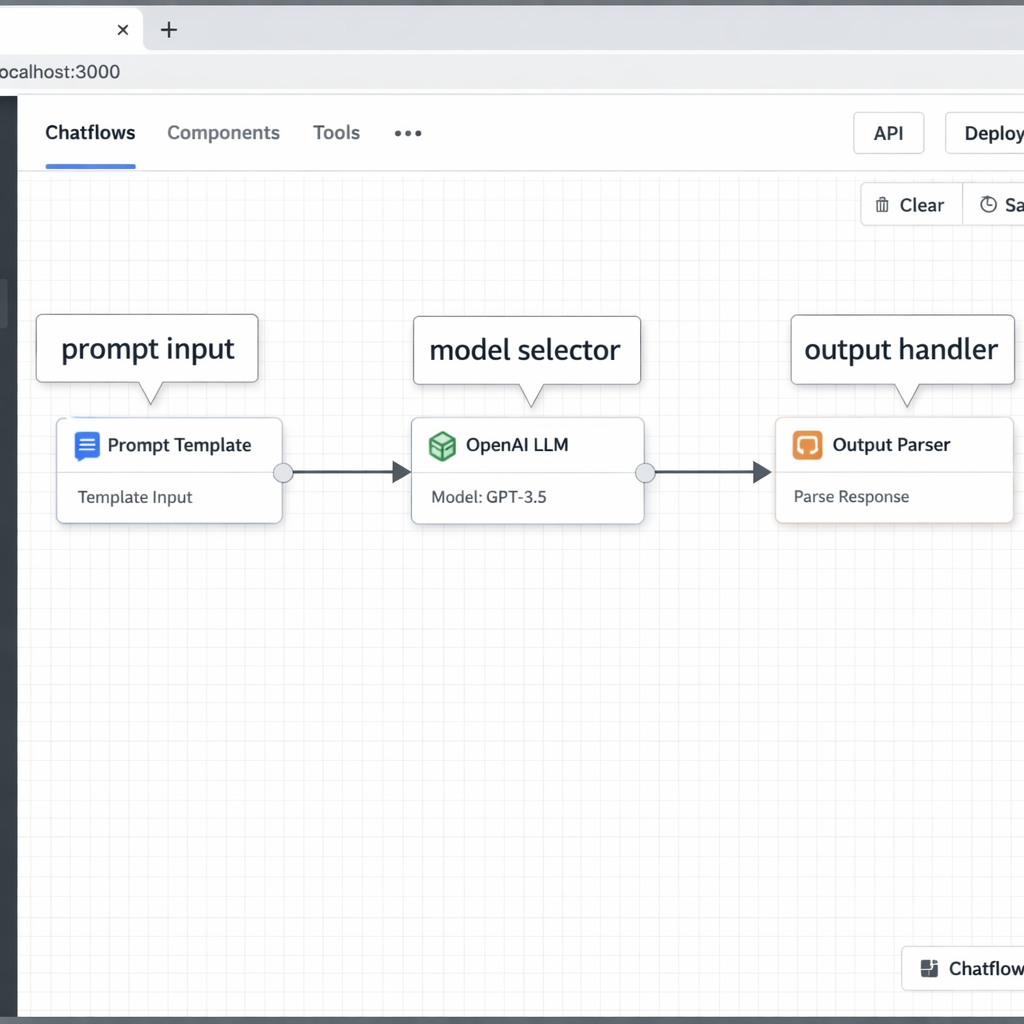
Flowise is an open-source, visual LLM workflow builder. You connect nodes — prompt templates, model connectors, memory modules, data retrievers — to build complete pipelines without writing code.
What makes Flowise stand out is its depth. It supports RAG pipelines, meaning you can connect it to your own documents and have the model answer questions based specifically on your content. If you want to understand why that matters, the guide to RAG for business LLM apps breaks down the concept in plain terms.
Flowise is free to self-host. A cloud version is available for teams that do not want to manage infrastructure.
Best for: Entrepreneurs who want serious capability without paying enterprise prices.
Botpress
Botpress is a no-code platform purpose-built for conversational agents. It combines a visual flow builder with native LLM integration, making it one of the fastest ways to deploy a customer-facing AI agent.
The platform handles conversation logic, fallback flows, and escalation paths through a clean drag-and-drop interface. It also includes built-in analytics so you can track where conversations succeed and where they break down.
Best for: Entrepreneurs focused specifically on customer service or sales automation.
Make (formerly Integromat)
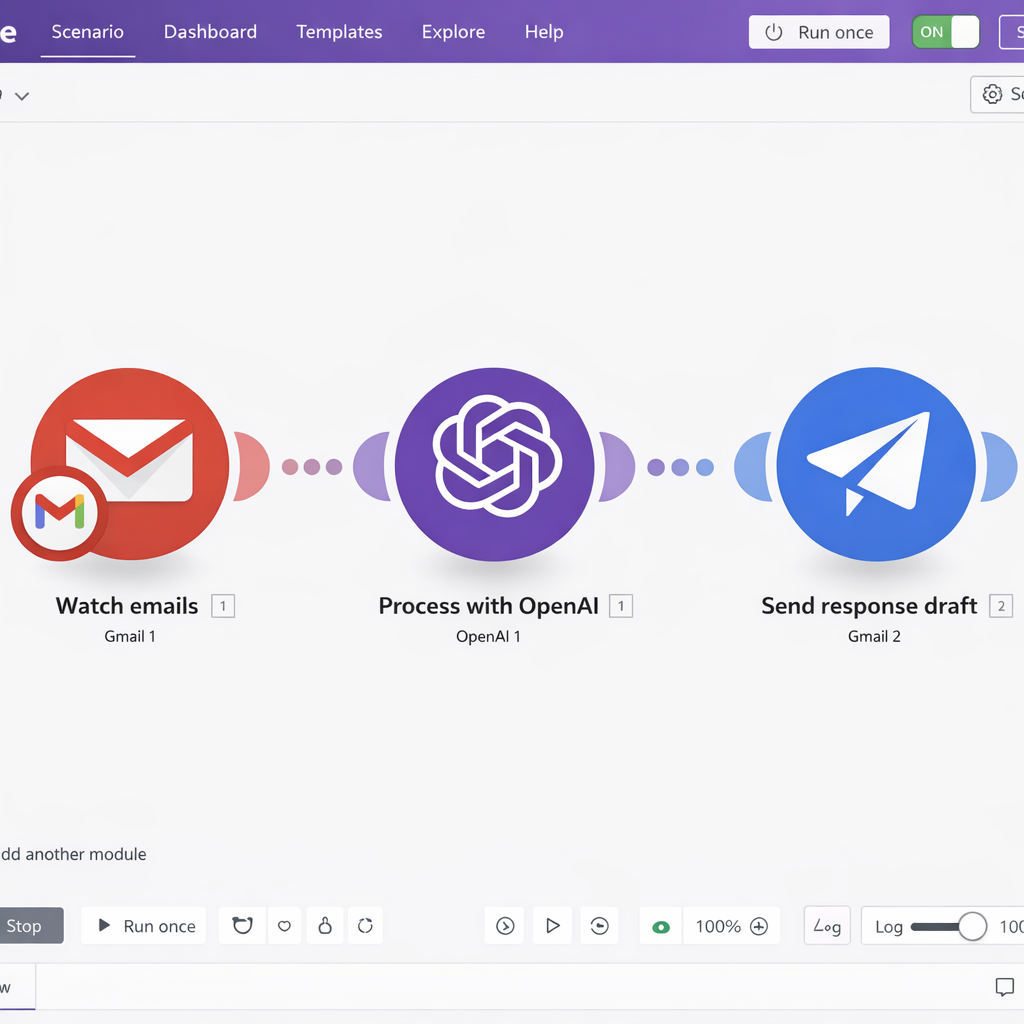
Make is a visual automation platform that connects apps, triggers, and actions across your entire stack. Its LLM modules let you drop language model steps directly into multi-step workflows — so you can, for example, receive a support email, run it through an LLM to generate a draft response, and send it for human review before it goes out.
Make is not a dedicated LLM builder, but it is one of the most powerful tools for connecting LLM logic to the rest of your business. For entrepreneurs building end-to-end automation pipelines, the LLM automation workflows guide shows exactly how Make fits into a complete stack.
Best for: Entrepreneurs who need LLM capabilities embedded inside broader multi-app workflows.
Bubble with AI plugins
no-code AI app builder Bubble is the most established no-code app builder on the market. With its growing ecosystem of AI plugins, you can build full web applications — with user authentication, databases, dashboards, and LLM-powered features — without touching code.
If your vision goes beyond a single automation and toward a fully functional product, Bubble is worth the learning curve. It takes longer to get started than the other tools on this list, but the output ceiling is significantly higher.
Best for: Entrepreneurs building LLM-powered products they plan to sell or scale.
Zapier AI (Zapier Central)
Zapier has been the king of no-code automation for years. Its AI layer, Zapier Central, lets you create AI agents that run inside your existing Zapier workflows. You can define behaviors, give the agent access to connected apps, and let it act autonomously based on triggers.
The advantage here is Zapier’s integration library — over 6,000 apps. If you already have a Zapier stack, adding LLM logic to it is a low-friction first move.
Best for: Entrepreneurs already using Zapier who want to add LLM capabilities without switching platforms.
How to choose the right tool for your business
The fastest path to the wrong decision is trying to pick the best tool in the abstract. The right tool depends entirely on your use caseno-code AI app builder.
Use this filter:
- If you want a customer-facing conversational agent → start with Botpress
- If you want LLM steps inside a multi-app workflow → start with Make or Zapier AI
- If you want to build a RAG-powered knowledge tool → start with Flowise
- If you want to build a full product → start with Bubble
The honest limitations of no-code
No-code platforms are powerful, but they have ceilings. Here is what you need to know before committing:
Customization limits. If your use case requires highly specific logic, custom model fine-tuning, or deep integration with proprietary systems, no-code tools may not get you all the way there.
Vendor dependency. You are building on someone else’s platform. If they change pricing, deprecate a feature, or shut down, your workflow is affected. This is manageable — but worth factoring into your build decisions.
Performance at scale. Most no-code platforms are optimized for small to mid-size usage. If you expect tens of thousands of interactions per day, you will eventually need to evaluate whether the platform can handle the load or whether a more custom infrastructure makes more sense. The LLM app development cost page covers when it makes financial sense to move beyond no-code.
Conclusion
No-code AI app builders have genuinely democratized what entrepreneurs can build in 2026. The platforms available today — from Hostinger Horizons and Base44 to Lovable and FlutterFlow — would have required a full engineering team just two years ago. The barrier is no longer technical; it’s strategic.
Knowing which problem to solve, which no-code AI app builder fits that problem best, and how to measure whether the output delivers real value — that’s where the real work begins.
Pick one no-code AI app builder. Build one thing. Measure it. Then build the next one. Start today — the tools are ready, and the advantage goes to the fast movers.
