
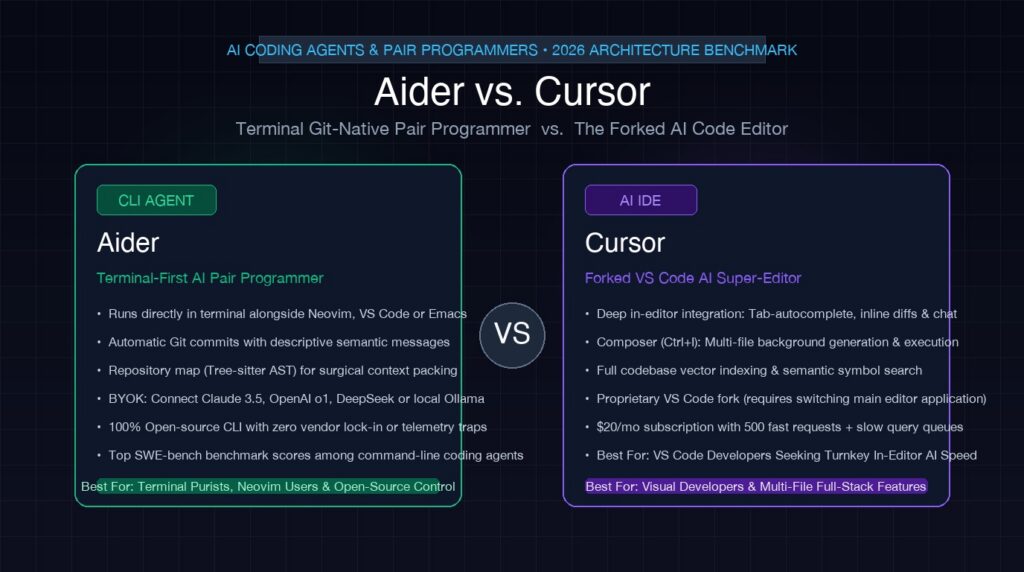
The developer ecosystem has reached a pivotal ideological fork in AI-assisted software engineering: should AI live inside your existing terminal as an autonomous, Git-native pair programmer, or should it subsume your entire editor into a custom-forked IDE? In one corner stands Aider, Paul Gauthier’s open-source terminal CLI that turns any codebase into an AST-indexed Git collaborator; in the other stands Cursor, Anysphere’s VS Code fork that transformed AI from an inline auto-completer into a full-fledged agentic IDE with Composer. Having deployed both across high-throughput production monorepos, microservices, and local offline stacks, here is the unfiltered architectural and workflow reality of Aider vs. Cursor in 2026.
For senior developers, terminal power-users, and infrastructure engineers, the choice between Aider and Cursor is not merely an aesthetic preference. It dictates your data privacy boundaries, token expenditure, dependency on proprietary closed-source middleware, and how tightly your version control history reflects AI-driven code refactoring.
The Fundamental Architectural Divide: CLI Pair vs. Forked IDE
To understand the practical divergence between Aider and Cursor, you must look at how each tool intersects with your codebase and editing environment.
1. Aider: The Headless, Git-Native Agent
Aider operates as an out-of-band terminal agent written in Python. It does not replace Neovim, Emacs, VS Code, or JetBrains; instead, it lives alongside your editor in an adjacent tmux pane or terminal window. When you launch Aider in a repository:
- Universal Compatibility: You keep your exact editor, keybindings, LSP configurations, and extensions untouched.
- AST Repo-Map: Aider parses your entire codebase using Tree-sitter to construct a concise map of classes, methods, and exported signatures. This compact AST representation is passed in the system prompt, providing global structural awareness without blowing up your token context window.
- Direct Git Commits: Every time Aider executes an edit, tests it, and confirms it compiles or passes linting, it automatically stages the files and generates an atomic, conventional commit with an accurate descriptive message.
2. Cursor: The Deeply Integrated Fork
Cursor takes the opposite philosophical bet: AI cannot reach its maximum utility as an external plugin or CLI tool. Anysphere hard-forked Microsoft’s VS Code (VSCodium base) to embed AI into the editor’s core event loop, file system watchers, and language server protocol:
- Composer & Multi-File Generation: Cursor’s flagship feature, Composer (invoked with
Cmd+IorCtrl+I), acts as a multi-file code generator that directly creates, modifies, and orchestrates changes across dozens of files simultaneously inside the GUI. - Predictive Copilot++ (Cursor Tab): Rather than just completing the current word or line, Cursor predicts your cursor movements and edits your syntax before you type, streaming unified diffs directly into your active buffer.
- Proprietary Indexing Engine: Cursor creates client-side and remote vector embeddings of your entire repository, calculating semantic similarity chunks for fast retrieval augmented generation (RAG).
Repository Indexing & Context Engines Compared
When dealing with 100,000+ lines of code, passing the entire codebase to an LLM is either impossible or economically reckless. How each tool manages context retrieval determines its coding accuracy.
| Context Vector | Aider | Cursor |
|---|---|---|
| Indexing Mechanism | Tree-sitter AST Repository Map (graph of symbols and call hierarchies) | Semantic Vector Embeddings (chunked code blocks stored locally/remotely) |
| Context Budgeting | Dynamically allocates ~1k-2k tokens for the AST map; explicit file inclusion (/add) |
Automatic RAG indexing with @codebase, @web, and @docs references |
| Configuration File | .aider.conf.yml and CONVENTIONS.md |
.cursorrules (or modern .cursor/rules/) |
| Noise & Hallucination Resistance | High. Only explicitly selected files and AST signatures enter prompt. | Moderate. Semantic search can occasionally pull irrelevant code chunks. |
Aider’s Tree-sitter AST approach solves the “needle in a haystack” problem with mathematical precision. If you ask Aider to update an API endpoint, it already knows which models define the request payload and which controllers export the routes because the AST captures relationship graphs, not just vector similarity. For deeper architectural patterns in agent systems, see our technical breakdown of Model Context Protocol (MCP) and LlamaIndex vs. LangChain.
Git Integration & Version Control Philosophy
The single greatest operational difference during a 10-hour coding sprint is how changes are vetted, staged, and rolled back.
Aider’s Autonomous Commit Loop
When working with Aider, every change is treated as a micro-pull request:
# Developer prompt in Aider CLI:
> Refactor the AuthMiddleware to check Redis token blacklists before JWT validation

# Aider steps:
# 1. Analyzes auth_middleware.py and redis_client.py
# 2. Emits unified search/replace blocks
# 3. Executes `git commit -m "feat(auth): add Redis token blacklist verification"`
# 4. If tests fail, developer types `/undo` to instantly revert the commit cleanly
This automated Git discipline keeps your repository spotless. If an LLM refactoring goes awry, you do not have to hunt through hundreds of unsaved buffer modifications. You simply run /undo, and your working tree reverts to the exact commit before the agent touched it.
Cursor’s Visual Buffer Acceptance
Cursor relies on interactive graphical diffs. When Composer generates modifications across six files, it presents side-by-side green and red diff blocks with individual Accept and Reject buttons. For visual developers who want to inspect every line before it touches disk, this is intuitive and reassuring. However, in large multi-file migrations (e.g., updating 30 files for a breaking API upgrade), clicking “Accept” 30 times quickly becomes fatigue-inducing.
Model Flexibility: BYOK Freedom vs. Managed Subscriptions
The economic and operational trade-offs between Aider and Cursor become stark when evaluating inference models and infrastructure costs.
The Pricing & Model Sovereignty Matrix:
- Aider: 100% Free & Open-Source (BYOK). You bring your own API keys for Anthropic Claude 3.5 Sonnet, OpenAI o1/o3-mini, DeepSeek-V3/R1, or run completely offline via local inference servers like Ollama or vLLM. You pay exact wholesale token pricing directly to the provider with zero middleman markup.
- Cursor: $20/Month Pro Subscription. Includes 500 fast premium requests per month (Claude 3.5 Sonnet, GPT-4o), followed by unlimited slow-pool requests. Enterprise plans cost $40/user/month. While you can configure custom API keys in Cursor, many native features (like background codebase indexing and multi-file Composer) run most reliably through Cursor’s proprietary proxy.
Privacy & Air-Gapped Environments
For defense, healthcare, and enterprise fintech organizations, Cursor’s requirement to route telemetry and context indexing through external servers can trigger compliance hurdles—even with Cursor’s “Privacy Mode” enabled. In contrast, Aider can run in a 100% air-gapped terminal, pointing directly to a private self-hosted vLLM instance running quantized open-weights models (such as DeepSeek-Coder or Qwen 2.5 Coder) without sending a single packet over the public internet.
SWE-bench Benchmark Reality: Who Actually Solves Bugs?
Marketing hype aside, how do these systems perform on standardized engineering benchmarks like SWE-bench (real GitHub issues from popular open-source repositories)?
Aider has consistently set industry benchmarks on the official SWE-bench Verified leaderboard. By pairing Claude 3.5 Sonnet with its specialized two-agent architecture (an Architect agent that reasons and drafts plans, combined with an Editor agent that translates changes into exact unified diffs), Aider frequently scores at the very top of autonomous coding evaluations.
Cursor is optimized for interactive developer velocity rather than pure unattended autonomous benchmarking. While Composer can resolve complex tickets, its primary strength is collaborative steering, where the human in the loop guides the agent at each juncture.
Comprehensive Head-to-Head Comparison
| Feature / Capability | Aider | Cursor |
|---|---|---|
| Primary Interface | Terminal CLI / REPL (Works with Neovim, Emacs, VS Code, Zed) | Full GUI IDE (Dedicated VS Code fork) |
| License & Source | 100% Open-Source (Apache 2.0) | Proprietary core on open-source VSCodium base |
| Git Automation | Automated atomic commits, lint check, instant /undo |
Manual staging, visual diff accept/reject in editor buffer |
| Inline Auto-Complete | None (Relies on your editor’s existing LSP/plugins) | Exceptional (Cursor Tab / Copilot++ multi-line prediction) |
| Local LLM Support | Native first-class support for Ollama, vLLM, LM Studio, llama.cpp | Supported via OpenAI-compatible endpoints, but feature-degraded |
| Voice & Multimodal | Built-in voice input via Whisper API (/voice); image input support |
Drag-and-drop screenshot attachments in chat/Composer |
| Monthly Cost | Free software + pay-per-token API fees (~$5-$30/mo depending on use) | $20/month flat (Pro tier) |
When to Choose Aider vs. Cursor
Choose Aider If:
- You refuse to leave Neovim, Emacs, or JetBrains: You have spent years tuning your window management, keybindings, and plugins. Aider runs alongside your setup without forcing you into an Electron-based VS Code clone.
- You demand strict Git hygiene: You want automated micro-commits with descriptive commit logs, making every AI experiment completely reversible with a single
/undocommand. - You operate on private or offline hardware: You need to connect directly to local models via Ollama or enterprise proxy clusters without sending code to proprietary third-party servers.
- You want exact control over token expenditures: Using Claude 3.5 Sonnet for architecture reasoning and DeepSeek-V3 for diff editing minimizes API costs while outperforming unified models.
Choose Cursor If:
- You want the most seamless GUI-based AI editing experience: You live inside VS Code and want inline predictive multi-line tab completions, visual side-by-side diffs, and drag-and-drop imagery.
- You prefer flat-rate billing: You do not want to manage API balances, usage limits, or separate accounts across OpenAI, Anthropic, and DeepSeek.
- You frequently explore unfamiliar codebases: Cursor’s
@codebasesemantic search index allows you to ask conversational questions and get immediate context-grounded explanations. If you are comparing modern IDE alternatives, check our deep analysis of Cursor vs. Windsurf.
The Hybrid Power Workflow
Many senior engineering teams do not treat Aider and Cursor as mutually exclusive. A battle-tested workflow is running Cursor as your primary visual IDE for rapid exploration, UI styling, and real-time tab autocompletion, while simultaneously running Aider inside an integrated Cursor terminal pane for complex, multi-file refactoring tasks and rigorous Git commit generation.
By leveraging Cursor’s visual ergonomics alongside Aider’s AST repo-map precision, you get the best of both paradigms: frictionless real-time editing with disciplined, automated version control.
Frequently Asked Questions
Can I use Aider with my existing VS Code extensions?
Yes. Aider runs in the terminal (including VS Code’s integrated terminal). Any changes Aider writes to disk are immediately picked up by VS Code’s file watcher, preserving all your extensions, themes, and settings.
Does Cursor send my proprietary code to their servers?
In standard mode, Cursor indexes your code and generates vector embeddings via their cloud infrastructure. When “Privacy Mode” is enabled in settings, Cursor guarantees that no code is stored or used for model training, though requests are still proxied through their inference routing layer.
Can Aider run fully offline with local models?
Yes. By pointing Aider to a local endpoint running Ollama, vLLM, or LM Studio (e.g., aider --model ollama/qwen2.5-coder:32b), Aider functions completely offline with zero internet connectivity.
How does Aider’s token consumption compare to Cursor’s $20 plan?
If you code heavily (40+ hours/week) using Claude 3.5 Sonnet for large refactoring, direct API fees with Aider can reach $25-$50/month. However, for moderate usage or when using cost-effective models like DeepSeek-V3 or local models, Aider is significantly cheaper than Cursor’s $20/month flat fee.