

Most entrepreneurs don’t lose their businesses to bad strategy. They lose momentum to operational drag the slow accumulation of manual processes, disconnected tools, and recurring decisions that eat forty hours a week and produce nothing that moves the business forward. Reordering stock manually. Chasing invoice approvals through email threads. Pulling numbers from three different systems to build a report that’s already outdated by the time it’s finished.
The right AI ERP software features don’t just digitize those processes. They remove them from your team’s plate entirely. The system handles the predictable work automatically, surfaces exceptions that need human judgment, and gives you a real-time view of your operation without requiring anyone to compile it.
This article covers the specific features that deliver the highest operational impact for small and mid-size businesses — not a generic feature checklist, but a practical breakdown of what each capability actually does inside a real business and why it matters.
If you are still evaluating which platforms offer these features at a price point that makes sense for your operation, AI ERP software cost — what you’ll actually pay in 2026 gives you the full financial picture before you commit to anything.
Why most businesses underuse their ERP features
Before covering the features themselves, it is worth addressing a pattern that shows up consistently across small business ERP implementations: most businesses activate less than half of the features they are paying for.
The reason is almost never technical. It is sequencing. Businesses implement the platform, train their teams on the basics, go live, and then move on to the next priority before the more sophisticated features are ever configured. The automation layer sits dormant. The predictive tools never get calibrated. The reporting capabilities get reduced to a single dashboard that someone checks once a week.
The AI ERP software features covered in this article are the ones worth going back to configure if your current implementation has left them untouched. Each one has a direct, measurable impact on time saved or decisions improved.
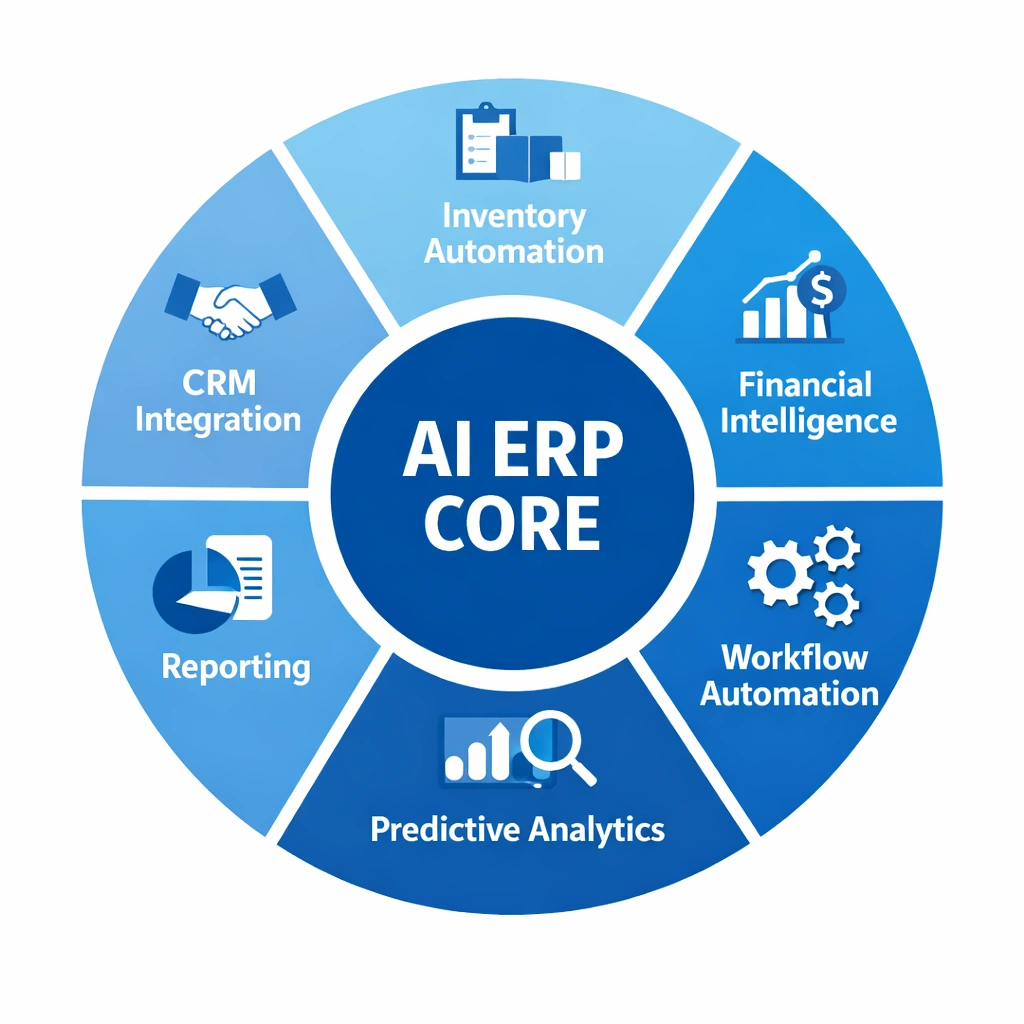
Intelligent inventory management
Inventory is where the AI layer of an ERP platform delivers its most immediately visible value for product-based businesses. The gap between what traditional inventory tools do and what AI ERP software features deliver in this category is substantial enough that it alone often justifies the platform investment.
Demand forecasting. The system analyzes your historical sales data, seasonal patterns, and current demand velocity to predict how much of each SKU you will need over the next 30, 60, and 90 days. This forecast updates continuously as new sales data comes in — it is not a static monthly projection but a rolling prediction that adjusts in real time. For businesses that have historically over-ordered to avoid stockouts or under-ordered to conserve cash, demand forecasting eliminates the guesswork that drives both of those costly habits.
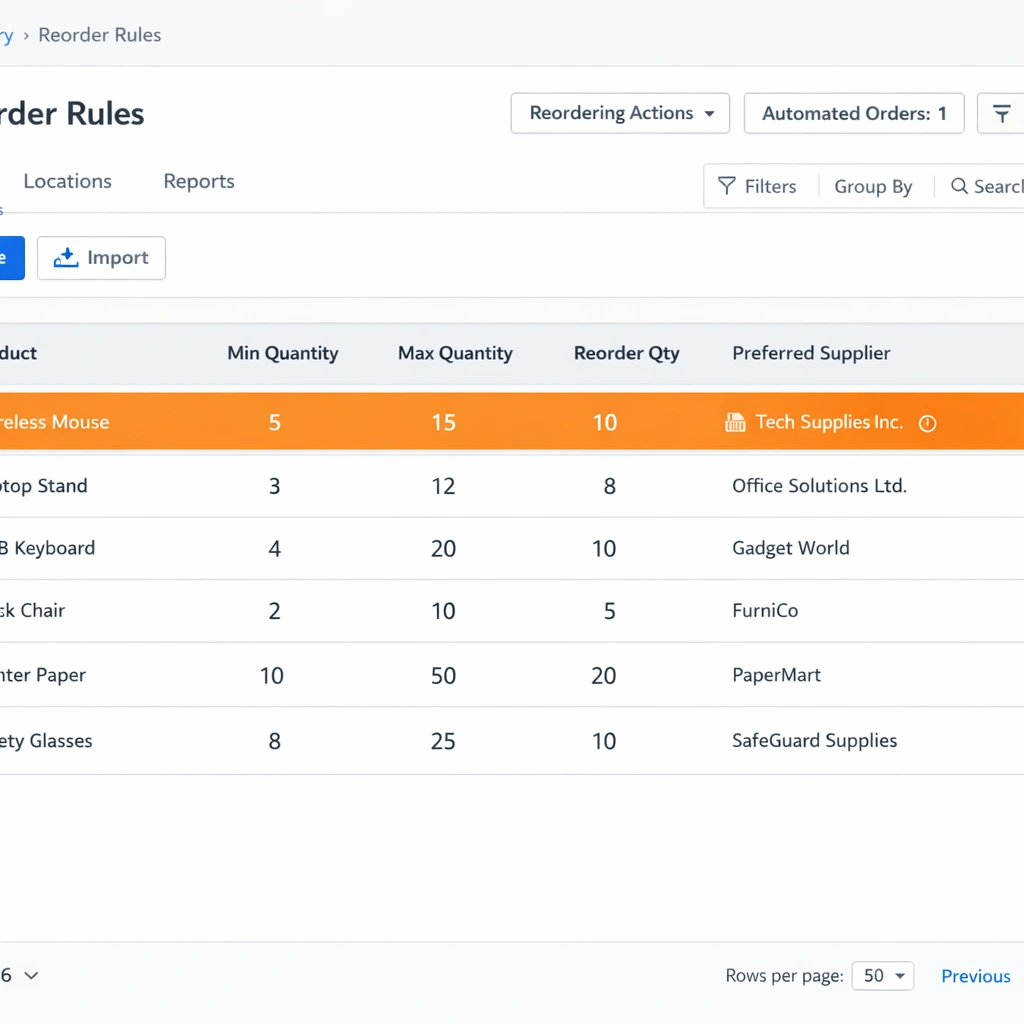
Automated reorder rules. Rather than monitoring stock levels manually and triggering purchase orders when something runs low, you define reorder thresholds and lead time parameters once. When inventory for a specific SKU crosses its reorder point, the system generates a purchase order automatically — or queues one for a single-click approval if you prefer a human checkpoint. The manual monitoring loop disappears entirely.
Supplier lead time intelligence. The system tracks actual delivery performance against promised lead times for each supplier over time. When a supplier starts running consistently late, the system adjusts reorder triggers automatically to account for the extended lead time — before a stockout occurs, not after. This feature alone prevents the kind of fulfillment failures that damage customer relationships and are entirely avoidable with the right data.
Multi-location inventory visibility. For businesses operating across multiple warehouses, retail locations, or fulfillment centers, the system maintains a single real-time view of stock across all locations. Transfer recommendations between locations appear automatically when one location is overstocked while another is running low on the same SKU.
Financial intelligence and automation
Financial management is the second category where AI ERP software features remove an disproportionate amount of manual work from small business operations. The finance function in most small businesses is a combination of necessary analysis and deeply tedious data handling — and the tedious parts are exactly what the automation layer absorbs.
Automated bank reconciliation. The system connects directly to your business bank accounts and credit card feeds, matches incoming transactions against open invoices and recorded expenses automatically, and flags only the transactions it cannot match with confidence for human review. A reconciliation process that previously took a bookkeeper two to three hours per week gets reduced to reviewing a short exception list.
Intelligent invoice matching. When a supplier invoice arrives, the system matches it automatically against the corresponding purchase order and receiving record. If the quantities and amounts align within your defined tolerance, the invoice routes for payment automatically. If there is a discrepancy, it gets flagged with the specific mismatch highlighted — not buried in a queue of documents for someone to review manually.
Cash flow forecasting. This is one of the most strategically valuable AI ERP software features for entrepreneurs managing growth. The system aggregates your current receivables aging, upcoming payables, recurring expenses, and historical collection patterns to generate a rolling cash flow forecast. You see projected cash position 30, 60, and 90 days out — updated daily — with alerts when the forecast shows a gap that requires action. The difference between discovering a cash flow problem two months early and discovering it two weeks early is the difference between having options and having a crisis.
Automated financial close. Month-end close is a recurring operational bottleneck in most small businesses. The system automates the routine steps — accruals, depreciation entries, intercompany eliminations for multi-entity businesses — and produces a preliminary close package that your finance team reviews rather than builds from scratch. Close cycles that previously took five to seven business days compress to one or two.
For businesses that are still running financial operations on a traditional ERP and wondering whether the upgrade is worth the transition cost, AI ERP vs traditional ERP — the brutal truth for entrepreneurs makes the operational case directly.
Workflow automation and approval routing
Beyond the finance and inventory modules, AI ERP software features in the workflow automation category affect every department in your business. This is the layer that eliminates the internal coordination overhead that accumulates invisibly across growing teams.
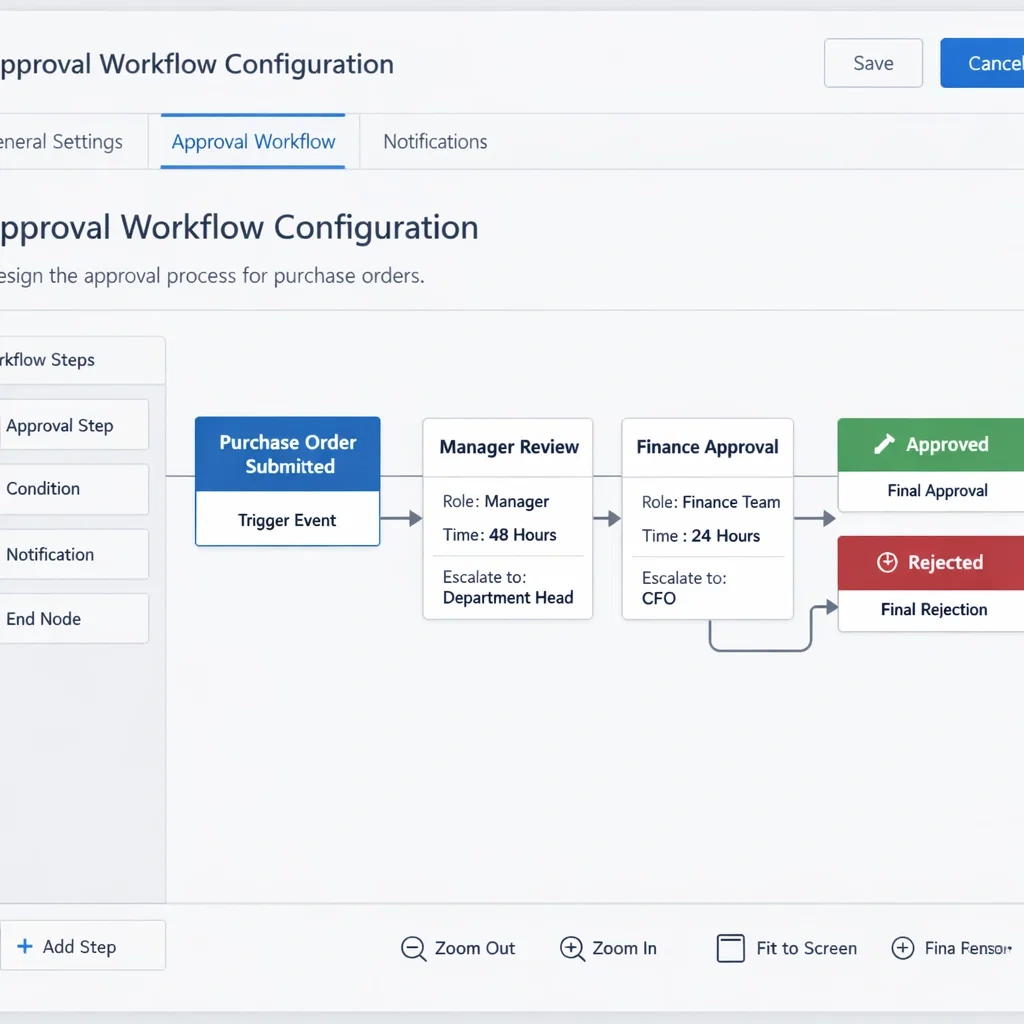
Configurable approval chains. Define approval workflows for any business process — purchase orders above a certain value, expense reports, new vendor onboarding, contract renewals — and the system routes them automatically based on the rules you set. Approvers receive notifications, review within the system, and approve or reject with a single action. The status of every pending approval is visible in real time. Email threads chasing signatures become a legacy behavior.
Exception-based management. The most operationally significant shift that AI ERP software features enable is moving your team from monitoring everything to reviewing only the exceptions. Standard transactions process automatically. The system surfaces only the situations that fall outside defined parameters — a purchase order that exceeds budget, a fulfillment that misses its committed date, an invoice that doesn’t match its purchase order. Your team’s attention goes to decisions that actually require it.
Cross-departmental process triggers. When a sales order is confirmed, it automatically triggers an inventory reservation, a production schedule update if applicable, a fulfillment task, and a revenue recognition entry — all without manual handoffs between departments. The chain of downstream actions that a single business event creates runs automatically, and the system logs every step for audit purposes.
Predictive analytics and business intelligence
The reporting and analytics capabilities of AI ERP software features represent the layer that most directly affects how entrepreneurs make strategic decisions as opposed to operational ones.
Real-time executive dashboard. Rather than waiting for a weekly or monthly report, you have a continuously updated view of the metrics that matter most to your specific business. Gross margin by product line, cash conversion cycle, inventory turnover, customer acquisition cost, fulfillment rate — configured once and updated automatically as new data flows through the system. The dashboard replaces the reporting ritual, not just the spreadsheet.
Anomaly detection. The system establishes baseline patterns for your key business metrics and alerts you when something deviates significantly from those patterns. A sudden spike in product returns. An unusual drop in a specific customer’s order frequency. A supplier whose invoice amounts have started running consistently higher than purchase order values. These signals exist in your data right now — the difference is whether anyone is looking for them systematically.
Scenario modeling. More sophisticated implementations include planning tools that let you model the financial impact of operational decisions before you make them. What happens to cash flow if you extend payment terms to a major customer? What does gross margin look like if raw material costs increase by 15 percent? The system runs those scenarios against your actual operational data and gives you a projected outcome rather than a spreadsheet estimate.
Cohort and trend analysis. For businesses with recurring revenue or repeat customer relationships, the analytics layer tracks customer behavior patterns over time purchase frequency, average order value trends, product category preferences, churn indicators. These insights inform retention strategy, product development, and sales prioritization in ways that transaction-level reporting alone cannot.
CRM and customer-facing integration
AI ERP software features in the customer relationship management category close the loop between your internal operations and your external customer experience a connection that many small businesses manage through disconnected tools and manual coordination.
Unified customer record. Every customer interaction — quotes, orders, invoices, support tickets, communication history — lives in a single record that is accessible to every team member who needs it. A sales representative can see whether a customer has an outstanding invoice before offering a new discount. A support team member can see the full order history before responding to a complaint. The context that improves customer interactions is available automatically rather than requiring someone to pull it from three separate systems.
Automated customer communication. Order confirmations, shipping notifications, invoice reminders, and renewal alerts send automatically based on triggers you define. The communication is consistent, timely, and logged against the customer record without requiring manual action from your team.
Sales forecasting. The system analyzes your pipeline data, historical close rates by stage and representative, and seasonal demand patterns to generate a sales forecast that is grounded in actual behavioral data rather than optimistic estimates. For businesses making hiring, inventory, or cash flow decisions based on expected revenue, the accuracy of this forecast has direct operational consequences.
If you are ready to move from evaluating features to understanding what a full implementation of these capabilities looks like in practice, how to implement AI ERP software without disrupting your business gives you the execution roadmap.
The features that separate good implementations from great ones
The AI ERP software features covered in this article are available on most mid-market platforms in 2026. The difference between a good implementation and a great one is not which features are activated it is how precisely they are configured to match your actual workflows.
Generic configuration produces generic results. A demand forecasting model that uses default parameters rather than your specific supplier lead times and seasonal patterns will generate forecasts that are directionally correct but not precise enough to act on with confidence. An approval workflow that mirrors a template rather than your actual organizational structure will get worked around rather than used.
The businesses that extract the most value from these features invest time upfront in configuration specificity. They define their reorder parameters based on actual supplier performance data. They build their approval chains to match how decisions actually get made in their organization. They configure their anomaly detection thresholds based on real baseline patterns rather than leaving them at defaults.
That investment in precision is what separates a platform that transforms operations from one that becomes expensive shelfware eighteen months after go-live.
For a complete view of how all of these capabilities fit together into a single operational strategy, AI ERP software — the complete guide to automating your business operations connects every feature category to the broader picture of what modern business automation actually looks like in practice.
Conclusion
The AI ERP software features that matter most are not the ones with the most impressive product demos. They are the ones that eliminate the specific manual work your team does every week that produces nothing except the absence of a problem. Demand forecasting that prevents stockouts. Cash flow alerts that prevent cash crises. Approval routing that prevents bottlenecks. Anomaly detection that prevents surprises from becoming disasters.
The operational leverage these features create is real and measurable. The businesses that configure them precisely and use them consistently build an infrastructure that scales without proportional increases in headcount or management complexity. That is the actual return on investment the technology delivers — and it compounds every year you run on it.
