

There is a version of your business that runs while you sleep: support questions answered instantly, leads qualified and routed before you check your phone, reports generated, emails drafted, data organized — all without anyone on your team touching it.
That version of your business is not a fantasy. It is an operational architecture powered by LLM apps — and learning how to build LLM apps that automate real operations is now accessible to non-technical entrepreneurs.
The entrepreneurs doing this right now aren’t all coders or venture-backed. What they share is clarity on how the technology works, which problems it solves best, and how to move from concept to a working system without drowning in unnecessary complexity.
This guide gives you the complete, actionable path: from understanding what LLM apps are, to choosing the right no-code/low-code tools in 2026, building your first automation, connecting it to your existing stack, and scaling it as your business grows.
Whether you’ve never built anything with large language models before or you’ve launched one isolated app and now want to create a full connected system, this is where you start.
What is an LLM and why it changes how you operate
Before building anything, you need a working mental model of what you are actually working with. Not a technical deep dive — a practical understanding that shapes every build decision you make downstream build LLM apps.
LLM stands for large language model. It is a type of software trained on enormous volumes of text — books, articles, code, conversations, documentation — until it develops the ability to generate coherent, contextually relevant language in response to an input. It does not retrieve stored answers. It generates responses based on patterns learned during training, shaped by the context you provide at the moment of the query.
What makes this useful for business is not the generation capability in isolation. It is the fact that you can constrain, direct, and specialize that capability. You can give the model a persona, a set of rules, a body of knowledge specific to your business, and a defined task — and it will operate within those parameters consistently, at scale, without fatigue.
The gap between what most entrepreneurs think LLMs can do and what they actually can do tends to run in both directions. Some underestimate the technology and dismiss it as a novelty. Others overestimate it and expect autonomous intelligence that does not yet exist in production systems. The entrepreneurs who build successfully are the ones who understand the realistic capability envelope — and design their systems to operate squarely within it.
The most common entry point is customer-facing automation: support agents, lead qualification tools, onboarding assistants. These use cases work well because they involve high-volume, repetitive language tasks with a relatively narrow range of expected inputs. The model does not need to be creative or unpredictable. It needs to be consistent, accurate, and fast.
From there, the scope expands. Internal knowledge tools, document processing pipelines, content operations, sales enrichment workflows — each of these is a different application of the same underlying capability, pointed at a different operational problem.
Understanding where to point the technology first is the strategic decision that determines whether your first build succeeds or stalls. For a complete breakdown of what LLMs are, how they process language, and which business functions they are best suited for, the guide to what an LLM is and why entrepreneurs should care covers the full foundation.
Best no-code tools to build LLM apps without writing a single line
The assumption that building with large language models requires a software engineer has stopped more entrepreneurs from starting than any other barrier. It is also, at this point in the tooling landscape, simply not true.
No-code LLM platforms have matured to the point where a non-technical founder can configure, test, and deploy a production-ready automation in a matter of days. The visual interfaces handle the infrastructure. The integrations are pre-built. The deployment options are straightforward. What remains is the strategic work — defining the use case, structuring the logic, and building the knowledge base — which is exactly the work that benefits from business judgment, not engineering skill.
The distinction between platforms matters, though. Not every no-code tool is built for the same purpose, and choosing the wrong one for your use case adds friction that compounds over time. The decision framework is simpler than most platform comparison articles make it appear.
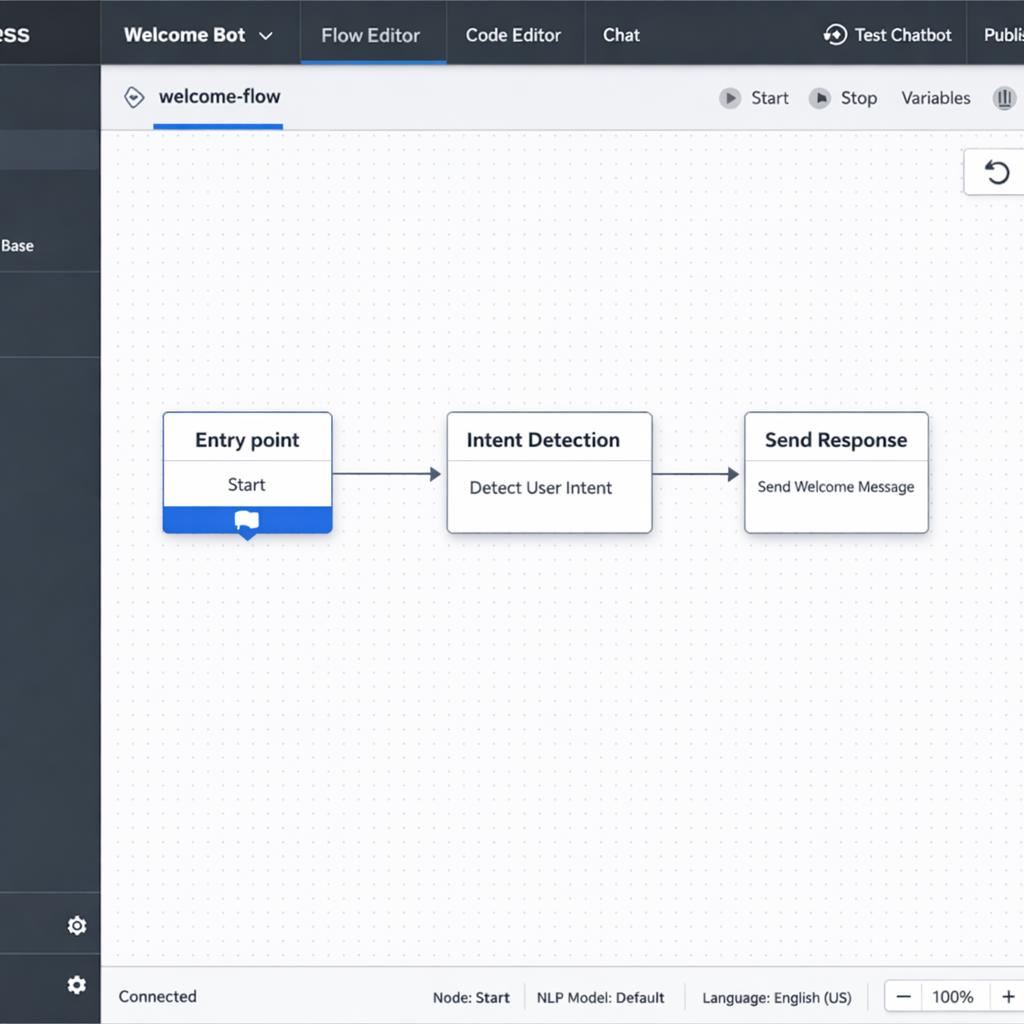
If your primary goal is a customer-facing conversational agent — a support bot, a lead qualification assistant, a booking tool — Botpress is the most direct path. It is purpose-built for conversational flows, handles escalation logic cleanly, and deploys to web chat, WhatsApp, and other messaging channels without requiring a developer to manage the final step.
If you need LLM logic embedded inside a broader multi-app workflow — where data moves between your CRM, your email platform, your spreadsheets, and an LLM processing step — Make is the more appropriate choice. Its visual canvas handles complex branching logic, error handling, and multi-step sequences that go well beyond what a dedicated chatbot builder can support.
If you want to build a RAG-powered knowledge tool — an app that answers questions based on your specific documents and data rather than general model training — Flowise is the strongest no-code option. It supports the full retrieval pipeline visually, including document ingestion, embedding configuration, vector store connection, and retrieval chain setup, all without writing code.
If you are already running automations in Zapier and want to add LLM capabilities to your existing stack without rebuilding everything, Zapier’s AI layer is the lowest-friction entry point. The integration library is unmatched, and dropping an LLM step into an existing Zap takes minutes.
For entrepreneurs whose vision extends beyond a single automation and toward a fully functional product — with user accounts, a database, a dashboard, and LLM-powered features — Bubble with its growing AI plugin ecosystem is the no-code platform with the highest output ceiling, at the cost of a steeper initial learning curve.
The practical guidance here is to resist the temptation to evaluate every platform before building anything. Pick the one that maps most directly to your first use case. Get one workflow running. The learning you get from a live system is more valuable than any amount of pre-build research.
One honest caveat: no-code platforms have ceilings. For most entrepreneur-level use cases — the ones that represent the highest-ROI starting points — those ceilings are nowhere near the limits of what you need to build. But as your automation stack grows and your use cases become more specialized, you may encounter constraints that point toward more custom infrastructure. Knowing when that threshold is approaching, and what it costs to cross it, is part of building strategically. The best no-code tools for building LLM apps covers each platform in full detail, including honest assessments of where each one hits its limits.
How to build an LLM-powered customer service agent in under a week
Customer service is where most entrepreneurs should start. Not because it is the most exciting application of this technology, but because it is the most immediately valuable one.
The math is straightforward. Support volume is predictable. The questions are repetitive. The cost of slow or inconsistent responses is measurable — in refund rates, in churn, in review scores. And the gap between what a well-built LLM agent can handle and what currently requires human time is wide enough that even a first version delivers meaningful ROI within the first month.
The framework below compresses the build process into five focused days. It is not a shortcut that sacrifices quality. It is a sequenced approach that prevents the two most common failure modes: building before you have defined the scope, and over-engineering before you have tested the basics.
Day one: audit before you build
The first day is entirely research. Do not open any platform. Do not write any prompts. Pull your last three months of support tickets and read them.
You are looking for two things. First, the twenty to forty questions that account for the majority of your inbound volume. These are your agent’s primary targets. Second, the question types that should never go to an agent — billing disputes, legal concerns, complex account issues, anything where a wrong answer carries real consequences. These become your escalation triggers.
Write the ideal answer to each of your top questions in plain, direct language. Not marketing language. Not hedged corporate language. The clearest, most useful answer a knowledgeable team member would give. This content is the raw material your agent will work from.
Also define your agent’s persona at this stage. Name, tone, opening message, closing behavior. These decisions shape every interaction the agent has, and they are far harder to retrofit after the system is built than to define upfront.
Day two: platform setup
Choose your platform based on your deployment target. For a web-embedded conversational agent, Botpress is the fastest path to a production-ready interface. For an agent embedded inside a broader workflow — one that connects to your CRM, your ticketing system, or your email platform — Make or Flowise gives you more pipeline flexibility.
Day two is configuration, not construction. Set up your account, create your project, connect your LLM provider, and run one test prompt to confirm the integration is working. Resist the urge to start building conversation flows before the environment is stable. One hour of setup validation prevents hours of debugging later.
Day three: build the core conversation architecture
On day three, you build the skeleton. Map your main conversation paths before configuring them in the platform:
The opening — how the agent greets a user and identifies their intent. The FAQ response layer — the structured responses to your top questions. The escalation path — the condition or phrase that transfers the conversation to a human, along with the handoff message the agent delivers before stepping back. The closing — how the agent ends a resolved conversation and prompts for any follow-up.
Keep this architecture simple. A clean skeleton with four well-defined paths outperforms a complex flow with twenty branches that have never been tested. Complexity comes after validation, not before.
Day four: connect your knowledge base
A language model trained on general internet data knows nothing specific about your business. Day four is about changing that through RAG — retrieval-augmented generation — the mechanism that allows your agent to pull from your actual documentation before generating a response.
Feed the system your product pages, your policy documents, your FAQ content, your shipping and returns information. Write this content in plain informational language before ingesting it. Marketing copy written to persuade performs poorly as a knowledge source. The model needs clear, factual statements it can retrieve and reference accurately.
The knowledge base is the single highest-leverage investment in your agent’s performance. A well-structured knowledge base with mediocre conversation flows outperforms a beautifully designed flow built on weak source material every time.
Day five: test, break, refine
Run a minimum of fifty test conversations before going live. Use real questions from your support history. Include edge cases — questions the agent should not answer, ambiguous requests, frustrated tones, multi-part questions. Document every failure. Fix the critical ones before launch. Accept that you will not catch everything on day five, and build a review process into your first two weeks of operation.
A soft launch — deploying to one channel or a small percentage of traffic before going fully live — reduces risk and gives you a controlled environment to catch issues before they affect your entire customer base.
The measurement framework that tells you whether the agent is actually working covers three metrics: containment rate, response accuracy, and customer satisfaction score. Containment rate — the percentage of conversations resolved without human handoff — is your primary indicator. A realistic first-month target for most businesses is 50 to 65 percent. Below that threshold, the knowledge base needs work. Above it, you start optimizing the edges.
For the complete build walkthrough including platform-specific configuration guidance and the knowledge base principles that determine output quality, the guide to building an LLM-powered customer service agent covers every step in full detail.
LLM app development cost: what you will actually spend in 2025
Cost uncertainty is the second most common reason entrepreneurs delay building their first LLM app. The first is technical intimidation — which the no-code tooling landscape has largely resolved. The second is the fear of starting a project without knowing whether the final bill lands at $500 or $50,000.
The wide ranges published in most cost guides are not useful because they conflate two fundamentally different build paths without distinguishing between them. A non-technical entrepreneur building a customer service agent on Botpress and a development team building a custom multi-agent pipeline for an enterprise client are not doing comparable work. Presenting their costs in the same range tells you nothing actionable about either.
This section separates those tracks and gives you the real numbers for each.
The four cost layers that apply to every LLM app
Regardless of what you build or how you build it, every LLM app carries four cost layers. Understanding these layers is what makes budgeting accurate instead of speculative.
Platform or infrastructure cost. What you pay to use the tool or hosting environment that runs your app. On the no-code path, this is a monthly subscription. On the custom path, this is cloud infrastructure — servers, databases, monitoring services.
API cost. Every call your app makes to a language model costs money. You pay for tokens — the units of text the model processes on both the input and output side. This cost scales directly with usage volume.
Build cost. The one-time investment required to construct the app. On the no-code path, this is your time. On the custom path, this is developer or agency fees.
Maintenance cost. Apps require ongoing attention. Knowledge bases need updating. Prompts need refining. Integrations break when connected platforms update their APIs. This is a recurring time or money investment that first-time builders consistently underestimate.
What the no-code path actually costs
For most entrepreneur use cases — a customer service agent, a lead qualification flow, an internal knowledge tool — the no-code path delivers fully functional automation at a cost that most businesses can absorb without a second thought.
Platform subscriptions across the major no-code LLM tools run between $30 and $300 per month depending on the platform and the feature tier you need. Botpress starts at around $89 per month for production-ready features. Make covers most entrepreneur-level workflow automation between $29 and $99 per month. Flowise is free to self-host, with infrastructure costs of $10 to $50 per month for a cloud-hosted version.
API costs are where most entrepreneurs over-index their concern. At realistic entrepreneur-level volumes, they are almost always a minor line item. A customer service agent handling 500 conversations per month at an average of 800 tokens per exchange consumes roughly 400,000 tokens monthly. At current mid-tier model pricing, that translates to approximately $1.20 to $4.00 per month. At 5,000 conversations per month — a meaningful business volume — the cost scales to $12 to $40 per month. These are not the budget risk the industry tends to dramatize.
Total monthly operating cost for a functional no-code LLM app sits between $30 and $80 at entry level, and $100 to $300 at growth level. One-time build cost in time runs 20 to 40 hours for a first version, depending on complexity.
When custom development becomes relevant
Custom development enters the picture when specific technical requirements exceed what no-code platforms can handle. The most common triggers are deep integration with proprietary internal systems, high-volume usage requiring optimized infrastructure, fine-tuned models trained on your specific business data, and complex multi-agent architectures with custom orchestration logic.
When you cross into custom territory, the cost structure changes substantially. Freelance LLM developers in the US market currently charge between $80 and $180 per hour. Specialized AI agencies price project work between $15,000 and $80,000 for a first production build, depending on scope and complexity. A mid-complexity custom build — a fully integrated customer service system with custom RAG pipelines, CRM connectivity, and a management dashboard — realistically costs $20,000 to $40,000 to construct from scratch.
Infrastructure costs on custom builds also shift. Cloud hosting, vector databases, and monitoring tools add $200 to $2,000 per month at production scale, costs that no-code platforms absorb for you behind their subscription pricing.
The financial break-even point for custom development is roughly when your automation is saving more than $3,000 to $5,000 per month in operational costs. Below that threshold, no-code tools almost always deliver better ROI. Above it, the control and performance gains of a custom build begin to justify the investment.
The hidden costs that catch first-time builders off guard
build LLM apps Four costs consistently surprise entrepreneurs who have not built with LLMs before.
Prompt engineering time is underestimated almost universally. Writing prompts that produce consistent, accurate, on-brand outputs requires iteration. Plan for two to five hours of refinement per major use case, and treat that as an ongoing investment rather than a one-time task.
Knowledge base maintenance is invisible until it becomes a problem. Your business information changes — products, pricing, policies, team structure. Every change that does not get reflected in your agent’s knowledge base is a future inaccurate response waiting to happen. Budget two to four hours per month for knowledge base review and updates as a minimum.
Integration maintenance is the cost nobody mentions in platform marketing. When the tools your app connects to update their APIs or restructure their data, your workflow may break. Factor a maintenance buffer of roughly ten percent of your build cost annually into your planning.
Output quality review is ongoing operational work, not a launch task. The entrepreneurs who get the most out of their LLM apps are the ones who treat transcript review as a recurring function — weekly for new systems, monthly for stable ones. This is how you catch the failure patterns that metrics alone will not surface.
For a complete breakdown of every cost component across both build paths, including platform-by-platform pricing comparisons and a step-by-step budgeting framework, the LLM app development cost guide gives you the full picture before you commit to a direction.
LLM automation workflows: how to connect your apps and run on autopilot
A single LLM app saves time. A connected workflow stack saves entire job functions.
Most entrepreneurs who build their first LLM app stop at one. A customer service agent that handles support questions. A lead qualification bot that screens inbound inquiries. Each one works. Each one delivers value in isolation. But none of them talk to each other, and none of them feed their outputs into the broader systems that run the business.
That is the gap between automation and orchestration. Automation replaces a single manual task. Orchestration connects multiple automated steps into a pipeline where data flows, gets processed, gets transformed, and drives action — without a human touching it at any stage.
An LLM automation workflow is a sequence of connected steps where at least one uses a large language model to interpret, generate, classify, or transform information. The model does not replace the workflow logic. It handles the steps within the workflow that previously required human judgment because they involved language — reading an email and understanding its intent, generating a personalized response, extracting structured data from an unstructured transcript, scoring a lead based on criteria defined in natural language.
The three workflow archetypes that cover most business use cases
build LLM apps Across industries and business functions, LLM automation workflows tend to collapse into three structural patterns. Building a mental model of these archetypes speeds up every future build because you stop designing from scratch and start recognizing which pattern applies to the problem in front of you.
The triage workflow routes incoming information based on LLM classification. An email arrives, a ticket is submitted, a form is filled — the LLM reads the content, assigns it to a category, scores its priority, and routes it to the appropriate destination or response queue. No human decides where it goes. The model makes that call based on criteria you define once in the prompt.
The generation workflow produces written output in response to a trigger event. A deal closes in the CRM — the workflow pulls the deal details, the LLM generates a personalized onboarding email referencing specifics from the record, and the email is either sent automatically or queued for a thirty-second human review. The human is not writing the email. They are approving it.
The extraction and enrichment workflow converts unstructured input into structured, actionable data. A sales call transcript lands in your storage system. The LLM reads it, extracts objections raised, next steps agreed, competitor mentions, and decision-maker details, and writes them directly into the corresponding CRM record as structured fields. The data that used to live in an audio file or a wall of text becomes queryable, reportable, and actionable.
Most of what you will build in the first year of running an LLM automation stack fits into one of these three patterns. Recognizing the pattern early saves hours of design time build LLM apps.
The tools that power connected LLM workflows
Building connected workflows requires two categories of tooling working in tandem: orchestration platforms that manage the flow logic, and LLM connectors that provide the language processing at specific steps within that flow.
Make is the strongest orchestration platform for entrepreneurs who need multi-step, multi-app workflow logic without writing code. Its visual canvas handles branching conditions, error handlers, filters, and loops — the structural complexity that separates a real production workflow from a simple two-step automation. LLM modules drop directly into any step of the canvas.
n8n is the open-source alternative for entrepreneurs who want deeper customization and full control over their infrastructure. Self-hosting means your data never passes through a third-party platform. The learning curve is steeper than Make, but for businesses handling sensitive customer data or operating in regulated industries, the control is worth the additional setup investment.
Zapier AI is the lowest-friction entry point for entrepreneurs already running automations in Zapier. Adding LLM logic to an existing Zap requires minimal reconfiguration, and the integration library — over 6,000 connected apps — means your LLM step can connect to virtually any tool in your existing stack.
Flowise and LangChain handle the LLM orchestration layer specifically — chaining multiple model calls together, managing conversation memory, connecting to external knowledge sources, and coordinating multi-step reasoning sequences. Flowise brings this capability into a no-code visual interface. LangChain operates in code but provides the architectural patterns that inform how the best no-code tools are designed.
How to map a workflow before you build it
The single most common reason LLM automation projects stall mid-build is that the builder started configuring a platform before they finished thinking through the logic. A thirty-minute mapping session on paper prevents hours of rebuilding laterbuild LLM apps.
Five questions structure every workflow map worth building from:
What is the trigger — the specific event that starts the workflow? A new email received, a form submitted, a row added to a database, a calendar event created. Define this precisely. Vague triggers produce inconsistent activations.
What are the current manual steps between the trigger and the final outcome? Write every one of them down, including the obvious ones. This map is what you are replacing.
Which step requires language interpretation or generation? That is your LLM insertion point. There is almost always one clear candidate. Sometimes two.
What format does the LLM step need to output for the next step to work correctly? A category label, a numerical score, a drafted text block, a structured data object. Define the output format before writing the prompt. Everything downstream depends on itKeyword Density is 0.10 which is low, the Focus Keyword and combination appears 6 times.
What happens after the LLM step? Data gets stored, a message gets sent, a record gets updated, a notification fires. Map the post-LLM actions completely before you open the platform.
Real workflows running in entrepreneur businesses right now

Sales lead enrichment. A prospect submits a contact form. The workflow pulls their company name, runs a search via an LLM agent, and enriches the CRM record with company size, industry, funding stage, and likely pain points — before any human reviews the lead. The sales rep opens a pre-researched record instead of a blank one.
Meeting intelligence pipeline. After every client call, the recording transcript is processed by an LLM that generates a structured summary — decisions made, action items, owners, deadlines, key concerns raised — and writes it directly into the project management system and the CRM record. The information that used to live in someone’s memory or a forgotten notes document becomes a permanent, searchable operational asset.
Content repurposing system. A published blog post triggers a workflow that generates a LinkedIn post, three tweet variations, and an email newsletter intro — all drafted from the original article as source material, formatted to each channel’s conventions, and queued in the scheduling tool for human review before publication. One piece of content becomes five distribution-ready assets without additional writing time.
Invoice processing pipeline. Incoming invoices are read by an LLM that extracts vendor name, amount, due date, and line items, then writes them directly into the accounting system as structured records. The manual data entry function is eliminated entirely.
Keeping connected workflows stable over time
Connected workflows have more failure points than single apps. Every integration is a potential break. Every API update from a connected platform is a potential disruption. Every change to your data structure can cascade into unexpected behavior downstream.
Three practices keep production workflows stable. Build error handlers from day one — route failures to an immediate notification so you catch problems before they compound. Version your prompts — treat prompt changes like code changes, document what changed, test before deploying, keep a rollback option. Monitor output quality, not just workflow completion — a workflow can execute successfully at every step and still produce wrong outputs. Regular transcript and output review is the only way to catch this category of failure.
For the complete framework including workflow templates by business function, platform configuration guidance, and the stability practices that keep automation stacks running reliably at scale, the LLM automation workflows guide covers the full operational picture.
RAG explained: how to make your LLM app actually know your business
Every LLM app hits the same wall eventually. The model performs beautifully in general conversation. It writes clearly, reasons logically, and handles ambiguous questions with apparent confidence. Then a customer asks something specific — about your return window, your pricing tiers, your product specifications — and the model either makes something up or admits it does not know.
This is not a flaw in the technology. It is a design gap. The model was trained on general internet data. Your business information was never part of that training. Without a mechanism to bridge that gap, your LLM app is a general-purpose language engine with your branding on the front end. Useful in limited contexts. Unreliable in the ones that matter most.
RAG — retrieval-augmented generation — is that mechanism. It is the architectural approach that allows an LLM app to search your specific content before generating a response, so the output is grounded in your actual information rather than the model’s general training. Understanding how it works, and how to implement it correctly, is what separates LLM apps that impress in demos from the ones that actually run businesses build LLM apps.
What RAG does and why it works
The name describes the process. Retrieval happens first — before the model generates anything, a separate system searches your knowledge base for content relevant to the user’s question and pulls the most applicable passages. Augmented generation happens second — those retrieved passages are inserted into the prompt alongside the user’s question, giving the model specific context to work from when it generates its response.
The model does not search your knowledge base directly. A retrieval system handles that step independently and hands the relevant content to the model as part of the input. The model’s role remains generation — but now it is generating from a foundation of your actual business information rather than its general training.
The practical result is an app that answers questions about your specific products, policies, and processes accurately and consistently — because every response is anchored to content you control.
How the pipeline works from document to response
Five steps move your business content from a folder of source documents to a live retrieval system that feeds your LLM app in real time.
Document ingestion. Your source materials — product documentation, policy pages, help center articles, internal SOPs, FAQ content — are loaded into the system. Each document is broken into smaller chunks, typically a few hundred words each. Chunk size matters. Too large and the retrieval step returns irrelevant content alongside the relevant passage. Too small and the chunk loses the surrounding context that gives the retrieved text its meaning. A starting point of 300 to 500 words per chunk works well for most business knowledge bases.
Embedding. Each chunk is converted into an embedding — a numerical representation of its semantic meaning. Embeddings capture conceptual content rather than exact keywords. Two chunks that express the same idea in different words will have similar embeddings, which is what allows the retrieval system to match a user’s question to relevant content even when the phrasing does not overlap directly.
Vector storage. The embeddings are stored in a vector database — a specialized data store built for similarity search. When a query comes in, the system converts it into an embedding and searches the vector database for the stored chunks with the closest semantic match. Pinecone, Chroma, and Weaviate are the most commonly used vector databases in production business applications.
Retrieval and prompt construction. The top matching chunks are retrieved and inserted into the prompt template alongside the user’s question. The prompt instructs the model to generate its response based on the provided context and to acknowledge clearly when that context does not contain a sufficient answer — preventing the hallucination that RAG is specifically designed to eliminate.
Generation. The model produces a response grounded in your retrieved content. The output is traceable back to your source documents. When the knowledge base is accurate and current, the responses are accurate and current.
What belongs in your knowledge base
The quality of a RAG system is determined almost entirely by the quality of the content it retrieves from. A technically perfect pipeline built on weak source material produces weak outputs. When you learn how to build LLM apps with RAG, the knowledge base work is not a technical task — it is a content and information architecture task, fully within the domain of the entrepreneur.
Your product and service documentation belongs in the knowledge base — every feature, specification, use case, and limitation, written in plain informational language. Your policy documents belong there — return windows, refund conditions, shipping timelines, terms of service translated into plain statements. Your real FAQs belong there — not generic SEO content, but actual customer questions pulled from support history.
What does not belong when you build LLM apps: marketing copy written to persuade rather than inform, blog posts optimized for rankings instead of precision, and outdated documents reflecting old products, prices, or policies. All introduce noise into retrieval that degrades every response.
Maintaining the knowledge base is an ongoing operational function, not a one-time setup. Every business change — product update, policy revision, new service launch — requires an update. Build a review process from day one when you build LLM apps. Assign ownership. Set a monthly cadence. An outdated knowledge base does not just underperform — it actively misleads users who depend on your LLM apps.
build LLM apps Building a RAG Pipeline Without Writing Code (No-Code Path to Build LLM Apps)
The no-code path to RAG is more accessible than most entrepreneurs expect when learning how to build LLM apps. Flowise is the most capable visual option — its drag-and-drop canvas connects document loaders, text splitters, embedding models, vector stores, and retrieval chains. A working RAG pipeline connected to your business documents can be configured in a few hours without code.
Botpress handles RAG infrastructure more abstractly — upload knowledge sources and the platform manages retrieval behind the scenes. Setup is faster, options narrower. For most customer-facing support use cases when you build LLM apps, the tradeoff is acceptable build LLM app.
The most common RAG mistakes that degrade system performance in production are worth knowing before you build LLM apps. Ingesting documents without cleaning them first — removing formatting artifacts, navigation text, boilerplate noise. Never testing retrieval quality independently from final chat output — validate retrieval on its own before trusting generation. Treating the knowledge base as a launch asset rather than an operational one — setting it up once and never updating as the business evolves.
For the complete technical walkthrough including chunk size guidance, vector database comparisons, prompt construction templates, and the knowledge base maintenance framework that keeps RAG systems accurate over time, the RAG for business LLM apps guide covers every component in detail.
Conclusion
Building LLM apps is not a technical project — it is an operational strategy that any entrepreneur can execute in 2026.
The entrepreneurs who move fastest are not the ones with engineering degrees or massive budgets. They are the ones who identify the right problem first, choose the right tool, learn how to build LLM apps quickly, launch a working first version, measure performance honestly, and iterate fast.
That sequence works whether you’re learning how to build LLM apps for a simple customer service agent in week one or creating a connected automation stack six months later.
The path from zero to a functioning LLM-powered operation is shorter than the industry noise suggests. A basic customer service agent can be live in five days. A connected lead qualification workflow can be running in two weeks. A full RAG-powered knowledge system can be configured without writing code. All of this is possible when you understand how to build LLM apps deliberately.
What the path demands is clarity: about what you’re building, why you’re building it, what success looks like, and what you’ll measure. The technology handles execution — the strategy remains yours.
Start with the highest-volume, lowest-complexity problem in your operation. Learn how to build LLM apps for that one use case first. Ship the smallest version that delivers real value. Get it in front of real users or workflows as fast as possible. Feedback from a live system in week two beats months of theoretical planning.
From there, the stack compounds naturally. Each new LLM app you build connects to the previous ones. Data flows between systems. Outputs become inputs. The operation gets faster, more consistent, and more scalable — without the headcount growth that used to be required.
The window between early adoption and mainstream saturation is still wide open in 2026. The tooling is mature, the use cases are proven, and the cost of entry is low enough that the downside of starting is minimal compared to the upside of getting there first.
One automation changes how you spend your time. A connected stack of LLM apps changes how your business operates. That compounding effect is what this technology delivers to entrepreneurs who learn how to build LLM apps deliberately and ship consistently.
